|
1999年3月 長嶋洋一
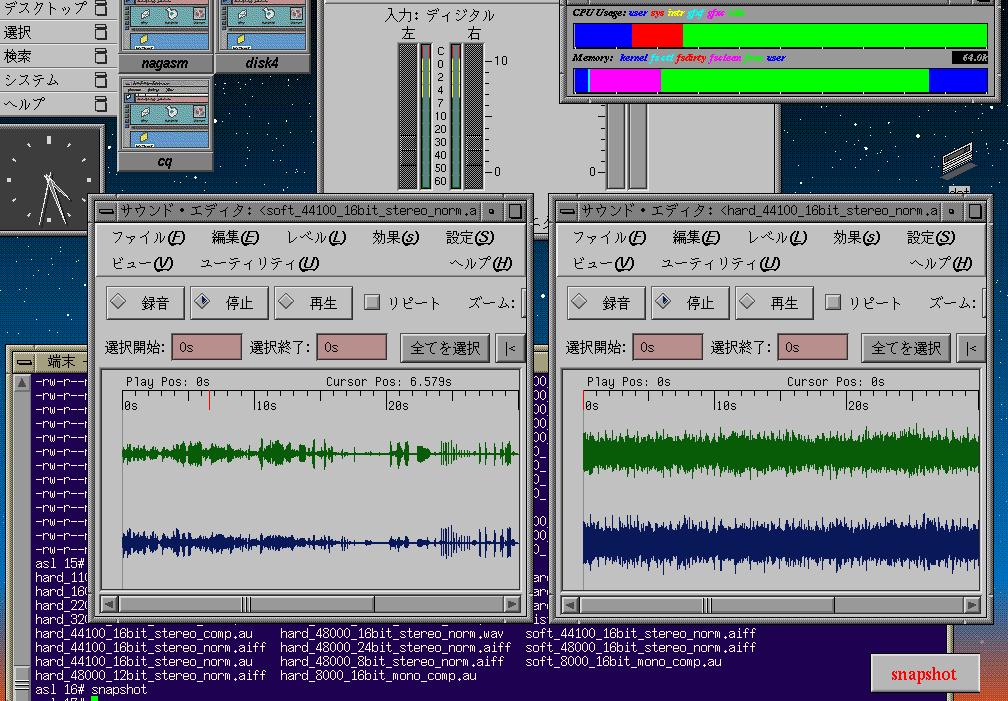
「コンピュータサウンドの世界」の内容に関する補足(^_^;) 比較実験をしているIndyの画面(^_^)
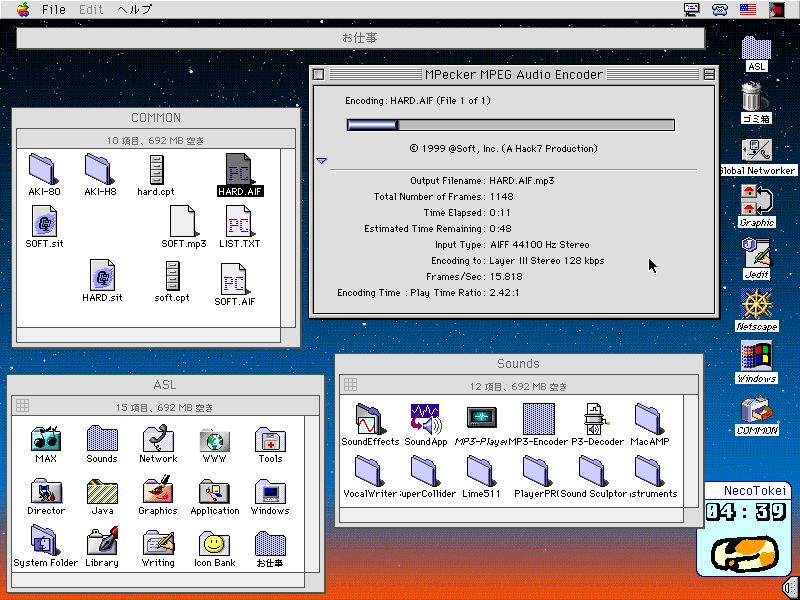
MP3エンコード中のMacの画面(^_^)
5292058 hard_44100_16bit_stereo_norm.aiff 3840062 hard_32000_16bit_stereo_norm.aiff 2646062 hard_22050_16bit_stereo_norm.aiff 1920062 hard_16000_16bit_stereo_norm.aiff 1323058 hard_11025_16bit_stereo_norm.aiff 960058 hard__8000_16bit_stereo_norm.aiff 480026 hard__8000_16bit_stereo_comp.au 481241 hard_44100_16bit_stereo_comp.mp3
比較実験のために作ったサウンドファイルのリスト01 -rw-r--r-- 1 root user 5760124 hard_48000_16bit_stereo_norm.aiff 02 -rw-r--r-- 1 root user 5760000 hard_48000_16bit_stereo_norm.data 03 -rw-r--r-- 1 root user 5760044 hard_48000_16bit_stereo_norm.wav 04 -rw-r--r-- 1 root user 5760124 hard_48000_16bit_stereo_norm.aiff 05 -rw-r--r-- 1 root user 2880062 hard_48000_16bit___mono_norm.aiff 06 -rw-r--r-- 1 root user 5760124 hard_48000_16bit_stereo_norm.aiff 07 -rw-r--r-- 1 root user 8640062 hard_48000_24bit_stereo_norm.aiff 08 -rw-r--r-- 1 root user 5760062 hard_48000_12bit_stereo_norm.aiff 09 -rw-r--r-- 1 root user 2880062 hard_48000__8bit_stereo_norm.aiff 10 -rw-r--r-- 1 root user 5760124 hard_48000_16bit_stereo_norm.aiff 11 -rw-r--r-- 1 root user 5292058 hard_44100_16bit_stereo_norm.aiff 12 -rw-r--r-- 1 root user 3840062 hard_32000_16bit_stereo_norm.aiff 13 -rw-r--r-- 1 root user 2646062 hard_22050_16bit_stereo_norm.aiff 14 -rw-r--r-- 1 root user 1920062 hard_16000_16bit_stereo_norm.aiff 15 -rw-r--r-- 1 root user 1323058 hard_11025_16bit_stereo_norm.aiff 16 -rw-r--r-- 1 root user 960058 hard__8000_16bit_stereo_norm.aiff 17 -rw-r--r-- 1 root user 5292058 hard_44100_16bit_stereo_norm.aiff 18 -rw-r--r-- 1 root user 5292024 hard_44100_16bit_stereo_norm.au 19 -rw-r--r-- 1 root user 2646026 hard_44100_16bit_stereo_comp.au 20 -rw-r--r-- 1 root user 5292058 hard_44100_16bit_stereo_norm.aiff 21 -rw-r--r-- 1 root user 5292058 soft_44100_16bit_stereo_norm.aiff 22 -rw-r--r-- 1 root user 960058 hard__8000_16bit_stereo_norm.aiff 23 -rw-r--r-- 1 root user 480060 hard__8000_16bit___mono_norm.aiff 24 -rw-r--r-- 1 root user 480026 hard__8000_16bit_stereo_comp.au 25 -rw-r--r-- 1 root user 240027 hard__8000_16bit___mono_comp.au 26 -rw-r--r-- 1 root user 240027 soft__8000_16bit___mono_comp.au 27 -rw-r--r-- 1 root user 5292058 hard_44100_16bit_stereo_norm.aiff 28 -rw-r--r-- 1 root user 5033097 hard_44100_16bit_stereo_norm.lzh 29 -rw-r--r-- 1 root user 5022285 hard_44100_16bit_stereo_norm.zip 30 -rw-r--r-- 1 root user 5027251 hard_44100_16bit_stereo_norm.sit 31 -rw-r--r-- 1 root user 5291891 hard_44100_16bit_stereo_norm.cpt 32 -rw-r--r-- 1 root user 481241 hard_44100_16bit_stereo_norm.mp3 33 -rw-r--r-- 1 root user 5292058 soft_44100_16bit_stereo_norm.aiff 34 -rw-r--r-- 1 root user 4352562 soft_44100_16bit_stereo_norm.lzh 35 -rw-r--r-- 1 root user 4368710 soft_44100_16bit_stereo_norm.zip 36 -rw-r--r-- 1 root user 4437119 soft_44100_16bit_stereo_norm.sit 37 -rw-r--r-- 1 root user 4714626 soft_44100_16bit_stereo_norm.cpt 38 -rw-r--r-- 1 root user 481233 soft_44100_16bit_stereo_norm.mp3
Audio Interchange File Format: "AIFF"A Standard for Sampled Sound Files
|
|||||||||||||||||||||||||||||||||||||||||||||||||||||||||||||||||||||||||||||||||||||||||||||||||||||||||||||||||||||||||||||||||||||||||||||||||||||||||||||||||||||||||||||||||||||||||||||||||||||||||||||||||||||||||||||||||||||||||||||||||||||||||||||||||||||||||||||||||||||||||||||||||||||||||||||||||||||||||||||||||||||||||||||||||||||||||||||||||||||||||||||||||||||||||||||||||||||||||||||||||||||||||||||||||||||||||||||||||||||||
| char: | 8 bits, signed. A char can contain more than just ASCII characters. It can contain any number from -128 to 127 (inclusive). |
| unsigned char: | 8 bits, unsigned. Contains any number from zero to 255 (inclusive). |
| short: | 16 bits, signed. Contains any number from -32,768 to 32,767 (inclusive). |
| unsigned short: | 16 bits, unsigned. Contains any number from zero to 65,535 (inclusive). |
| long: | 32 bits, signed. Contains any number from -2,147,483,648 to 2,147,483,647 (inclusive). |
| unsigned long: | 32 bits, unsigned. Contains any number from zero to 4,294,967,295 (inclusive). |
| extended: | 80 bit IEEE Standard 754 floating point number (Standard Apple Numeric Environment [SANE] data type Extended). |
| pstring: | Pascal-style string, a one byte count followed by text bytes. The total number of bytes in this data type should be even. A pad byte can be added at the end of the text to accomplish this. This pad byte is not reflected in the count. |
| ID: | 32 bits, the concatenation of four printable ASCII character in the range ' ' (SP, 0x20) through '~' (0x7E). Spaces (0x20) cannot precede printing characters; trailing spaces are allowed. Control characters are forbidden. |
| OSType: | 32 bits. A concatenation of four characters, as defined in Inside Macintosh, vol II. |
Constants
Decimal values are referred to as a string of digits, for example 123, 0, 100 are all decimal numbers. Hexadecimal values are preceded by a 0x - e.g. 0x0A12, 0x1, 0x64.
Data Organization
All data is stored in Motorola 68000 format. Data is organized as follows:

Referring to Audio IFF
The official name for this standard is Audio Interchange File Format. If an application program needs to present the name of this format to a user, such as in a "Save as..." dialog box, the name can be abbreviated to Audio IFF.
File Structure
The "EA IFF 85" Standard for Interchange Format Files defines an overall structure for storing data in files. Audio IFF conforms to the "EA IFF 85" standard. This document will describe those portions of "EA IFF 85" that are germane to Audio IFF. For a more complete discussion of "EA IFF 85", please refer to the document "EA IFF 85" Standard for Interchange Format Files.
An "EA IFF 85" file is made up of a number of chunks of data. Chunks are the building blocks of "EA IFF 85" files. A chunk consists of some header information followed by data:

A chunk can be represented using our C-like language in the following manner:
typedef struct {
    ID              ckID;       /* chunk ID */
    long            ckSize;     /* chunk Size   */
    char            ckData[];   /* data */
} Chunk;
ckID describes the format of the data portion a chunk. A program can determine how to interpret the chunk data by examining ckID.
ckSize is the size of the data portion of the chunk, in bytes. It does not include the 8 bytes used by ckID and ckSize.
ckData contains the data stored in the chunk. The format of this data is determined by ckID. If the data is an odd number of bytes in length, a zero pad byte must be added at the end. The pad byte is not included in ckSize .
Note that an array with no size specification (e.g. char ckData[];) indicates a variable-sized array in our C-like language. This differs from standard C.
An Audio IFF file is a collection of a number of different types of chunks. There is a Common Chunk which contains important parameters describing the sampled sound, such as it's length and sample rate. There is a Sound Data Chunk that contains the actual audio samples. There are several other optional chunks that define markers, list instrument parameters, store application-specific information, etc. All of these chunks are described in detail in later sections of this document.
The chunks in a Audio IFF file are grouped together in a container chunk. "EA IFF 85" defines a number of container chunks, but the one used by Audio IFF is called a FORM. A FORM has the following format:
typedef struct {
    ID          ckID;
    long        ckSize;
    ID          formType;
    char        chunks [];
} Chunk;
ckID is always 'FORM'. This indicates that this is a FORM chunk.
ckSize contains the size of data portion of the 'FORM' chunk. Note that the data portion has been broken into two parts, formType and chunks[].
formType describes what's in the 'FORM' chunk. For Audio IFF files, formType is always 'AIFF'. This indicates that the chunks within the FORM pertain to sampled sound. A FORM chunk of formType 'AIFF' is called a FORM AIFF.
chunks are the chunks contained within the FORM. These chunks are called local chunks. A FORM AIFF along with its local chunks make up an Audio IFF file.
Here is an example of a simple Audio IFF file. It consists of a file containing single FORM AIFF which contains two local chunks, a Common Chunk and a Sound Data Chunk.
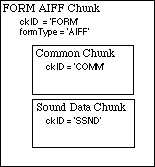
There are no restrictions on the ordering of local chunks within a FORM AIFF.
On an Apple II, the FORM AIFF is stored in a ProDOS file. The file type is 0xD8 and the aux type is 0x0000. AIFF versions 1.2 and earlier used file type 0xCB, which is incorrect. Please see the Apple II File Type Note for file type 0xD8 and aux type 0x0000 for strategies on dealing with this inconsistency.
On a Macintosh, the FORM AIFF is stored in the data fork of an Audio IFF file. The Macintosh file type of an Audio IFF file is 'AIFF'. This is the same as the formType of the FORM AIFF.
Macintosh or Apple II applications should not store any information in Audio IFF file's resource fork, as this information may not be preserved by all applications. Applications can use the Application Specific Chunk, defined later in this document, to store extra information specific to their application.
On an operating system that uses file extensions, such as MS-DOS or UNIX, it is recommended that Audio IFF file names have a ".AIF" extension.
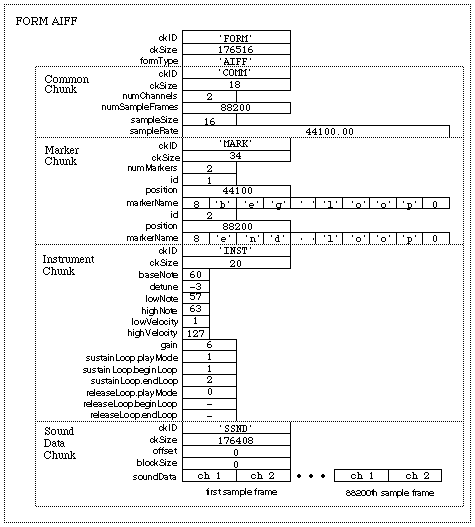
A more detailed example of an Audio IFF file can be found in the Appendix. Please refer to this example as often as necessary while reading the remainder of this document.
Local Chunk Types
The formats of the different local chunk types found within a FORM AIFF are described in the following sections. The ckIDs for each chunk are also defined.
There are two types of chunks, those that are required and those that are optional. The Common Chunk is required. The Sound Data chunk is required if the sampled sound has greater than zero length. All other chunks are optional. All applications that use FORM AIFF must be able to read the required chunks, and can choose to selectively ignore the optional chunks. A program that copies a FORM AIFF should copy all of the chunks in the FORM AIFF.
Common Chunk
The Common Chunk describes fundamental parameters of the sampled sound.
#define CommonID    'COMM'  /* ckID for Common Chunk */
typedef struct {
    ID              ckID;
    long            ckSize;
    short           numChannels;
    unsigned long   numSampleFrames;
    short           sampleSize;
    extended        sampleRate;
} CommonChunk;
ckID is always 'COMM'. ckSize is the size of the data portion of the chunk, in bytes. It does not include the 8 bytes used by ckID and ckSize. For the Common Chunk, ckSize is always 18.
numChannels contains the number of audio channels for the sound. A value of 1 means monophonic sound, 2 means stereo, and 4 means four channel sound, etc. Any number of audio channels may be represented.
The actual sound samples are stored in another chunk, the Sound Data Chunk, which will be described shortly. For multichannel sounds, single sample points from each channel are interleaved. A set of interleaved sample points is called a sample frame. This is illustrated below for the stereo case.

For monophonic sound, a sample frame is a single sample point.
For multichannel sounds, the following conventions should be observed:

numSampleFrames contains the number of sample frames in the Sound Data Chunk. Note that numSampleFrames is the number of sample frames, not the number of bytes nor the number of sample points in the Sound Data Chunk. The total number of sample points in the file is numSampleFrames times numChannels.
sampleSize is the number of bits in each sample point. It can be any number from 1 to 32. The format of a sample point will be described in the next section, the Sound Data Chunk.
sampleRate is the sample rate at which the sound is to be played back, in sample frames per second.
One and only one Common Chunk is required in every FORM AIFF.
Sound Data Chunk
The Sound Data Chunk contains the actual sample frames.
#define SoundDataID 'SSND'  /* ckID for Sound Data Chunk */
typedef struct {
    ID                  ckID;
    long                ckSize;
    unsigned long       offset;
    unsigned long       blockSize;
    unsigned char       soundData[];
} SoundDataChunk;
ckID is always 'SSND'. ckSize is the size of the data portion of the chunk, in bytes. It does not include the 8 bytes used by ckID and ckSize.
offset determines where the first sample frame in the soundData starts. offset is in bytes. Most applications won't use offset and should set it to zero. Use for a non-zero offset is explained in the Block-Aligning Sound Data section below.
blockSize is used in conjunction with offset for block-aligning sound data. It contains the size in bytes of the blocks that sound data is aligned to. As with offset, most applications won't use blockSize and should set it to zero. More information on blockSize is in the Block-Aligning Sound Data section below.
soundData contains the sample frames that make up the sound. The number of sample frames in the soundData is determined by the numSampleFrames parameter in the Common Chunk.
Sample Points
Each sample point in a sample frame is a linear, 2's complement value. The sample points are from 1 to 32 bits wide, as determined by the sampleSize parameter in the Common Chunk. Sample points are stored in an integral number of contiguous bytes. One to 8 bit wide sample points are stored in one byte, 9 to 16 bit wide sample points are stored in two bytes, 17 to 24 bit wide sample points are stored in 3 bytes, and 25 to 32 bit wide samples are stored in 4 bytes. When the width of a sample point is less than a multiple of 8 bits, the sample point data is left justified, with the remaining bits zeroed. An example case is illustrated below. A 12 bit sample point, binary 101000010111, is stored left justified in two bytes. The remaining bits are set to zero.

Sample Frames
Sample frames are stored contiguously in order of increasing time. The sample points within a sample frame are packed together, there are no unused bytes between them. Likewise, the sample frames are packed together with no pad bytes.
Block-Aligning Sound Data
There may be some applications that, to insure real time recording and playback of audio, wish to align sampled sound data with fixed-size blocks. This can be accomplished with the offset and blockSize parameters, as shown below.

In the above figure, the first sample frame starts at the beginning of block N. This is accomplished by skipping the first offset bytes of the soundData. Note too that the soundData array can extend beyond valid sample frames, allowing the soundData array to end on a block boundary.
blockSize specifies the size in bytes of the block that is to be aligned to. A blockSize of zero indicates that the sound data does not need to be block-aligned. Applications that don't care about block alignment should set blockSize and offset to zero when writing Audio IFF files. Applications that write block-aligned sound data should set blockSize to the appropriate block size. Applications that modify an existing Audio IFF file should try to preserve alignment of the sound data, although this is not required. If an application doesn't preserve alignment, it should set blockSize and offset to zero. If an application needs to realign sound data to a different sized block, it should update blockSize and offset accordingly.
The Sound Data Chunk is required unless the numSampleFrames field in the Common Chunk is zero. A maximum of one Sound Data Chunk can appear in a FORM AIFF.
Marker Chunk
The Marker Chunk contains markers that point to positions in the sound data. Markers can be used for whatever purposes an application desires. The Instrument Chunk, defined later in this document, uses markers to mark loop beginning and end points, for example.
Markers
A marker has the following format.
typedef short   MarkerId;
typedef struct {
    MarkerId            id;
    unsigned long       position;
    pstring             markerName;
} Marker;
id is a number that uniquely identifies the marker within a FORM AIFF. The id can be any positive non-zero integer, as long as no other marker within the same FORM AIFF has the same id.
The marker's position in the sound data is determined by position . Markers conceptually fall between two sample frames. A marker that falls before the first sample frame in the sound data is at position zero, while a marker that falls between the first and second sample frame in the sound data is at position 1. Note that the units for position are sample frames, not bytes nor sample points.

markerName is a Pascal-style text string containing the name of the mark.
Note: Some "EA IFF 85" files store strings as C-strings (text bytes followed by a null terminating character) instead of Pascal-style strings. Audio IFF uses pstrings because they are more efficiently skipped over when scanning through chunks. Using pstrings, a program can skip over a string by adding the string count to the address of the first character. C strings require that each character in the string be examined for the null terminator.
Marker Chunk Format
The format for the data within a Marker Chunk is shown below.
#define MarkerID    'MARK'  /* ckID for Marker Chunk */
typedef struct {
    ID                  ckID;
    long                ckSize;
    unsigned short      numMarkers;
    Marker              Markers[];
} MarkerChunk;
ckID is always 'MARK'. ckSize is the size of the data portion of the chunk, in bytes. It does not include the 8 bytes used by ckID and ckSize.
numMarkers is the number of markers in the Marker Chunk.
numMarkers, if non-zero, it is followed by the markers themselves. Because all fields in a marker are an even number of bytes in length, the length of any marker will always be even. Thus, markers are packed together with no unused bytes between them. The markers need not be ordered in any particular manner.
The Marker Chunk is optional. No more than one Marker Chunk can appear in a FORM AIFF.
Instrument Chunk
The Instrument Chunk defines basic parameters that an instrument, such as a sampler, could use to play back the sound data.
Looping
Sound data can be looped, allowing a portion of the sound to be repeated in order to lengthen the sound. The structure below describes a loop:
typedef struct {
    short           playMode;
    MarkerId        beginLoop;
    MarkerId        endLoop;
} Loop;
A loop is marked with two points, a begin position and an end position. There are two ways to play a loop, forward looping and forward/backward looping. In the case of forward looping, playback begins at the beginning of the sound, continues past the begin position and continues to the end position, at which point playback restarts again at the begin position. The segment between the begin and end positions, called the loop segment, is played over and over again, until interrupted by something, such as the release of a key on a sampling instrument, for example.

With forward/backward looping, the loop segment is first played from the begin position to the end position, and then played backwards from the end position back to the begin position. This flip-flop pattern is repeated over and over again until interrupted.
playMode specifies which type of looping is to be performed.
#define NoLooping               0
#define ForwardLooping          1
#define ForwardBackwardLooping  2
If NoLooping is specified, then the loop points are ignored during playback.
beginLoop is a the marker id that marks the begin position of the loop segment.
endLoop marks the end position of a loop. The begin position must be less than the end position. If this is not the case, then the loop segment has zero or negative length and no looping takes place.
Instrument Chunk Format
The format of the data within an Instrument Chunk is described below.
#define InstrumentID    'INST'  /* ckID for Instrument Chunk */
typedef struct {
    ID              ckID;
    long            ckSize;
    char            baseNote;
    char            detune;
    char            lowNote;
    char            highNote;
    char            lowVelocity;
    char            highVelocity;
    short           gain;
    Loop            sustainLoop;
    Loop            releaseLoop;
} InstrumentChunk;
ckID is always 'INST'. ckSize is the size of the data portion of the chunk, in bytes. For the Instrument Chunk, ckSize is always 20.
baseNote is the note at which the instrument plays back the sound data without pitch modification. Units are MIDI (MIDI is an acronym for Musical Instrument Digital Interface) note numbers, and are in the range 0 through 127. Middle C is 60.
detune determines how much the instrument should alter the pitch of the sound when it is played back. Units are in cents (1/100 of a semitone) and range from -50 to +50. Negative numbers mean that the pitch of the sound should be lowered, while positive numbers mean that it should be raised.
lowNote and highNote specify the suggested range on a keyboard for playback of the sound data. The sound data should be played if the instrument is requested to play a note between the low and high notes, inclusive. The base note does not have to be within this range. Units for lowNote and highNote are MIDI note values.
lowVelocity and highVelocity specify the suggested range of velocities for playback of the sound data. The sound data should be played if the note-on velocity is is between low and high velocity, inclusive. Units are MIDI velocity values, 1 (lowest velocity) through 127 (highest velocity).
gain is the amount by which to change the gain of the sound when it is played. Units are decibels. For example, 0 db means no change, 6 db means double the value of each sample point, while -6 db means halve the value of each sample point.
sustainLoop specifies a loop that is to be played when an instrument is sustaining a sound.
releaseLoop specifies a loop that is to be played when an instrument is in the release phase of playing back a sound. The release phase usually occurs after a key on an instrument is released.
The Instrument Chunk is optional. No more than one Instrument Chunk can appear in a FORM AIFF.
MIDI Data Chunk
The MIDI Data Chunk can be used to store MIDI data (please refer to Musical Instrument Digital Interface Specification 1.0, available from the International MIDI Association, for more details on MIDI).
The primary purpose of this chunk is to store MIDI System Exclusive messages, although other types of MIDI data can be stored in this block as well. As more instruments come on the market, they will likely have parameters that have not been included in the Audio IFF specification. The MIDI System Exclusive messages for these instruments may contain many parameters that are not included in the Instrument Chunk. For example, a new sampling instrument may have more than the two loops defined in the Instrument Chunk. These loops will likely be represented in the MIDI System Exclusive message for the new machine. This MIDI System Exclusive message can be stored in the MIDI Data Chunk.
#define MIDIDataID  'MIDI'  /* ckID for MIDI Data Chunk */
typedef struct {
    ID                  ckID;
    long                ckSize;
    unsigned char       MIDIdata[];
} MIDIDataChunk;
ckID is always ' MIDI'. ckSize is the size of the data portion of the chunk, in bytes. It does not include the 8 bytes used by ckID and ckSize.
MIDIData contains a stream of MIDI data.
The MIDI Data Chunk is optional. Any number of MIDI Data Chunks may exist in a FORM AIFF. If MIDI System Exclusive messages for several instruments are to be stored in a FORM AIFF, it is better to use one MIDI Data Chunk per instrument than one big MIDI Data Chunk for all of the instruments.
Audio Recording Chunk
The Audio Recording Chunk contains information pertinent to audio recording devices.
#define AudioRecordingID  'AESD'        /* ckID for Audio Recording */
                                        /*   Chunk.                 */
typedef struct {
    ID                  ckID;
    long                ckSize;
    unsigned char       AESChannelStatusData[24];
} AudioRecordingChunk;
ckID is always 'AESD'. ckSize is the size of the data portion of the chunk, in bytes. For the Audio Recording Chunk, ckSize is always 24.
The 24 bytes of AESChannelStatusData are specified in the AES Recommended Practice for Digital Audio Engineering - Serial Transmission Format for Linearly Represented Digital Audio Data, section 7.1, Channel Status Data. That document describes a format for real-time digital transmission of digital audio between audio devices. This information is duplicated in the Audio Recording Chunk for convenience. Of general interest would be bits 2, 3, and 4 of byte 0, which describe recording emphasis.
The Audio Recording Chunk is optional. No more than one Audio Recording Chunk may appear in a FORM AIFF.
Application Specific Chunk
The Application Specific Chunk can be used for any purposes whatsoever by manufacturers of applications. For example, an application that edits sounds might want to use this chunk to store editor state parameters such as magnification levels, last cursor position, and the like.
#define ApplicationSpecificID  'APPL'   /* ckID for Application */
                                        /*  Specific Chunk.     */
typedef struct {
    ID          ckID;
    long        ckSize;
    OSType      applicationSignature;
    char        data[];
} ApplicationSpecificChunk;
ckID is always 'APPL'. ckSize is the size of the data portion of the chunk, in bytes. It does not include the 8 bytes used by ckID and ckSize.
applicationSignature identifies a particular application. For Macintosh applications, this will be the application's four character signature. For Apple II applications, applicationSignature should always be 'pdos', or the hexadecimal bytes 0x70646F73. If applicationSignature is 'pdos', the beginning of the data area is defined to be a Pascal-style string (a length byte followed by ASCII string bytes) containing the name of the application. This is necessary because Apple II applications do not have a four-byte signature as do Macintosh applications.
data is the data specific to the application.
The Application Specific Chunk is optional. Any number of Application Specific Chunks may exist in a single FORM AIFF.
Comments Chunk
The Comments Chunk is used to store comments in the FORM AIFF. "EA IFF 85" has an Annotation Chunk that can be used for comments, but the Comments Chunk has two features not found in the "EA IFF 85" chunk. They are: 1) a timestamp for the comment; and 2) a link to a marker.
Comment
A comment consists of a time stamp, marker id, and a text count followed by text.
typedef struct {
    unsigned long       timeStamp;
    MarkerID            marker;
    unsigned short      count;
    char                text;
} Comment;
timeStamp indicates when the comment was created. Units are the number of seconds since January 1, 1904. (This time convention is the one used by the Macintosh. For procedures that manipulate the time stamp, see The Operating System Utilities chapter in Inside Macintosh, vol II ). For a routine that will convert this to an Apple II GS/OS format time, please see Apple II File Type Note for filetype 0xD8, aux type 0x0000.
A comment can be linked to a marker. This allows applications to store long descriptions of markers as a comment. If the comment is referring to a marker, then marker is the ID of that marker. Otherwise, marker is zero, indicating that this comment is not linked to a marker.
count is the length of the text that makes up the comment. This is a 16 bit quantity, allowing much longer comments than would be available with a pstring.
text contains the comment itself. This text must be padded with a byte at the end to insure that it is an even number of bytes in length. This pad byte, if present, is not included in count.
Comments Chunk Format
#define CommentID       'COMT'  /* ckID for Comments Chunk.  */
typedef struct {
    ID                  ckID;
    long                ckSize;
    unsigned short      numComments;
    Comment             comments[];
} CommentsChunk;
ckID is always ' COMT'. ckSize is the size of the data portion of the chunk, in bytes. It does not include the 8 bytes used by ckID and ckSize.
numComments contains the number of comments in the Comments Chunk. This is followed by the comments themselves. Comments are always an even number of bytes in length, so there is no padding between comments in the Comments Chunk.
The Comments Chunk is optional. No more than one Comments Chunk may appear in a single FORM AIFF.
Text Chunks - Name, Author, Copyright, Annotation
These four chunks are included in the definition of every "EA IFF 85" file. All are text chunks; their data portion consists solely of text. Each of these chunks is optional.
#define NameID          'NAME'  /* ckID for Name Chunk.  */
#define AuthorID        'AUTH'  /* ckID for Author Chunk.  */
#define CopyrightID     '(c) '  /* ckID for Copyright Chunk.  */
#define AnnotationID    'ANNO'  /* ckID for Annotation Chunk.  */
typedef struct {
    ID                  ckID;
    long                ckSize;
    char                text[];
} TextChunk;
ckID is either ' NAME', ' AUTH', '(c) ', or ' ANNO', depending on whether the chunk as a Name Chunk, Author Chunk, Copyright Chunk, or Annotation Chunk, respectively. For the Copyright Chunk, the 'c' is lowercase and there is a space (0x20) after the close parenthesis.
ckSize is the size of the data portion of the chunk, in this case the text.
text contains pure ASCII characters. It is not a pstring nor a C string. The number of characters in text is determined by ckSize. The contents of text depend on the chunk, as described below:
Name Chunk
text contains the name of the sampled sound. The Name Chunk is optional. No more than one Name Chunk may exist within a FORM AIFF.
Author Chunk
text contains one or more author names. An author in this case is the creator of a sampled sound. The Author Chunk is optional. No more than one Author Chunk may exist within a FORM AIFF.
Copyright Chunk
The Copyright Chunk contains a copyright notice for the sound. text contains a date followed by the copyright owner. The chunk ID '(c) ' serves as the copyright characters '©'. For example, a Copyright Chunk containing the text "1988 Apple Computer, Inc." means "© 1988 Apple Computer, Inc."
The Copyright Chunk is optional. No more than one Copyright Chunk may exist within a FORM AIFF.
Annotation Chunk
text contains a comment. Use of this chunk is discouraged within FORM AIFF. The more powerful Comments Chunk should be used instead. The Annotation Chunk is optional. Many Annotation Chunks may exist within a FORM AIFF.
Chunk Precedence
Several of the local chunks for FORM AIFF may contain duplicate information. For example, the Instrument Chunk defines loop points and MIDI system exclusive data in the MIDI Data Chunk may also define loop points. What happens if these loop points are different? How is an application supposed to loop the sound?
Such conflicts are resolved by defining a precedence for chunks:

The Common Chunk has the highest precedence, while the Application Specific Chunk has the lowest. Information in the Common Chunk always takes precedence over conflicting information in any other chunk. The Application Specific Chunk always loses in conflicts with other chunks. By looking at the chunk hierarchy, for example, one sees that the loop points in the Instrument Chunk take precedence over conflicting loop points found in the MIDI Data Chunk.
It is the responsibility of applications that write data into the lower precedence chunks to make sure that the higher precedence chunks are updated accordingly.
Appendix
Illustrated below is an example of a FORM AIFF. An Audio IFF file is simply a file containing a single FORM AIFF. On a Macintosh, the FORM AIFF is stored in the data fork of a file and the file type is 'AIFF'.
WAVE PCM soundfile format
The WAVE file format is a subset of Microsoft's RIFF specification for the storage of multimedia files. A RIFF file starts out with a file header followed by a sequence of data chunks. A WAVE file is often just a RIFF file with a single "WAVE" chunk which consists of two sub-chunks -- a "fmt " chunk specifying the data format and a "data" chunk containing the actual sample data. Call this form the "Canonical form". Who knows how it really all works. An almost complete description which seems totally useless unless you want to spend a week looking over it can be found at MSDN (mostly describes the non-PCM, or registered proprietary data formats).

Offset  Size  Name             Description

The canonical WAVE format starts with the RIFF header:

0         4   ChunkID          Contains the letters "RIFF" in ASCII form
                               (0x52494646 big-endian form).
4         4   ChunkSize        36 + SubChunk2Size, or more precisely:
                               4 + (8 + SubChunk1Size) + (8 + SubChunk2Size)
                               This is the size of the rest of the chunk
                               following this number.  This is the size of the
                               entire file in bytes minus 8 bytes for the
                               two fields not included in this count:
                               ChunkID and ChunkSize.
8         4   Format           Contains the letters "WAVE"
                               (0x57415645 big-endian form).

The "WAVE" format consists of two subchunks: "fmt " and "data":
The "fmt " subchunk describes the sound data's format:

12        4   Subchunk1ID      Contains the letters "fmt "
                               (0x666d7420 big-endian form).
16        4   Subchunk1Size    16 for PCM.  This is the size of the
                               rest of the Subchunk which follows this number.
20        2   AudioFormat      PCM = 1 (i.e. Linear quantization)
                               Values other than 1 indicate some
                               form of compression.
22        2   NumChannels      Mono = 1, Stereo = 2, etc.
24        4   SampleRate       8000, 44100, etc.
28        4   ByteRate         == SampleRate * NumChannels * BitsPerSample/8
32        2   BlockAlign       == NumChannels * BitsPerSample/8
                               The number of bytes for one sample including
                               all channels. I wonder what happens when
                               this number isn't an integer?
34        2   BitsPerSample    8 bits = 8, 16 bits = 16, etc.
          2   ExtraParamSize   if PCM, then doesn't exist
          X   ExtraParams      space for extra parameters

The "data" subchunk contains the size of the data and the actual sound:

36        4   Subchunk2ID      Contains the letters "data"
                               (0x64617461 big-endian form).
40        4   Subchunk2Size    == NumSamples * NumChannels * BitsPerSample/8
                               This is the number of bytes in the data.
                               You can also think of this as the size
                               of the read of the subchunk following this
                               number.
44        *   Data             The actual sound data.
As an example, here are the opening 72 bytes of a WAVE file with bytes shown as hexadecimal numbers:
52 49 46 46 24 08 00 00 57 41 56 45 66 6d 74 20 10 00 00 00 01 00 02 00
22 56 00 00 88 58 01 00 04 00 10 00 64 61 74 61 00 08 00 00 00 00 00 00
24 17 1e f3 3c 13 3c 14 16 f9 18 f9 34 e7 23 a6 3c f2 24 f2 11 ce 1a 0d
Here is the interpretation of these bytes as a WAVE soundfile:
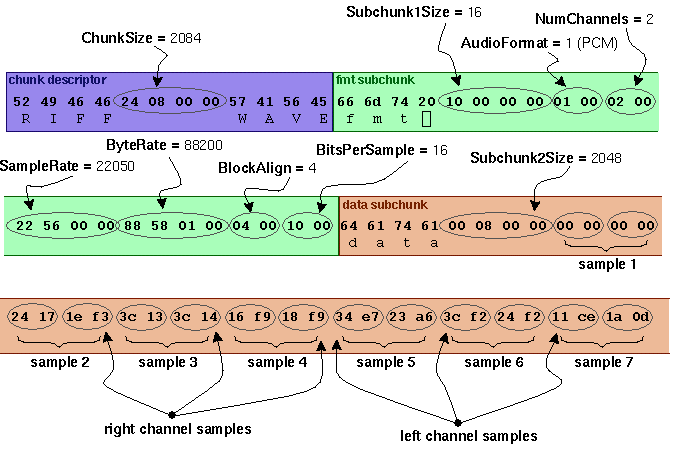
Notes:
- The default byte ordering assumed for WAVE data files is little-endian. Files written using the big-endian byte ordering scheme have the identifier RIFX instead of RIFF.
- The sample data must end on an even byte boundary. Whatever that means.
- 8-bit samples are stored as unsigned bytes, ranging from 0 to 255. 16-bit samples are stored as 2's-complement signed integers, ranging from -32768 to 32767.
- There may be additional subchunks in a Wave data stream. If so, each will have a char[4] SubChunkID, and unsigned long SubChunkSize, and SubChunkSize amount of data.
- RIFF stands for Resource Interchange File Format.
General discussion of RIFF files:
Multimedia applications require the storage and management of a wide variety of data, including bitmaps, audio data, video data, and peripheral device control information. RIFF provides a way to store all these varied types of data. The type of data a RIFF file contains is indicated by the file extension. Examples of data that may be stored in RIFF files are:- Audio/visual interleaved data (.AVI)
- Waveform data (.WAV)
- Bitmapped data (.RDI)
- MIDI information (.RMI)
- Color palette (.PAL)
- Multimedia movie (.RMN)
- Animated cursor (.ANI)
- A bundle of other RIFF files (.BND)
For more info see
http://www.ora.com/centers/gff/formats/micriff/index.htm
References:
- http://www.ora.com/centers/gff/formats/micriff/index.htm (good).
- http://premium.microsoft.com/msdn/library/tools/dnmult/d1/newwave.htm
- http://www.lightlink.com/tjweber/StripWav/WAVE.html
RIFF WAVE (.WAV) file format
Waveform Audio File Format (WAVE)
This section describes the Waveform format, which is used to
represent digitized sound.
The WAVE form is defined as follows. Programs must expect
(and ignore) any unknown chunks encountered, as with all
RIFF forms. However, 〈fmt-ck〉 must always occur before
〈wave-data〉, and both of these chunks are mandatory in a
WAVE file.
〈WAVE-form〉 -〉
RIFF( 'WAVE'
〈fmt-ck〉 // Format
[〈fact-ck〉] // Fact chunk
[〈cue-ck〉] // Cue points
[〈playlist-ck〉] // Playlist
[〈assoc-data-list〉] // Associated
data list
〈wave-data〉 ) // Wave data
The WAVE chunks are described in the following sections.
WAVE Format Chunk
The WAVE format chunk 〈fmt-ck〉 specifies the format of the
〈wave-data〉. The 〈fmt-ck〉 is defined as follows:
〈fmt-ck〉 -〉 fmt( 〈common-fields〉
〈format-specific-fields〉 )
〈common-fields〉 -〉
struct
{
WORD wFormatTag; // Format category
WORD wChannels; // Number of channels
DWORDdwSamplesPerSec; // Sampling rate
DWORDdwAvgBytesPerSec; // For buffer
estimation
WORD wBlockAlign; // Data block size
}
The fields in the 〈common-fields〉 chunk are as follows:
Field Description
wFormatTag A number indicating the WAVE format
category of the file. The content of
the 〈format-specific-fields〉 portion
of the `fmt' chunk, and the
interpretation of the waveform data,
depend on this value.
You must register any new WAVE format
categories. See ``Registering
Multimedia Formats'' in Chapter 1,
``Overview of Multimedia
Specifications,'' for information on
registering WAVE format categories.
``Wave Format Categories,'' following
this section, lists the currently
defined WAVE format categories.
wChannels The number of channels represented in
the waveform data, such as 1 for mono
or 2 for stereo.
dwSamplesPerSe The sampling rate (in samples per
c second) at which each channel should
be played.
dwAvgBytesPerS The average number of bytes per second
ec at which the waveform data should be
transferred. Playback software can
estimate the buffer size using this
value.
wBlockAlign The block alignment (in bytes) of the
waveform data. Playback software needs
to process a multiple of wBlockAlign
bytes of data at a time, so the value
of wBlockAlign can be used for buffer
alignment.
The 〈format-specific-fields〉 consists of zero or more bytes
of parameters. Which parameters occur depends on the WAVE
format category-see the following section for details.
Playback software should be written to allow for (and
ignore) any unknown 〈format-specific-fields〉 parameters that
occur at the end of this field.
WAVE Format Categories
The format category of a WAVE file is specified by the value
of the wFormatTag field of the `fmt' chunk. The
representation of data in 〈wave-data〉, and the content of
the 〈format-specific-fields〉 of the `fmt' chunk, depend on
the format category.
The currently defined open non-proprietary WAVE format
categories are as follows:
wFormatTag Value Format Category
WAVE_FORMAT_PCM (0x0001) Microsoft Pulse Code
Modulation (PCM) format
The following are the registered proprietary WAVE format
categories:
wFormatTag Value Format Category
IBM_FORMAT_MULAW IBM mu-law format
(0x0101)
IBM_FORMAT_ALAW (0x0102) IBM a-law format
IBM_FORMAT_ADPCM IBM AVC Adaptive
(0x0103) Differential Pulse Code
Modulation format
The following sections describe the Microsoft
WAVE_FORMAT_PCM format.
Pulse Code Modulation (PCM) Format
If the wFormatTag field of the 〈fmt-ck〉 is set to
WAVE_FORMAT_PCM, then the waveform data consists of samples
represented in pulse code modulation (PCM) format. For PCM
waveform data, the 〈format-specific-fields〉 is defined as
follows:
〈PCM-format-specific〉 -〉
struct
{
WORD wBitsPerSample; // Sample size
}
The wBitsPerSample field specifies the number of bits of
data used to represent each sample of each channel. If there
are multiple channels, the sample size is the same for each
channel.
For PCM data, the wAvgBytesPerSec field of the `fmt' chunk
should be equal to the following formula rounded up to the
next whole number:
wBitsPerSample
wChannels x wBitsPerSecond x --------------
8
The wBlockAlign field should be equal to the following
formula, rounded to the next whole number:
wBitsPerSample
wChannels x --------------
8
Data Packing for PCM WAVE Files
In a single-channel WAVE file, samples are stored
consecutively. For stereo WAVE files, channel 0 represents
the left channel, and channel 1 represents the right
channel. The speaker position mapping for more than two
channels is currently undefined. In multiple-channel WAVE
files, samples are interleaved.
The following diagrams show the data packing for a 8-bit
mono and stereo WAVE files:
Sample 1 Sample 2 Sample 3 Sample 4
Channel 0 Channel 0 Channel 0 Channel 0
Data Packing for 8-Bit Mono PCM
Sample 1 Sample 2
Channel 0 Channel 1 Channel 0 Channel 0
(left) (right) (left) (right)
Data Packing for 8-Bit Stereo PCM
The following diagrams show the data packing for 16-bit mono
and stereo WAVE files:
Sample 1 Sample 2
Channel 0 Channel 0 Channel 0 Channel 0
low-order high-order low-order high-order
byte byte byte byte
Data Packing for 16-Bit Mono PCM
Sample 1
Channel 0 Channel 0 Channel 1 Channel 1
(left) (left) (right) (right)
low-order high-order low-order high-order
byte byte byte byte
Data Packing for 16-Bit Stereo PCM
Data Format of the Samples
Each sample is contained in an integer i. The size of i is
the smallest number of bytes required to contain the
specified sample size. The least significant byte is stored
first. The bits that represent the sample amplitude are
stored in the most significant bits of i, and the remaining
bits are set to zero.
For example, if the sample size (recorded in nBitsPerSample)
is 12 bits, then each sample is stored in a two-byte
integer. The least significant four bits of the first (least
significant) byte is set to zero.
The data format and maximum and minimums values for PCM
waveform samples of various sizes are as follows:
Sample Size Data Format Maximum Value Minimum Value
One to Unsigned 255 (0xFF) 0
eight bits integer
Nine or Signed Largest Most negative
more bits integer i positive value of i
value of i
For example, the maximum, minimum, and midpoint values for
8-bit and 16-bit PCM waveform data are as follows:
Format Maximum Minimum Value Midpoint
Value Value
8-bit PCM 255 (0xFF) 0 128 (0x80)
16-bit PCM 32767 -32768 0
(0x7FFF) (-0x8000)
Examples of PCM WAVE Files
Example of a PCM WAVE file with 11.025 kHz sampling rate,
mono, 8 bits per sample:
RIFF( 'WAVE' fmt(1, 1, 11025, 11025, 1, 8)
data( 〈wave-data〉 ) )
Example of a PCM WAVE file with 22.05 kHz sampling rate,
stereo, 8 bits per sample:
RIFF( 'WAVE' fmt(1, 2, 22050, 44100, 2, 8)
data( 〈wave-data〉 ) )
Example of a PCM WAVE file with 44.1 kHz sampling rate,
mono, 20 bits per sample:
RIFF( 'WAVE' INFO(INAM("O Canada"Z))
fmt(1, 1, 44100, 132300, 3, 20)
data( 〈wave-data〉 ) )
Storage of WAVE Data
The 〈wave-data〉 contains the waveform data. It is defined as
follows:
〈wave-data〉 -〉 { 〈data-ck〉 : 〈data-list〉 }
〈data-ck〉 -〉 data( 〈wave-data〉 )
〈wave-list〉 -〉 LIST( 'wavl' { 〈data-ck〉 :
// Wave samples
〈silence-ck〉 }... ) // Silence
〈silence-ck〉 -〉 slnt( 〈dwSamples:DWORD〉 ) // Count
of
// silent samples
Note: The `slnt' chunk represents silence, not necessarily
a repeated zero volume or baseline sample. In 16-bit PCM
data, if the last sample value played before the silence
section is a 10000, then if data is still output to the D to
A converter, it must maintain the 10000 value. If a zero
value is used, a click may be heard at the start and end of
the silence section. If play begins at a silence section,
then a zero value might be used since no other information
is available. A click might be created if the data following
the silent section starts with a nonzero value.
FACT Chunk
The 〈fact-ck〉 fact chunk stores important information about
the contents of the WAVE file. This chunk is defined as
follows:
〈fact-ck〉 -〉 fact( 〈dwFileSize:DWORD〉 ) // Number
of samples
The `fact'' chunk is required if the waveform data is
contained in a `wavl'' LIST chunk and for all compressed
audio formats. The chunk is not required for PCM files using
the `data'' chunk format.
The "fact" chunk will be expanded to include any other
information required by future WAVE formats. Added fields
will appear following the 〈dwFileSize〉 field. Applications
can use the chunk size field to determine which fields are
present.
Cue-Points Chunk
The 〈cue-ck〉 cue-points chunk identifies a series of
positions in the waveform data stream. The 〈cue-ck〉 is
defined as follows:
〈cue-ck〉 -〉 cue( 〈dwCuePoints:DWORD〉 // Count of cue
points
〈cue-point〉... ) // Cue-point
table
〈cue-point〉 -〉 struct {
DWORD dwName;
DWORD dwPosition;
FOURCC fccChunk;
DWORD dwChunkStart;
DWORD dwBlockStart;
DWORD dwSampleOffset;
}
The 〈cue-point〉 fields are as follows:
Field Description
dwName Specifies the cue point name. Each
〈cue-point〉 record must have a unique
dwName field.
dwPosition Specifies the sample position of the
cue point. This is the sequential
sample number within the play order.
See ``Playlist Chunk,'' later in this
document, for a discussion of the play
order.
fccChunk Specifies the name or chunk ID of the
chunk containing the cue point.
dwChunkStart Specifies the file position of the
start of the chunk containing the cue
point. This is a byte offset relative
to the start of the data section of
the `wavl' LIST chunk.
dwBlockStart Specifies the file position of the
start of the block containing the
position. This is a byte offset
relative to the start of the data
section of the `wavl' LIST chunk.
dwSampleOffset Specifies the sample offset of the cue
point relative to the start of the
block.
Examples of File Position Values
The following table describes the 〈cue-point〉 field values
for a WAVE file containing multiple `data' and `slnt' chunks
enclosed in a `wavl' LIST chunk:
Cue Point Field Value
Location
In a `slnt' fccChunk FOURCC value `slnt'.
chunk
dwChunkStart File position of the
`slnt' chunk relative to
the start of the data
section in the `wavl' LIST
chunk.
dwBlockStart File position of the data
section of the `slnt'
chunk relative to the
start of the data section
of the `wavl' LIST chunk.
dwSampleOffs Sample position of the cue
et point relative to the
start of the `slnt' chunk.
In a PCM fccChunk FOURCC value `data'.
`data' chunk
dwChunkStart File position of the
`data' chunk relative to
the start of the data
section in the `wavl' LIST
chunk.
dwBlockStart File position of the cue
point relative to the
start of the data section
of the `wavl' LIST chunk.
dwSampleOffs Zero value.
et
In a fccChunk FOURCC value `data'.
compressed
`data' chunk
dwChunkStart File position of the start
of the `data' chunk
relative to the start of
the data section of the
`wavl' LIST chunk.
dwBlockStart File position of the
enclosing block relative
to the start of the data
section of the `wavl' LIST
chunk. The software can
begin the decompression at
this point.
dwSampleOffs Sample position of the cue
et point relative to the
start of the block.
The following table describes the 〈cue-point〉 field values
for a WAVE file containing a single `data' chunk:
Cue Point Field Value
Location
Within PCM fccChunk FOURCC value `data'.
data
dwChunkStart Zero value.
dwBlockStart Zero value.
dwSampleOffs Sample position of the cue
et point relative to the
start of the `data' chunk.
In a fccChunk FOURCC value `data'.
compressed
`data' chunk
dwChunkStart Zero value.
dwBlockStart File position of the
enclosing block relative
to the start of the `data'
chunk. The software can
begin the decompression at
this point.
dwSampleOffs Sample position of the cue
et point relative to the
start of the block.
Playlist Chunk
The 〈playlist-ck〉 playlist chunk specifies a play order for
a series of cue points. The 〈playlist-ck〉 is defined as
follows:
〈playlist-ck〉 -〉 plst(
〈dwSegments:DWORD〉 // Count of play
segments
〈play-segment〉... ) // Play-segment
table
〈play-segment〉 -〉 struct {
DWORD dwName;
DWORD dwLength;
DWORD dwLoops;
}
The 〈play-segment〉 fields are as follows:
Field Description
dwName Specifies the cue point name. This
value must match one of the names
listed in the 〈cue-ck〉 cue-point
table.
dwLength Specifies the length of the section in
samples.
dwLoops Specifies the number of times to play
the section.
Associated Data Chunk
The 〈assoc-data-list〉 associated data list provides the
ability to attach information like labels to sections of the
waveform data stream. The 〈assoc-data-list〉 is defined as
follows:
〈assoc-data-list〉 -〉 LIST('adtl'
〈labl-ck〉 // Label
〈note-ck〉 // Note
〈ltxt-ck〉 // Text
with data length
〈file-ck〉 ) // Media
file
〈labl-ck〉 -〉 labl(〈dwName:DWORD〉
〈data:ZSTR〉 )
〈note-ck〉 -〉 note(〈dwName:DWORD〉
〈data:ZSTR〉 )
〈ltxt-ck〉 -〉 ltxt(〈dwName:DWORD〉
〈dwSampleLength:DWORD〉
〈dwPurpose:DWORD〉
〈wCountry:WORD〉
〈wLanguage:WORD〉
〈wDialect:WORD〉
〈wCodePage:WORD〉
〈data:BYTE〉... )
〈file-ck〉 -〉 file(〈dwName:DWORD〉
〈dwMedType:DWORD〉
〈fileData:BYTE〉...)
Label and Note Information
The `labl' and `note' chunks have similar fields. The `labl'
chunk contains a label, or title, to associate with a cue
point. The `note' chunk contains comment text for a cue
point. The fields are as follows:
Field Description
dwName Specifies the cue point name. This
value must match one of the names
listed in the 〈cue-ck〉 cue-point
table.
data Specifies a NULL-terminated string
containing a text label (for the
`labl' chunk) or comment text (for the
`note' chunk).
Text with Data Length Information
The `ltxt'' chunk contains text that is associated with a
data segment of specific length. The chunk fields are as
follows:
Field Description
dwName Specifies the cue point name. This
value must match one of the names
listed in the 〈cue-ck〉 cue-point
table.
dwSampleLength Specifies the number of samples in the
segment of waveform data.
dwPurpose Specifies the type or purpose of the
text. For example, dwPurpose can
specify a FOURCC code like `scrp' for
script text or `capt' for close-
caption text.
wCountry Specifies the country code for the
text. See ``Country Codes'' in Chapter
2, ``Resource Interchange File
Format,'' for a current list of
country codes.
wLanguage, Specify the language and dialect codes
wDialect for the text. See ``Language and
Dialect Codes'' in Chapter 2,
``Resource Interchange File Format,''
for a current list of language and
dialect codes.
wCodePage Specifies the code page for the text.
Embedded File Information
The `file' chunk contains information described in other
file formats (for example, an `RDIB' file or an ASCII text
file). The chunk fields are as follows:
Field Description
dwName Specifies the cue point name. This
value must match one of the names
listed in the 〈cue-ck〉 cue-point
table.
dwMedType Specifies the file type contained in
the fileData field. If the fileData
section contains a RIFF form, the
dwMedType field is the same as the
RIFF form type for the file.
This field can contain a zero value.
fileData Contains the media file.
MPEG Facts and Info
- What is MPEG?
- How does MPEG-1 AUDIO work?
- How good is MPEG-1 AUDIO compression?
- How does MPEG-1 AUDIO achieve this compression ratio?
- Explain the masking effect
- Who is using MPEG-1 AUDIO?
- Which sampling frequencies are used?
- How many audio channels?
- Where can I get more details about MPEG audio?
What is MPEG?
MPEG stands for Motion PicturesExperts Group. MPEG is a group of people that meet under ISO (the InternationalStandards Organization) to generate standards for digital video(sequences of images in time) and audio compression. In particular,they define a compressed bit stream, which implicitly defines adecompressor. However, the compression algorithms are up to theindividual manufacturers, and that is where proprietary advantage is obtained within the scope of a publicly available international standard. MPEG meets roughly four times a year for roughly a week each time. In between meetings, a great deal of work is done by the members, so it doesn't all happen at the meetings. The work is organized and planned at the meetings.How does MPEG-1 AUDIO work ?
Well, first you need to know how sound is stored in a computer. Sound is pressure differences in air. When picked up by a microphone and fed through an amplifier this becomes voltage levels. The voltage is sampled by the computer a number of times per second. For CD-audio quality you need to sample 44100 times per second and each sample has a resolution of 16 bits. In stereo this gives you 1.4 Mbit per second and you can probably see the need for compression.To compress audio MPEG tries to remove the irrelevant parts of the signal and the redundant parts of the signal. Parts of the sound that we do not hear can be thrown away. To do this MPEG Audio uses psyco-acustic principles.
How good is MPEG-1 AUDIO compression ?
MPEG can compress to a bitstream of 32 kbit/s to 384 kbit/s (Layer II). A raw PCM audio bitstream is about 705kbit/s so this gives a max compression ratio of about 22. Normal compression ratio is morelike 1:6 or 1:7. If you think that this is not much please remember that unlike video we are talking about no perceivable quality loss here. 96kbit/s is considered transparent for most practical purposes. This means that you will not notice any difference between the original and the compressed signal for rock'n roll or popular music. For more demanding stuff like piano concerts and such you will need to go up to 128kbit/s.How does MPEG-1 AUDIO achieve this compression ratio ?
Well, with audio you basically have two alternatives. Either you sample less often or you sample with less resolution (less than 16bit per sample). If you want quality you can't do much with the sample frequency. Humans can hear sounds with frequencies from about 20Hz to 20kHz. According to the Nyquist theorem you must sample at least two times the highest frequency you want to reproduce. Allowing for imperfect filters, a 44,1kHz sampling rate is a fair minimum. So you either set out to prove the Nyquist theorem is wrong or go to work on reducing the resolution. The MPEG committee chose the latter.Now, the real reason for using 16 bits is to get a good signal-to-noise (s/n) ratio. The noise we're talking about here is quantization noise from the digitizing process. For each bit you add, you get 6dBbetter s/n. (To the ear, 6dBu corresponds to a doubling of the soundlevel.) CD-audio achieves about 90dB s/n. This matches the dynamic range of the ear fairly well. That is, you will not hear any noise coming from the system itself (well, there is still some people arguing about that, but lets not worry about them for the moment). So what happens when you sample to 8 bit resolution ? You get a very noticeable noise floor in your recording. You can easily hear this in silent moments in the music or between words or sentences if your recording is a human voice. Waitaminnit. You don't notice any noise in loud passages, right? This is the masking effect and is the key to MPEG Audio coding. Stuff like the masking effect belongs to a science called psyco-acoustics that deals with the way the human brain perceives sound. And MPEG uses psycoacoustic principles when it does its thing.
Explain the masking effect
Say you have a strong tone with a frequency of 1000Hz. You also have a tone nearby of say 1100Hz. This second tone is 18 dB lower.You are not going to hear this second tone. It is completely masked by the first 1000Hz tone. As a matter of fact, any relatively weak sounds near a strong sound is masked. If you introduce another tone at 2000Hz also 18 dB below the first 1000Hz tone, you will hear this. You will have to turn down the 2000Hz tone to something like 45 dB below the 1000Hz tone before it will be masked by the first tone. So the further you get from a sound the less masking effect it has. The masking effect means that you can raise the noise floor around a strong sound because the noise will be masked anyway. And raising the noise floor is the same as using less bits and using less bits is the same as compression.Let's now try to explain how the MPEG Audio coder goes about its thing. It divides the frequency spectrum (20Hz to 20kHz) into 32 sub-bands. Each sub-band holds a little slice of the audio spectrum. Say, in the upper region of sub-band 8, a 1000Hz tone with a level of60dB is present. OK, the coder calculates the masking effect of this sound and finds that there is a masking threshold for the entire 8thsub-band (all sounds w. a frequency...) 35dB below this tone. The acceptable s/n ratio is thus 60 - 35 = 25 dB. The equals 4 bitresolution. In addition there are masking effects on band 9-13 and onband 5-7, the effect decreasing with the distance from band 8.I a real-life situation you have sounds in most bands and the masking effects are additive. In addition the coder considers the sensitivity of the ear for various frequencies. The ear is a lot less sensitive in the high and low frequencies. Peak sensitivity is around 2-4kHz,the same region that the human voice occupies.
The sub-bands should match the ear, that is each sub-band should consist of frequencies that have the same psycoacustic properties. In MPEG layer II, each subband is 625Hz wide. It would been better ifthe sub-bands where narrower in the low frequency range and wider inthe high frequency range. To do this you need complex filters. To keep the filters simple they chose to add FFT in parallel with the filtering and use the spectral components from the FFT as additional information to the coder. This way you get higher resolution in the low frequencies where the ear is more sensitive.
But there is more to it. We have explained concurrent masking, but the masking effect also occurs before and after a strong sound (pre- and postmasking)
If there is a significant (30 - 40dB ) shift in level. The reason is believed to be that the brain needs some processing time. Premasking is only about 2 to 5 ms. The postmasking can be up till100ms. Other bit-reduction techniques involve considering tonal and non-tonal components of the sound. For a stereo signal you have a lot of redundancy between channels. The last step before formatting is Huffman coding.
The coder calculates masking effects by an iterative process untilit runs out of time. It is up to the implement or to spend bits in the least obtrusive fashion. For layer II the coder works on 23 ms of sound (1152 samples) at a time. For some material the 23 ms time-window can be a problem. This is normally in a situation with transients where there are large differences in sound level over the 23 ms. The masking is calculated on the strongest sound and the weak parts will drown in quantization noise. This is perceived as a noise-echo by the ear. Layer III addresses this problem specifically.
Who is using MPEG-1 AUDIO?
Philips uses MPEG for their new digital video CD's. They say they will start shipping movies and music videos on CD's for their CD-Iplayer by the end of this year. MPEG is accepted by Eureka-147. That means that when digital radio broadcasts starts in Europe a couple of years from now, you will receive MPEG coded audio.The IUMA (Internet Underground Music Archive) holds many audio clips in MPEG compressed format, but you might need to configure your WWW browser. IUMA, has been founded to provide a world wide audience to otherwise obscure and unavailable bands and artists.
Which sampling frequencies are used ?
You can have 48kHz, (used in professional sound equipment), 44,1kHz(used in consumer equipment like CD-audio) or 32kHz (used in some communications equipment).How many audio channels?
MPEG I allows for two audio channels. These can be either single(mono) dual (two mono channels), stereo or joint stereo (intensity stereo or m/s-stereo). In normal (l/r) stereo one channel carries the left audio signal and one channel carries the right audio signal. In m/s stereo one channel carries the sum signal (l+r) and the other the difference (l-r) signal. In intensity stereo the high frequency part of the signal (above 2kHz) is combined. The stereo image is preserved but only the temporal envelope is transmitted.In addition MPEG allows for pre-emphasis, copyright marks and original/copy marks. MPEG II allows for several channels in the same stream.Where can I get more details about MPEG audio ?
There is no description of the coder in the specs. The specs describes in great detail the bitstream and suggests psycoacustic models.A good summary of MPEG-1 audio is :ISO-MPEG-1 Audio: A generic standard for coding of high-quality digital audio J. Audio Eng. Soc. 42(10):780-792, October 1994.
| [8] Links Section | |
| [8.0] | Other Helpful FAQs |
| [8.1] | General Info |
| [8.2] | Technical Info |
|
[8.3]
|
Musical Reference |
|
[8.4]
|
Newsreader Software Info |
|
[8.5]
|
MP3 Software For Non-Windows Machines |
| [9] The FAQ Quick Review Guide | |
| [9.0] | A Quick Reference For Working Within The a.b.s.m.* Newsgroups |
| [1] General Information |
|
[1.0]
|
What is an "MP3"? |
| MP3 is another name for a layer-3 mpeg. It is a sound compression system that can create near cd-quality sound files while maintaining a small file size. | |
|
[1.1]
|
What newsgroups does this FAQ apply to? |
| This FAQ covers the alt.binaries.sounds.mp3 hierarchy and
includes, but is not restricted to:
alt.binaries.sounds.mp3 - The Binary posting group. This group is for the posting of binary sound files that are in the MP3 format. This group is NOT for the posting of text, requests, or ftp site announcements. It is for Binaries and Binaries only. The exceptions are: postings of this FAQ, zero-files (a.k.a. (0/x)), and Periodic Informational Postings (a.k.a. PIPs). The non-musical binary exceptions are cover art/insert scans, and other select related binaries. alt.binaries.sounds.mp3.d - This is the discussion group for the a.b.s.mp3 hierarchy. This is one of two non-binaries group of the hierarchy. Binaries are strictly forbidden in this group. DO NOT post any binaries in the "d" (discussion) group. This group is for the discussion of MP3s, MP3 technology, and other MP3 related topics. alt.binaries.sounds.mp3.requests - This is the request group of the hierarchy. It is *not* a binaries group and MP3 files should not be posted there. This group is intended to contain only requests and request follow-ups alerting the requestor that their request has been filled. alt.binaries.sounds.mp3.19xxs - Also known as the decade groups.
These are groups that are similar to the main group (a.b.s.mp3) but are
ONLY for the posting of sounds from a specific decade, as indicated by
the group name. The groups are:
NOTE: Although the alt.binaries.sounds.country.mp3 group is *not* part of the alt.binaries.sounds.mp3 hierarchy (and therefore not bound by it's FAQ or charter), it is available on a number of news servers and deserves a mention here for those people interested in country MP3s. |
|
|
[1.2]
|
Dividing the groups into genres would be a good idea. How come there aren't groups like a.b.s.m.jazz, or a.b.s.m.metal? |
| It seems like every week there is a request that a new
MP3 binary group be created for a specific genre of music that
would be posted there.
There are a couple of reasons why this isn't the great idea that it may appear to be. The first reason is that there isn't enough consistently posted content to validate the addition of the new group. If there was one specific type of music that consistently accounted for more than 50% of the content of the main group *and* the rest of the group had no interest in that type of music, then *maybe* you'd have a case on this one point. But the types of music that get posted in the main group vary day to day, and you may go weeks without seeing any specific type of music being posted. Look at the alt.binaries hierarchy as a good example of why a hierarchy *should* get subdivided into specific groups. There is a reason that there isn't just one group "alt.binaries". It has been divided and subdivided because there is/was a demand for that. There were enough people who wanted "sounds" versus "pictures" and felt a need to divide the "alt.binaries" hierarchy into those divisions. They were then subdivided even more into specific types of pictures, and specific types of sound files as necessary, but is it necessary to divide a.b.s.mp3 into *every* genre of music? Another major problem would be specifying the content of the new group, and how it would differ from the other MP3 groups. Specifying by genre is an incredible difficult thing to do. Where would the soundtrack to 'Bill & Ted's Excellent Adventure' be posted? Should it be posted to a.b.s.m.soundtrack? a.b.s.m.film-soundtrack? a.b.s.m.metal? a.b.s.m.pop.hits? a.b.s.m.compilation, a.b.s.m.male-artists? or a.b.s.m.80s? How do you determine the difference between "metal" and "hard rock"? Take a look at WinAMP's ID-Tag genre list, it's a great example of a lot of different ways to describe the same music. One person's "Booty Bass" is another person's "House" is another person's "Hip Hop". Also, would your new group even get used? There are thousands of binary groups, and a large number of those are nothing more than spam traps. A lot of them aren't even carried by most ISPs. The decade groups (the ones that are even used at all) are *still* unavailable to many news servers, and AOL won't even add the discussion group. Right now a.b.s.mp3 is the largest newsgroup by volume. Do you think that many news-admins want to add *another* MP3 binary group? For examples of some other mp3 groups, take a look at:
These groups all have very low mp3 traffic and may not even be carried by your news server. All in all, while creating the new group of your choice (so you don't have to search through the main group to find something that *you* like) may seem like a good idea, the odds of it truly being successful on it's own are probably pretty small. |
|
|
[1.3]
|
What are these groups all about? |
| They are about the posting of high quality MP3 compressed sound files. If you post here, please keep that in mind. | |
|
[1.4]
|
What about the other MP3 groups that I see? Does this FAQ apply to them too? |
| There are a number of MP3 groups, some of which are unused (except for spam-posting). The above mentioned groups are the primary groups that this FAQ deals with. This does not mean that the information within this FAQ is not relevant and applicable to other groups, only that it is not this FAQ's intent | |
|
[1.5]
|
Anything else I should know about this FAQ before I continue on? |
| There are many software applications and utilities involved
in the playing, encoding, decoding, posting, and retrieving of MP3s.
This FAQ is not meant to be a primer for the use of your particular software.
If it was to take into account every piece of popular software and it's
inner-workings or tricks, then this FAQ would rapidly become bloated and
unreadable. So, for the most part, this FAQ does not deal with specific
software issues. The exceptions are those that either relate to "frequently
asked questions" in the discussion group, or other helpful tips that might
not be readily found elsewhere. Specific Software Sub-Faqs
(S.S.Ss) may be available in the future to accommodate software issues
that relate to the a.b.s.mp3 hierarchy.
With all newsgroups, it is a common and recommended practice to "lurk".
This means that you follow the newsgroup, watching and learning, before
you begin posting. Posting is NOT required. There is no "ratio" or
required "trading" in the a.b.s.mp3 newsgroups. Leeching is completely
acceptable. If you are new to Usenet, or to binary newsgroups in
particular, there are a number of basic FAQ's that may help you:
http://www.netannounce.org/news.announce.newusers/archive/usenet/primer/part1
http://www.netannounce.org/news.announce.newusers/archive/usenet/what-is/part1
|
|
| [2] Requesting MP3s |
| [2.0] | I really want a song to get posted. How do I request it? |
| Please post your request (REQ) in alt.binaries.sounds.mp3.requests
Posting Requests in the Binary group is particularly frowned upon, and these requests are likely to be ignored. The binary groups (alt.binaries.sounds.mp3 and the decade groups) are specifically intended to carry the binary posts (i.e. The MP3s themselves), and not requests. The exception to this is a "zero-file" included with the binary itself, which sometimes will include a request along within it. A typical request might look like this: REQ: Song Title - Artist - Other Info - Thanks "Other Info" would include a specific album version or other pertinent information. And the "Thanks" is, of course, up to the discretion of the poster, as is the format. This is just a suggestion, but a standard REQ format would make the reading easier and allow sorting by Subject, which would provide an alphabetical listing of all requested songs. |
|
| [2.1] | I've come up with about 100 songs that I want. I guess I should post a separate request for each one, right? |
| Whoa now, wait one second. Nobody likes to see a REQ-Flood filling up the group. It makes you appear greedy, and is just generally annoying. And when you're asking for something from somebody, it's best to avoid being greedy and annoying. | |
| [2.2] | So how do I get ALL the songs that I want? |
| Why don't you pick the 5 songs that you particularly want
and request those. If/when they get posted, then you can request
the next 5, and so on. Don't forget that ripping, encoding, and posting
songs is a time consuming process, so try not to be too greedy.
Another option is to put your request list in the body of the message. The downside to this is that it's easier to quickly read the subject header. But if you're someone who posts a lot of files for other people, then it's likely that people will go through the process of reading your post, and will probably try to help you. |
|
| [2.3] | I want to make sure that people see my requests, so I'm going to post them five times each. People will notice me then, right? |
| People will notice you, but not in a good light. Posting the same message multiple times is called spamming, and it annoys people. See my previous note about asking people for something while simultaneously annoying them. The combination is not advantageous to you. | |
| [2.4] | I posted my requests and nobody filled them. Why? And what can I do about it? |
| It's possible that nobody has the songs you're requesting.
It's also possible that the song you requested was JUST posted, and people
don't want to repost it right away.
What can you do about it? Wait a week and post your requests again. It takes time for people to rip/encode and upload songs; give them a chance to get to you. There are a lot of people requesting songs all the time. Don't forget, beggars can't be choosers. You can also use an MP3 search engine. If your request is a popular song, it's pretty likely that somebody has already made an MP3 out of it, and it may be readily available via the World Wide Web. Links to search engines can be found on some of the MP3 web sites referenced in other portions of this FAQ. |
|
| [2.5] | I know how to make my requests now, but I can't find alt.binaries.sounds.mp3.requests. How am I supposed to post to the "requests" group if it doesn't exist? |
| It does exist, but maybe your news server doesn't carry it. First thing to do is to confirm that you can't access it through your ISP. | |
| [2.6] | How can I confirm that my news server carries the requests group? |
| The first thing to do is make sure you have an updated
list of all the newsgroups that your server provides. If you're using
Agent, this is accomplished by going to Online|Refresh Groups List
-or- Online|Get New Groups
After you have successfully retrieved all of the groups that your server carries, do a search for "alt.binaries.sounds.mp3.requests" (not including the quotes). If you find it, then subscribe, pull headers, and you're good to go. |
|
| [2.7] | The requests group isn't on my news server! I TOLD you that it doesn't exist! Now what do I do? |
| Okay, maybe it doesn't exist on your news server, after all it *is* a relatively new group. The quickest option is to use www.dejanews.com. They provide free web access to Usenet, including alt.binaries.sounds.mp3.requests | |
| [2.8] | I'm trying to remain anonymous, but when I signed up for dejanews they needed to know my e-mail address. So when I post a request won't people be able to find me? |
| I don't know of all of the inner workings of dejanews, but you can always go to www.hotmail.com and get a new e-mail address. | |
| [2.9] | If I get a new e-mail address, then people won't recognize my name/nym and I won't get the files I request. Isn't there ANY other way to get the requests group? |
| Maybe you should try to get your ISP/news server to carry the group. Send a polite e-mail to them explaining that in your effort to respect Usenet etiquette, you feel that the discussion group alt.binaries.sounds.mp3.d should be carried by them. It was properly proposed in alt.config without a single dissenting comment. They already carry the binary group, and the addition of a discussion/non-binary group will not substantially affect their news server's performance. | |
| [2.10] | I made my request and I think it got posted, but with all the spam in the binary group I can't find a thing. I thought I heard about some filter that people are using. What is it? |
| Some newsreader software will allow you to use filters which can make the newsgroup more readable. A filter commonly being used in these groups filters out any post with less than 100 lines IF it does not contain any of the following (0/#) , nfo, txt, image, scan, or "0 of" Just remember that filters are not infallible, and if you use them there is the possibility that you'll miss something that you wanted to see. | |
| [2.11] | Yadda-yadda-yadda... Just give me the spam filter for Agent! |
| Until an a.b.s.mp3 software FAQ is created, and since this
is of interest to a number of people in the a.b.s.mp3 groups, the filter
for Agent 1.51 is included here. Note that although it is formatted
for Agent 1.51, similar filters can easily be created for other software
packages or other versions of Agent.
kill subject: * and [1,100] and not ({0/} |"0 of"|nfo|txt|image|scan) |
|
| [2.12] | Where is this "d" group or "discussion group" that everybody talks about? I can't find it on my news server. |
| If you can't find alt.binaries.sounds.mp3.d then you should refer back to sections [2.5], [2.6] , and [2.7] and think about the "d" or "discussion" group instead of the requests group. | |
| [2.13] | I thought that all requests were supposed to go into the discussion group. If that's not true, then why are there so many requests there? |
| Until recently the requests group hasn't existed on any news servers, therefore the only appropriate (i.e. non-binary) group in the hierarchy for requests was alt.binaries.sounds.mp3.d Until the requests group fully propagates, there will continue to be requests in the discussion group, and it is still more appropriate than posting them in the binary groups. | |
| [3] Making MP3s |
| [3.0] | Other detailed sources of instruction |
| There are other introductions to the creation of MP3s available
on the WWW that provide a much more detailed description of the process,
and even have specific software examples. This document is not intended
to replace those, or to teach you all the ins and outs of mp3 creation.
Look at: http://www.mp3.com/dummies.html |
|
| [3.1] | I want to give something back to this group. How do I make an MP3? |
| Making MP3s from scratch involves a couple of steps. The first is acquiring the sound file and the second is encoding the file into MP3 format. | |
| [3.2] | How do I get the music from my CD-ROM onto my computer? |
| The preferred method of making MP3s is to do it from a
digital source (CD) and capture it digitally (digital audio extraction).
NOTE:
The first thing is to determine if your CD-ROM supports Digital Audio Extraction. |
|
| [3.3] | How do I determine if my CD-ROM supports digital audio extraction (DAE)? |
| Some software packages will test your system for you.
If you have Easy CD Creator, then you go to Tools|System Tests|Audio Extraction and run the test. You can also check the page at: http://www.tardis.ed.ac.uk/~psyche/cdda/CDDAresults_f.shtml, or a less detailed, but easier to read page at: http://www.mp3.com/cdrom.html. If you think that you're ripping tracks (dae) but you're not sure, and you may actually be sampling them through your sound card, then disconnect the audio cable that goes from your cd-rom to your sound card and try again. That should leave no doubt. |
|
| [3.4] | I know my CD-ROM does DAE, but I'm having strange problems and I can't get it to work right. What do I do? |
| You may be having compatibility problems with a specific
piece of software.
Check: http://www.tardis.ed.ac.uk/~psyche/cdda/CDDAresults_f.shtml to see if there are any software issues with your particular cd-rom drive. You can also find some tips at: http://www.mp3.com/cdromtips.html |
|
| [3.5] | My CD-ROM supports DAE, what do I use to rip audio tracks? |
| There are many different software choices, and each has
it's pros and cons. Some will encode as you rip the audio, some work
better with SCSI drives etc. Rippers of choice are WinDAC, audiograbber,
CD-Copy, CDDA and many others.
For more information go to: http://www.layer3.org/software/rippers.html or http://www.mp3.com/windows/cdrippers.html |
|
| [3.6] | Can I encode an MP3 straight off of the CD? |
| Yes, if you have mp3 compressor or mp3 producer installed, you can copy a track straight to into an MP3 with windac32. Go to the menu 'DAC', then to 'select wave format' and choose 'Fraunhofer IIS MPEG Layer-3 Codec (professional). The 'MPEG Encoder' (a.k.a. SoloH encoder) also allows MP3 encoding straight from the CD. | |
| [3.7] | I've ripped the audio track but the .wav file is messed up. It seems jittery and has pops or skips. Why? |
| Just because your CD-ROM is a 24x doesn't mean that it
can necessarily rip audio at that speed. Frequently jitter problems
are directly related to the speed at which you're ripping audio.
Set your software to a slower speed and try again.
Some software, such as WinDAC, has a jitter-correction option that may help. Or you may just be having a software compatibility problem. Some ripping software doesn't work well with certain CD-ROM drives. Try using a different piece of software. For more info on specific drives and software that works with them, go to: http://www.tardis.ed.ac.uk/~psyche/cdda/CDDAresults_f.shtml or http://www.mp3.com/cdrom.html. For some general CD-ROM compatibility tips check out: http://www.mp3.com/cdromtips.html |
|
| [3.8] | I don't like the way the song sounds on the CD because I like more bass. Should I adjust the E.Q. on the .wav file before making it into an MP3 and uploading it? |
| Please don't. People generally want to hear an MP3 that is as close to the original CD as possible. Even though you may feel that something helpful (like normalizing the songs) will make them better, that decision should be left to the final recipient. If they want to tweak their MP3s, then they can do it themselves. If you *have* tweaked or adjusted the song before you encode it, please make that information known when you post it. See section [4.7] and [4.8] for more information. | |
| [3.9] | I've ripped the track to my hard drive. Anything I should do before I turn it into an MP3? |
| Yes. Listen to all of your files first. Before you encode the file into an MP3, and possibly upload a problematic MP3, make sure your source file is clean and doesn't have any jitter, skipping, distortion or unwanted noise. | |
| [3.10] | I've listened to all my uncompressed files and they sound great, now how do I make them into MP3s? |
| There are a number of different programs that encode MP3s,
and each has different features. There are also different codecs
which provide varying results. Some software comes with it's
own codec, and others require you to already have a codec installed on
your computer
More information can be found at:
|
|
| [3.11] | I've heard that not all encoders/codecs give equal quality results. Which encoder/codec is best? |
| http://www.mp3bench.com
compares the speed and quality of the different codecs. Even though
there are many "encoders" available, some use the same codecs. There
is a new encoder available which appears to be producing some stunning
results.
A quick summary of some basic encoder differences. Some are very fast and some are very slow. As you might expect, the slower ones produce a higher quality MP3. The fastest encoders drop all sound information that occurs above 16kHz. The slowest (and highest quality encoders) are producing results that are nearly identical to the original sound file, apparently all the way up to 22kHz!! An old summary of the mp3bench page provided this information:
- MP3 Producer (ACM Pro Codec in HQ mode) is clearly the winner. - L3ENC in HQ mode is 3 times slower than producer and still produces lower quality ! - Xing is the worst encoder, but it's 10 times faster than Producer HQ and 30 times faster than L3ENC HQ. Even though the Xing encoder is much faster, many people would discourage
its use due to the fact that it
Now that there are new encoders available the page has changed. MP3 Producer is no longer giving the highest quality MP3 output (although it is still highly ranked). According to these pages, the highest quality MP3s are coming from 'mpeg Encoder' (a.k.a. the SoloH encoder) available at: http://www.isafeelin.org/SoloH/mpegEnc.html At the time of this writing Audio Active Producer is also getting a good response from people in the MP3 newsgroups. The Xing encoders still provide the worst MP3 output. Please don't use them. http://www.mp3bench.com is a great site. The summaries in this FAQ do not replace the wealth of information available there. Between the information posted in a.b.s.m.d. and www.mp3bench.com you should be able to determine the current encoder of choice. |
|
| [3.12] | What is HQ? Should I use it? |
| Using the HQ setting means that the encoder determines
the best encoding based on *all* parts of the file, while non-HQ determines
its "best encoding" by testing part of the file.
Not all encoders have an HQ option. But if your encoder does allow for High Quality encoding, then you should use it. |
|
| [3.13] | What sampling rate and bitrate should I use? |
| The standard for the a.b.s.mp3 newsgroup is 44.1KHz sampling rate, 128kbits/sec for Stereo music files. This is considered to be near cd-quality and of a manageable size for Usenet. Of course higher bitrates *can* produce higher quality MP3s in some cases, but 128/44 is high quality while not being too bloated for the MP3 newsgroups. | |
| [3.14] | Is there any time that a sample and bitrate other than 44.1/128 is recommended? |
| For mono music, spoken material and waves with a 22050 sample rate, 64k is recommended. Encoding a mono file at 128/44 is equivalent to recording a stereo file at 256/44. Please refrain from doing so. | |
| [3.15] | What's the Difference between Stereo, Joint-Stereo and Dual-Channel? |
| Joint-Stereo - This method of encoding combines
duplicate (or "perceptually similar") information from the Right
and Left channels in an effort to most efficiently compress the file.
This way the duplicate information is only encoded *once* instead
of twice (one time for each channel) and allows for more bits to be
allocated to the other non-duplicate information. The problem with
Joint-Stereo is that it occasionally produces a flanging or "swooshing"
effect to the resulting MP3, which can be remedied by re-encoding with
either Stereo or Dual-Channel. Hypothetically Joint-Stereo should
produce the best sounding MP3s (because it so efficiently utilizes it's
bits while encoding). The reality however is that Joint-Stereo all too
frequently produces inferior sounding MP3s.
Dual-Channel - Two independent channels. This method keeps the Right and Left channel information completely separate. The downside is that if there is very little information on the Left channel, there is some "waste" of available bits that could be used by a very busy Right channel. Stereo - Stereo does *not* combine similar information in the manner of Joint-Stereo, but it *does* use available or "leftover" bits from one channel to store information from the other channel if necessary. So it provides a compromise of the previous methods. Separate Right and Left Channels along with a somewhat efficient usage of the available bits. No matter which type of encoding you use, please remember to listen to your files before uploading them. |
|
| [3.16] | My CD-ROM doesn't do DAE but I can sample the audio via my sound card. Should I do that? |
| The general consensus is "no" due to the amount of noise that gets introduced into the file by that process. You may not initially even hear the noise due to your computer fan, the quality of your speakers, etc; but inexpensive sound cards, in conjunction with your computer itself, introduce noise into the files. However, if it's something that's unavailable anywhere else, or the requestor doesn't mind, then just make sure you make a note of the ripping technique in the Subject Line of your post. | |
| [3.17] | I don't have a CD-ROM in my computer, but I do have a CD player in my stereo; can I just hook that up to my sound card and sample it that way? |
| Non DAE MP3s are generally discouraged, but it is possible
to do it with your equipment. You'll want to connect the line-out
of your cd-player to the line-in of your sound card. If you're
sampling a stereo source, make sure you're using a stereo cable.
Before sampling the song, you'll want to check the levels so you don't create a file with
a lot of distortion. You may have software that came with your sound
card that will allow you to do this; Creative Labs SoundO'LE wave recorder
is one example.
You also want to be sure you're using the line inputs and not the microphone inputs. The impedance is different, and if you use the mic inputs, your files will very likely be distorted. It is possible to create files using the mic-inputs, but no matter which you do use make sure you monitor the sound levels. People don't like distorted MP3s. There have also been reports of a signal that is too low. If this is that case you may have to add your amplifier into the mix; going from your CD player, to the amp, to the sound card. This of course adds even more noise into the file and will result in a less than optimum mp3. The best signal to noise ratio will ba achieved if you record the music at a high level, but not so high that it distorts or clips. Don't let the levels go into the red. An application like Cool Edit or Sound Forge will prove to be very helpful during this process. |
|
| [3.18] | I have some tapes that I want to post as MP3s. How can I do that? |
| MP3s originating from cassettes are GREATLY discouraged. But it can be done, see the previous Q and A for the setup. Also note that because of the way that tapes stretch slightly using Joint-Stereo will often produce low-quality MP3s. Using an encoder with Dual-Channel or Stereo encoding options may greatly improve the quality of your MP3. | |
| [3.19] | I made an MP3 from a tape and it sounds TERRIBLE! No, I mean a lot worse than the .wav file did. Why? |
| Try using mpeg-2 encoding instead of MP3. Apparently this creates a better sound file from certain analog sources. A reminder that this is the FAQ for a.b.s.mp3, a group for the posting of MP3s, not other formats. Also note that because of the way that tapes stretch slightly using Joint-Stereo will often produce low-quality MP3s. Using an encoder with Dual-Channel or Stereo encoding options may greatly improve the quality of your MP3. | |
| [3.20] | I've made my MP3s and it's time to name them. Is there a naming standard? What information should I include in the name? |
| There is a saying that one man's garbage is another man's
treasure. Even though most people would like there to be a naming
convention, there are far too many different versions of what is the best.
I think everyone agrees that the full title of the song should be included
and the artist. A number of people would also like the album title,
some want the track number, and others want the year and the genre of music.
There is no right answer, but for goodness sake, at LEAST put the band name and the title of the song in the name of the file. And USE MP3 ID TAGS. That way everybody has all of the information necessary to rename their MP3s as they wish. |
|
| [3.21] | What about MP3 ID tags? Should I bother with them? |
| Use them, use them, use them!. ID taggers are a great
way to add information to the mp3 without putting it into the actual name
of the file. It is highly suggested that you use the tags and insert
all of the information for each file. There are a number of utilities
to help you do this, and some of the encoder programs will even do it automatically.
For more info and software downloads:
|
|
| [3.22] | Cool, I've ID'd all of my MP3s and I'm ready to post. Is there anything else I should know? |
| Yea, a couple things. First of all, please listen to your files. Are there any pops in them? Do they cut off before the song is over? Secondly, see the "Posting MP3 files" section of this FAQ. | |
| [4] Posting MP3s |
| [4.0] | Where should I post my MP3s? |
| You should post your MP3s to the main MP3 binary group (alt.binaries.sounds.mp3) with a crosspost to the appropriate "decade" group. | |
| [4.1] | What are the "decade" groups? |
| The decade groups are:
alt.binaries.sounds.mp3.1950s alt.binaries.sounds.mp3.1960s alt.binaries.sounds.mp3.1970s alt.binaries.sounds.mp3.1980s alt.binaries.sounds.mp3.1990s |
|
| [4.2] | What about the "other" decade groups? |
| There were some groups created with an improper hierarchy format. They don't exist on most servers, and even where they do exist, they get little or no MP3 traffic. | |
| [4.3] | Why should I crosspost the files? Doesn't that eat up bandwidth and disk space? |
| The decade groups allow people to locate songs based on
their recording date. Each decade group receives far fewer posts
than the main group (which contains music from all eras) and therefore
is easier to navigate.
No, crossposting does not eat up bandwidth or disk space. Crossposting DOES NOT mean making your post TWICE. It means that you include both newsgroups in the "Newsgroups:" header of your post. Each news server will only carry one copy of your post, but it will provide two separate "pointers" to that file. |
|
| [4.4] | My news server doesn't carry the decade groups, so I can't crosspost to them. Can I? |
| Sure you can. When you crosspost, the information in your "newsgroups" header propagates to the other servers along with your post. As long as your server carries at least ONE of the groups listed in the header, then it should accept your post and propagate it (and all of the header information) on to other servers. And if those other servers carry the decade groups, then pointers to your post will appear in all the specified newsgroups. | |
| [4.5] | I read both the main group AND the decade groups. Is there a way to avoid seeing all those posts twice? |
| If you're using Agent (versions .99g or later), this can
be solved by going to Group|Default Properties|Crossposts and checking
the box that says, "Enable Crosspost Checking"
Now when you pull headers in all six groups, you will see only one occurrence of each message. |
|
| [4.6] | Don't some ISPs cancel your message if it's crossposted? |
| Certain ISP's may have filters set up to cancel messages crossposted to four or more groups. However, crossposting is a generally acceptable activity if it is warranted, and in this case it is only to 2 groups. There have been no reports of any ISP's canceling posts made to only two groups. | |
| [4.7] | What should I put in the subject header of my post? |
| You should include the name of the song, the artist,
and the album it was ripped from, if appropriate. If you're
filling a request, then include the requestor's name in the subject, preceded
with an "ATTN:", to help that person locate the post.
If you have done anything that would be considered unconventional, than
you should include that in the subject header.
Some songs have been recorded by many different artists, or even many times by the original artist. If you are posting a version that you *know* is not the original, then you should make note of that in the subject header too. There are many people who are only interested in the original-artist/original-recording of a song. The addition of the words "Re-Recording" in the header will alert those who are only interested in original recordings. Like the MP3 naming convention difficulties, there are many opinions of what should and shouldn't be included in subject headers. The suggestions here are to prevent people from downloading something that they did not expect. Don't forget that there are many people who are still using 28.8 modems and downloading multiple MP3 files is a time consuming process for them. Also, please be aware of the length of your subject headers and try to keep them under 70 characters. And keep in mind that some newsreader software adds the name of the file to the subject line, so don't fill the header with extraneous information that might push the name of the song off of the screen. |
|
| [4.8] | What about the zero-file (0/x)? |
| The zero-file should contain ANY and ALL pertinent information about the post. You should include information about how the files were created, what software was used, what album the song was taken from, and possibly a full track listing (if it's a full CD rip) You might also want to mention other files you could post, and any requests that you might have. In the zero-file, the more information you give, the better. | |
| [4.9] | Some of my files aren't appearing on some other news servers. Why is that? |
| There are a number of things that could cause this. Short of getting a new ISP, or complaining to your present ISP about poor propagation, you can't do anything about most of the problems, but one thing that has seemed to improve propagation is adjusting your segment size. | |
| [4.10] | How many lines per segment should I use when I post? |
| Try setting your segment size to about 7900 lines, or around 1/2 Meg. This can be done in Agent by going to Group|Default Properties|Send Files and adjusting the number in the "Maximum bytes per section" box to 500000. | |
| [4.11] | I noticed that people are following up my MP3 posts with questions/salutations/requests/etc in the binary group. I thought the binary group was only for binaries. Is there anything I can do to discourage this? |
| One thing that you should do is to set your "follow-up"
header to point back to alt.binaries.sounds.mp3.d A lot of
the time, the people are merely trying to "Follow-up Usenet Message" and
ending up with a non-binary post in the binary group. If you
change your follow-up header to the discussion group, then the discussion
is easily re-routed to the proper forum.
This is easily done in Agent by going to Group|Properties|Post and then fill in alt.binaries.sounds.mp3.d into the "Followup-To:" field. You can also make a note in your zero-file (0/x) to post any questions in the discussion group with a subject header including: "ATTN: <Your Name>" |
|
| [4.12] | Should I answer the questions posted to me in the binary group? |
| That is something that you must decide for yourself.
But, if you're interested in keeping the binary groups clean and manageable,
then you might avoid posting non-binaries there yourself.
If you encourage posting discussions in the discussion group, and *discourage* discussions in the binary group, then you're helping to keep these groups clean and organized. |
|
| [4.13] | I'm trying to post, but my server keeps timing out, or I get disconnected in the middle of my post. Is there any way to resume my post in the middle, or do I have to start over? |
| There is some newsreader software that will allow you to resume your post. Microsoft's Outlook Express will do this. And, for those who use Agent, a program called Pecks Power Post will allow you to do this also. It's available at: http://www.skuz.net/madhat/agent/util.html | |
| [4.14] | Man, I had to restart my MP3 upload 5 times last night, and now there are all kinds of little pieces cluttering up the newsgroup. Is there anything that I can do to clean it up? |
| Yes. Cancel your unfinished posts. Most newsreaders will allow you to easily cancel your own posts. Read the help file. The unusable pieces of your post do nothing but consume space on the news server and you should cancel them. | |
| [4.15] | Whoops! I posted an MP3 to the discussion group. What should I do? |
| You should not only post an apology to the group, but you
should also cancel the post. Most newsreaders will allow you to easily
cancel your own posts. Read the help file. Clean up your
mess and free up the server space. Most news servers allocate
different amounts of space for the binary groups than they do for the non-binary
groups, so stop hogging all of the non-binary space with your misplaced
binary.
Don't forget that most MP3s will be broken into multiple parts by your newsreader. This means that there is not just one post to cancel, but many. Your binary may appear to be one file, but you need to split it into all of it's separate parts. If you are using Forte's Agent newsreader you must use the "Split Sections" command first, and then issue a cancel message for each part. |
|
| [4.16] | Somebody posted the same file that I posted, should I cancel their post? |
| NO! NO-NO-NO! You should NEVER cancel someone else's post. It is a severe breech of netiquette and will often result in your ISP canceling your service. DO NOT CANCEL ANYBODY'S POSTS BUT YOUR OWN! | |
| [4.17] | I'm posting my MP3s. Should I make an announcement to a.b.s.m.d? |
| Maybe. If you are filling a request, then you should alert the person who requested it by posting a follow-up to the request, stating that you are going to upload the requested file (see section [4.20]). If you are planning on doing a full album rip, you might want to make an announcement before you post. This will give people a chance to prepare for downloading multiple songs. | |
| [4.18] | I've got a couple hundred MP3s and a cable modem, should I post everything I have so everybody can listen to my MP3s? |
| No. Hard drive floods are not particularly advised.
In fact, because alt.binaries.sounds.mp3 is the single largest newsgroup
by volume, and there is constant concern about keeping the group available
on as many servers as possible, a certain amount of self-restraint should
be applied. There is a guideline of how many songs should be posted
in any 24-hour period by any individual.
The guideline as it stands is: No more than one full CD, or fifteen single songs in any 24-hour period. It is also suggested that you do not "save up" days and then flood the group with a large number of posts in any 24-hour period. If you spread your posts out, (especially with a full CD) then even people with limited online time, slow modems or short-retention news servers will be able to download all your MP3s. These are not attempts to restrict *what* is being posted. These guidelines are an attempt to slow the constant ballooning of the MP3 binary group, smooth out sudden peaks of activity, and allow more people to download a particular poster's MP3s without the need of a repost. |
|
| [4.19] | I heard that I'm only allowed to post MP3s if they've been requested, is that true? |
| No, that's not true at all. One of the great things
about the MP3 group is that people are exposed to, or reminded of, songs
that they would never request. But since Usenet is particularly flooded
these days, and random hard drive dumps into the binary groups don't really
help anybody, there are certain people who will only posts MP3s if they
have been requested.
If you want to share your MP3s, then you should. But wouldn't you like to post something that people actually want? If you indiscriminately fill the group with unknown songs it's very possible that people won't take the time to download them. If you take a look at the requests you might see that somebody has requested one of the mp3s that you were thinking about posting. Or maybe you have a song that is of the same genre as a requested song, or a little known song by a member of a popular band. By posting a 'heads up' to the requestor maybe you can turn somebody onto a song that they never knew that they wanted. |
|
| [4.20] | I see an MP3 request that I can fill. What should I do? |
| The first thing that you should do is to see if the request has already been filled. Multiple simultaneous postings of the same MP3 are a terrible waste. The second thing that you should do is to alert the requestor and the rest of the group, that you're going to fill the request. This not only lets the requestor know to be on the lookout, but it also will help prevent multiple posts of the same song. Then you post it to the binary group and the appropriate decade group. | |
| [4.21] | I just posted a bunch of MP3s but they some were incomplete on a couple news servers, should I just keep re-posting until everybody gets them? |
| No. There is a standard repost rule of a 5 to 7 day
waiting period that applies to the MP3 groups. The group alt.binaries.sounds.mp3
consistently tops the charts for the highest volume of posts. There
is no reason to push that level any higher.
NOTE: This repost rule does NOT mean that you should repost all files in 5 to 7 days. This means that you should not repost the same MP3s any *sooner* than 5 to 7 days. And make sure you alert people as to when they are being posted so they won't miss them again. The MP3 groups are very visible right now to system admins and use of server space is a hot topic. Controlling your reposts (especially of full cd rips) helps us all in the end. |
|
| [4.22] | But people keep requesting the same songs. What do I tell them? |
| Reply to their requests with a message that tells them when you plan on reposting it. Since the expire times in the non-binary groups are typically longer than in the binary groups, your reply will alert any other people who might come looking for those songs in the following days. This will help prevent the constant reposting of the current pop hit. | |
| [4.23] | I can never get the songs that I want. Either they scroll off of my news server, or I have to wait for a repost, or they never show up at all. What can I do? |
| Usenet was never intended to carry large numbers of binary files, and there are always difficulties. Try making other arrangements for your MP3s. Make friends in the group. Arrange for your songs via e-mail, ftp or ICQ. At a certain point, there is no reason to waste global bandwidth on one little file that only one person can't get. | |
| [4.24] | Is there a standard format for encoding binaries for posting to Usenet? |
| There are a number of different ways to encode binaries for Usenet. The standard is UUE. Almost every newsreader available can decode a UUE encoded post, whereas BinHex and Mime are not as widespread. Also UUE encoding allows for MP3 "previewing". UUE is a Usenet standard and will make your posts available to the largest number of people. Also, contrary to rumors, Mime encoding does not result in smaller posts. Even though Mime encodes have fewer lines, the size remains the same. | |
| [4.25] | I've got some album cover scans for the MP3s that I just uploaded. Can I post them in the MP3 binary group? |
| Sure. Even though they are not MP3 files it is acceptable to post accompanying album scans along with the songs. You may also want to crosspost them to alt.binaries.pictures.cd-covers | |
| [4.26] | Should I zip (arj, rar, jar, gzip etc) my files before uploading? |
| In general, no. Compression is pretty useless for MP3s because they're already compressed. There are occasions, due to posting difficulties, when people will break their MP3s into distinct sections using one of these formats. But for the most part, you'll just post them as MP3s. | |
| [4.27] | I've got a new shareware MP3 player/encoder/decoder, should I share it with the group? |
| Yes and no. Is it available on the WWW or ftp? If so, then post a message in a.b.s.m.d that includes the WWW/ftp address. If it is not available via the WWW or ftp, and it is a sound utility, then post it to the appropriate group: alt.binaries.sounds.utilities and post an announcement in the discussion group to let people know. | |
| [4.28] | What are the "test" groups and who should use them? |
| You should use them if you're new to binary
posting or are using a newsreader that you are unfamiliar with.
The test groups (alt.test and alt.binaries.test) are intended for
posting tests without disrupting the normal activity in other
newsgroups. They are there so you can work out the wrinkles of
posting *before* you do it in the MP3 groups, or any other group.
Everybody makes mistakes, wouldn't you rather make yours in a test group? |
|
| [5] Playing MP3s On Your Home CD Player |
| [5.0] | I've got all these great MP3s and a CD-recorder; is there any way that I can play these songs on my home CD player? |
| Yes and No. You can't play MP3s (in that format) on a regular CD player. What you can do, however, is to change the MP3s back into .wav files and burn them as an audio CD (redbook) format. You, of course, lose the size compression that you get with the MP3 format, and will only be able to burn ~74minutes worth of music. | |
| [5.1] | So there's no way to just play my MP3s on a CD player, a walkman, or anything like that? |
| Well, there are companies that are coming out with walkman type units to play the compressed MP3 files. And I'm sure more will arrive in the near future. For now, you can get information at: http://www.mp3.com/hardware/index.html | |
| [5.2] | How do I make a normal music CD from these MP3 files? |
| Like everything else, there are a number of steps involved. First of all, you have to decompress the MP3 files into .wav files. | |
| [5.3] | How do I decompress my MP3s into .wav files for burning a CD? |
| A number of software packages will do this, and are often referred to as "decoders". They can be found at: http://www.mp3bench.com/ http://www.layer3.org/software/decoders.html or http://www.mp3.com/software/players.html (NOTE: Not all players will decode MP3s into .wav files, read the individual descriptions for more details) | |
| [5.4] | How do I use WinAMP to make .wav files? |
| Change the output preferences to Wave File (silent). In the newer versions of WinAMP, the output preferences is actually under the "Input" tab. Click Options|Preferences|Input Tab, select one of Nullsoft's Plug-In decoders, click on "Configure", then the "Output" tab, and change the output Device to ".WAV File (Silent)" (this specific info refers to version 1.92) | |
| [5.5] | Is WinAMP the only/best decoder? |
| No and no. WinAMP is very popular as a decoder because of it's popularity as a player, but the links in [5.3] will take you to some other decoders. www.mp3bench.com lists some interesting information about decoders and their bitrates. While WinAMP will decode at 32 or 64 bits, NAD decodes at 110 bits and reportedly delivers the highest quality .wav output. NAD is available at: http://nad.inept.org/ | |
| [5.6] | I've got my .wav files, how do I burn a CD? |
| That question is beyond the scope and relevancy of this
FAQ. Read the instructions or the help files for your CD-R software,
or try the newsgroups: comp.publish.cdrom.hardware, alt.comp.periphs.cdr
or alt.cdrom
There is also some information available on the WWW. There is a good CD-R FAQ at: http://www.fadden.com/cdrfaq/ and the comp.publish.cdrom FAQ is available at: http://www.cis.ohio-state.edu/hypertext/faq/usenet/cdrom/cd-recordable/part1/faq.html |
|
| [5.7] | I burned a CD and there are pops between each track; what gives? |
| You should burn your music CDs disk-at-once, not track-at-once. Most popular CD-burning software offers this option. Take a look under preferences or options, or consult the help file for your particular software package. | |
| [5.8] | I was trying to record a live music CD, but there are pauses between each track. What can I do? |
| You should burn your music CDs disk-at-once, not track-at-once.
Most popular CD-burning software offers this option. Take a look
under preferences or options, or consult the help file for your particular
software package. When you burn a music CD track-at-once, a 2-second
gap is inserted between each track.
Also, apparently when you take a wav file --> mp3 --> wav file, there is a bit of silence inserted at the beginning of the final .wav that wasn't present in the original .wav. In order to make a truly seamless series of songs, some manipulation of the .wav files is necessary. Many audio software packages, like CoolEdit and SoundForge, will allow you to delete the silence. Some people even combine every track into one large .wav file before burning it to their CD. If you do this however, you will have to edit your cuesheet to reflect a distinction between one song and the next. |
|
| [5.9] | What is the best software to use if I want to decode and/or burn a CD? |
| Best is subjective, but information can be found at www.mp3bench.com that compares some MP3 software. Take a look at the LINKS section of this FAQ for more sites. | |
| [6] MP3s And The World Wide Web |
| [6.0] | Where are the best places on the web to find MP3s? |
| This FAQ only covers the alt.binaries.sounds.mp3 hierarchy,
not the entire www. Sorry. There are many search engines available
to help you with your search. www.yahoo.com
, www.lycos.com
www.infoseek.com,
www.excite.com etc.
There are also specific MP3 search engines available via the WWW |
|
| [6.1] | I downloaded some MP3s from the web and they're all screwy. What's up? |
| You may need a program like Uncook, Phix or Detox to repair
your files.
They are available at: http://www.layer3.org/software/fileutils.html and http://www.mp3.com/software/utilities.html |
|
| [6.2] | I downloaded some cool songs from this web site that I found, should I upload them? |
| Has somebody requested those songs? I'd suggest posting an announcement in a.b.s.mp3.d informing the other group members of the location of the songs. Very often the MP3 files that you find on the World Wide Web are not up to the quality of those that are ripped and encoded by members of the a.b.s.mp3 newsgroups. Use your own discretion, but if they are readily and freely available on the Web, then there isn't an overwhelming reason to post them to Usenet. | |
| [7] Hardware And Software Choices |
| [7.0] | What CD-ROM should I buy? |
| That all depends on your system and/or your bank account,
but for making MP3s a CD-ROM that does dae (digital audio extraction) is
a must.
The speed of dae is sometimes related to, but not always correlated to the speed of your CD-ROM (i.e. Just because your 24x is faster than my 8x DOESN'T mean that either one does dae any faster than 1x) So how do you find out how fast your new drive is going to do dae?
Remember, it is a reader-supported page, so if you can send your info to the author, it will make the page just that much better for the next person who refers to it. |
|
| [7.1] | What CD-ripping/MP3 encoding/MP3decoding software should I use? |
| Go to http://www.mp3bench.com, http://www.layer3.org and http://www.mp3.com They are wonderful sources of information on these topics. Also, refer to the sections of this FAQ that deal specifically with your needs. | |
| [7.2] | What .wav file software should I use? |
| Two popular audio manipulation packages are Cool Edit and Sound Forge. Information on these programs can be found at: http://www.syntrillium.com/ and http://www.sfoundry.com/ respectively. These are just two out of MANY different software packages. | |
| [7.3] | Do I need a special soundcard to play MP3s? |
| Most decent quality soundcards will play MP3s well, however, if you only have an old 8-bit sound card, then you may have trouble playing 16-bit MP3s. | |
| [7.4] | What is the best soundcard? |
| That is out of the realm of this faq, but info can be found
in the comp.sys.ibm.pc.soundcard.* hierarchy.
Also http://www.rockpark.com/soundcards/ has detailed technical comparisons of some sound cards. |
|
| [7.5] | How do I do XXXX with this cool piece of software called YYYYY? |
| This FAQ covers the alt.binaries.sounds.mp3.* newsgroups. It is not intended to be a primer on every piece of software that you may use to make, listen to, change, post, or in any other way affect these files. The Internet is a vast resource, and many other very fine FAQs are available for your perusal. Use the search engines to your benefit. | |
| [8] Links Section |
| [8.0] | Other Helpful FAQs |
|
http://www.europa.com/~tick1845/bin_help.htm
- Guide for Usenet binary attachments <== A MUST for those who are new
to Usenet binary groups
http://www.fadden.com/cdrfaq/ - Compact Disc Recordable FAQ http://www.netannounce.org/news.announce.newusers/archive/usenet/primer/part1 - A Primer on How to Work With the Usenet Community http://www.netannounce.org/news.announce.newusers/archive/usenet/what-is/part1 - What is Usenet? http://www.cis.ohio-state.edu/hypertext/faq/usenet/cdrom/cd-recordable/part1/faq.html - the FAQ for the comp.publish.cdrom newsgroups. |
|
| [8.1] | General Info |
| http://www.layer3.org
- Lots of MP3 stuff. Encoders, rippers, players etc. <-- At the time of
this fAQ revision www.layer3.org is unavailable
http://www.mp3.com - Lots of MP3 stuff. Encoders, rippers, players etc. |
|
| [8.2] | Technical Info |
| http://www.mp3bench.com
- Technical Comparisons of Encoders, Decoders and a lot of other MP3 information.
Great Site.
http://cips02.physik.uni-bonn.de/~scheller/audio/main.html - This site compares different bitrates. http://www.tardis.ed.ac.uk/~psyche/cdda/ - Info on CD-ROM specs regarding digital audio extraction |
|
| [8.3] | Musical Reference |
| http://www.allmusic.com/index.html
- The All Music Guide Great search tool for songs/albums/artist names and
info.
http://www.cdnow.com - Another tool for information on specific albums, songs or artists. http://www.cddb.com/ - The CD Database. A searchable database of album information that can be used by some software to automatically name your files. http://www.lyrics.ch/ - A searchable database for song lyrics. |
|
| [8.4] | Newsreader Software Info |
| www.forteinc.com - Source
of Agent and Free Agent newsreaders.
http://www.megalink.net/tech/agent.html - Basics for using Free Agent http://maikon.net/templeton/ppp/index.shtml -Peck's Power Post - Agent newsreader add-on for uploading. http://www.skuz.net/madhat/agent/ - Enhancing Forte's newsreader Agent http://www.skuz.net/madhat/agent/util.html - Pecks' Power Post and other Agent Add-ons and Utilities http://www.macorchard.com/ - A Large collection of Macintosh Internet applications, including newsreaders. |
|
| [8.5] | MP3 Software For Non Windows Machines |
| http://www.mp3.com/mac
- MP3 software for Macintosh users
http://www.mp3.com/other - MP3 software for Linux, Amiga, OS2, and other operating Systems. |
|
| [9] The FAQ Quick Review Guide |
| [9.0] | Here are 10 basic things that, if followed,
can make these groups better and more useful for everyone.
If there's one that you don't understand, then take a look at the appropriate section of the FAQ for more information. Thanks. |
| -1- Test post in test groups. [4.28]
-2- Use a high quality encoder. [3.11] [3.12] http://www.mp3bench.com -3- Encode at 128/44.1 for stereo 64/44.1 for mono. [3.13] [3.14] -4- Check your MP3s before posting them. [3.22] -5- Make good use of a 0-file and your subject headers. [4.7] [4.8] -6- Limit your posts to 1-CD or 15 single files each day so everybody can enjoy your posts. [4.18] -7- Post at ~7900 lines per segment (~1/2 meg per segment) for best propagation. [4.9] [4.10] -8- Crosspost into the appropriate decade group (if you know it). [4.0] through [4.6] -9- Don't post binaries in the discussion group and vise-versa. [1.1] -10- Enjoy the music. |
|
What is the Audio Layer 3
Informations about MPEG Audio Layer-3

1. ISO-MPEG Standard
2. MPEG Audio Codec Family ("Layer 1, 2, 3")
3. Applications
4. Products
5. Support by Fraunhofer-IIS
6. Shareware Information

1. ISO-MPEG Standard

Q: What is MPEG, exactly?
A: MPEG is the "Moving Picture Experts Group", working under the joint
direction of the International Standards Organization (ISO) and the
International Electro-Technical Commission (IEC). This group works on
standards for the coding of moving pictures and associated audio.

Q: What is the status of MPEG's work, then? What about MPEG-1, -2, and so
on?
A: MPEG approaches the growing need for multimedia standards step-by-
step. Today, three "phases" are defined:

MPEG-1:"Coding of Moving Pictures and Associated Audio for
Digital Storage Media at up to about 1.5 MBit/s"
Status: International Standard IS-11172, completed in 10.92

MPEG-2:"Generic Coding of Moving Pictures and Associated
Audio"
Status: International Standard IS-13818, completed in 11.94

MPEG-3: does no longer exist (has been merged into MPEG-2)

MPEG-4: "Very Low Bitrate Audio-Visual Coding"
Status: Call for Proposals first deadline 1. 10. 95

Q: MPEG-1 and MPEG-2 are  ready-for-use. How do the standards look like?
A: Both standards consist of 4 main parts.
The structure is the same for MPEG-1 and MPEG-2.
-1: System	describes synchronization and multiplexing of video and audio
-2: Video describes compression of video signals
-3: Audio describes compression of audio signals
-4: Compliance Testing describes procedures for determining the characteristics
of coded bitstreams and the decoding process and for testing compliance with
the requirements stated in the other parts.

Q: How do I get the MPEG documents?
A: You order it from your national standards body.
E.g., in Germany, please contact:
DIN-Beuth Verlag, Auslandsnormen
Mrs. Niehoff, Burggrafenstr. 6, D-10772 Berlin, Germany
Phone: +49-30-2601-2757, Fax: +49-30-2601-1231

2. MPEG Audio Codec Family ("Layer 1, 2, 3")

Q: Talking about MPEG audio coding, I heard a lot about "Layer 1, 2 and 3".
What does it mean, exactly?
A: MPEG describes the compression of audio signals using high performance
perceptual coding schemes. It specifies a family of three audio coding
schemes, simply called Layer-1,-2,-3, with increasing encoder complexity
and performance (sound quality per bitrate) from 1 to 3.
The three codecs are compatible in a hierarchical way, i.e. a Layer-N
decoder is able to decode bitstream data encoded in Layer-N and all Layers
below N (e.g., a Layer-3 decoder may accept Layer-1,-2 and -3, whereas a
Layer-2 decoder may accept only Layer-1 and -2.)

Q: So we have a family of three audio coding schemes. What does the MPEG
standard define, exactly?
A: For each Layer, the standard specifies the bitstream format and the
decoder. To allow for future improvements, it does *not* specify the
encoder, but an informative chapter gives an example for an encoder for
each Layer.

Q: What have the three audio Layers in common?
A: All Layers use the same basic structure. The coding scheme can be
described as "perceptual noise shaping" or "perceptual subband / transform
coding".
The encoder analyzes the spectral components of the audio signal by
calculating a filterbank or transform and applies a psychoacoustic model
to estimate the just noticeable noise-level. In its quantization and coding
stage, the encoder tries to allocate the available number of data bits in a
way to meet both the bitrate and masking requirements.
The decoder is much less complex. Its only task is to synthesize an audio
signal out of the coded spectral components.
All Layers use the same analysis filterbank (polyphase with 32 subbands).
Layer-3 adds a MDCT transform to increase the frequency resolution.
All Layers use the same "header information" in their bitstream, to support
the hierarchical structure of the standard.
All Layers have a similar sensitivity to biterrors. They use a bitstream
structure that contains parts that are more sensitive to biterrors ("header",
"bit allocation", "scalefactors", "side information") and parts that
are less sensitive ("data of spectral components").
All Layers support the insertion of programm-associated information
("ancillary data") into their audio data bitstream.
All Layers may use 32, 44.1 or 48 kHz sampling frequency.
All Layers are allowed to work with similar bitrates:
Layer-1: from 32 kbps to 448 kbps
Layer-2: from 32 kbps to 384 kbps
Layer-3: from 32 kbps to 320 kbps
The last two statements refer to MPEG-1; with MPEG-2, there is an
extension for the sampling frequencies and bitrates (see below).

Q: What are the main differences between the three Layers, from a global
view?
A: From Layer-1 to Layer-3,
complexity increases (mainly true for the encoder),
overall codec delay increases, and
performance increases (sound quality per bitrate).

Q: What are the main differences between MPEG-1 and MPEG-2 in the audio
part?
A: MPEG-1 and MPEG-2 use the same family of audio codecs, Layer-1, -2
and -3. The new audio features of MPEG-2 are:
"low sample rate extension" to address very low bitrate applications
with limited bandwidth requirements (the new sampling frequencies
are 16, 22.05 or 24 kHz, the bitrates extend down to 8 kbps),
"multichannel extension" to address surround sound applications
with up to 5 main audio channels (left, center, right, left surround,
right surround) and optionally 1 extra "low frequency enhancement
(LFE)" channel for subwoofer signals; in addition, a "multilingual
extension" allows the inclusion of up to 7 more audio channels.

Q: A lot of new stuff! Is this all compatible to each other?
A: Well, more or less, yes - with the execption of the low sample rate
extension. Obviously, a pure MPEG-1 decoder is not able to handle the
new "half" sample rates.

Q: You mean: compatible!? With all these extra audio channels? Please
explain!
A: Compatibility has been a major topic during the MPEG-2 definition phase.
The main idea is to use the same basic bitstream format as defined in
MPEG-1, with the main data field carrying two audio signals (called L0
and R0) as before, and the ancillary data field carrying the multichannel
extension information. Without going further into details, three terms can
be explained here:
"forwards compatible": the MPEG-2 decoder has to accept any
MPEG-1 audio bitstream (that represents one or two audio channels)
"backwards compatible": the MPEG-1 decoder should be able to
decode the audio signals in the main data field (L0 and R0) of the
MPEG-2 bitstream
"Matrixing" may be used to get the surround information into L0 and
R0:
L0 = left signal + a * center signal + b * left surround signal
R0 = right signal + a * center signal + b * right surround signal
Therefore, a MPEG-1 decoder can reproduce a comprehensive downmix of
the full 5-channel information. A MPEG-2 decoder uses the multichannel
extension information (3 more audio signals) to reconstruct the five
surround channels.

Q: I heard something about a new NBC mode for MPEG-2 audio? What does
it mean?
A: "NBC" stands for "non-backwards compatible". During the development
of the backwards compatible MPEG-2 standard, the experts encountered
some trouble with the compatibility matrix. The introduced quantisation
noise may become audible after dematrixing. Although some clever
strategies have been devised to overcome this problem, the question
remained how much better a non-compatible multichannel codec might
perform.
So ISO-MPEG decided to address that issue in a "NBC" working group -
among the proponents are AT&T, Dolby, Fraunhofer, IRT, Philips, and
Sony. Their work will lead to an addendum to the MPEG-2 standard
(13818-8).

Q: O.K., that should do for a first overview. Are there some papers for a more
detailed information?
A: Sure! You'll find more technical informations about MPEG audio coding
in a variety of AES papers (AES = Audio Engineering Society). The AES
organizes two conventions per year, and perceptual audio coding has been
a topic since the middle of the 80s. Some interesting papers might be:

K. Brandenburg, G. Stoll, et al.: "The ISO/MPEG-Audio Codec: A
Generic Standard for Coding of High Quality Digital Audio", 92nd
AES, Vienna Mar. 92, pp. 3336; revised version ("ISO-MPEG-1
Audio: A Generic Standard...") published in the Journal of AES,
Vol.42, No. 10, Oct. 94

S. Church, B. Grill, et al.: "ISDN and ISO/MPEG Layer-3 Audio
Coding: Powerful New tools for Broadcast and Audio Production",
95th AES, New York Oct. 93, pp. 3743

E. Eberlein, H. Popp, et al.: "Layer-3, a Flexible Coding Standard",
94th AES, Berlin Mar. 93, pp. 3493

B. Grill, J. Herre, et al.: "Improved MPEG-2 Audio Multi-Channel
Encoding", 96th AES, Amsterdam Feb. 94, pp. 3865

J. Herre, K. Brandenburg, et al.: "Second Generation ISO/MPEG
Audio Layer-3 Coding", 98th AES, Paris Feb. 95

F.-O. Witte, M. Dietz, et al.: "'Single Chip Implementation of an
ISO/MPEG Layer-3 Decoder", 96th AES, Amsterdam Feb. 94, pp.
3805

For ordering informations, contact:

AES
60 East 42nd Street, Suite 2520
New York, NY 10165-2520, USA
phone: (212) 661-8528, fax: (212) 682-0477

Another interesting publication: the "Proceedings of the Sixth Tirrenia
International Workshop on Digital Communications", Tirrenia Sep. 93,
Elsevier Science B.V. Amsterdam 94 (ISBN 0 444 81580 5).

An excellent tutorial about MPEG-2 has recently been published in a
German technical journal (Fernseh- und Kino-Technik); part 4, by E. F.
Schroeder and J. Spille, talks about the audio part (7/8 94, p. 364 ff).

And for further informations, please feel free to contact layer3@iis.fhg.de.

3. Applications

Q: O.K., let us concentrate on one or two audio channels. Which Layer shall I
use for my application?
A: Good Question. Of course, it depends on all your requirements. But as a
first approach, you should consider the available bitrate of your
application as the Layers have been designed to support certain areas of
bitrates most effectively. Roughly, today you can achieve a data reduction
of around
1:4	with Layer-1 (or 192 kbps per audio channel),
1:6..8	with Layer-2 (or 128..96 kbps per audio channel), and
1:10..12	with Layer-3, (or 64..56 kbps per audio channel),
and still the reconstructed audio signal will maintain a "CD-like" sound
quality. This may be used as a first "thumb rule" - let's talk about details
later on.

Q:	Why does the performance increase with the number of the Layer? Why
does the standard define a family of audio codecs instead of one single
powerful algorithm?
A: Well, the MPEG standard has forged together two main coding schemes
that offered advantages either in complexity (MUSICAM) or in
performance (ASPEC).
Layer-2 is identical with the MUSICAM format. It has been designed as a
trade-off between sound quality per bitrate and encoder complexity. So it is
most useful for the "medium" range of bitrates (96..128 kbps per channel).
For higher bitrates, even a simplified version, the Layer-1, performs well
enough. Layer-1 has originally been developed for a target bitrate of 192
kbps per channel. It is used as "PASC" within the DCC recorder.
For lower bitrates (64 kbps per channel or even less), the Layer-2 format
suffers from its build-in limitations, and with decreasing bitrate, artefacts
become audible more and more. Here is the strong domain of the most
powerful MPEG audio format, Layer-3. It specifies a set of unique features
that all address one goal: to preserve as much sound quality as possible
even at very low bitrates.

Q: Wait a second! I understand that Layer-3 has been an important asset to
the MPEG-1 standard, to address the high-quality low bitrate
applications. With the advent of  the "low sample rate extension (LSF)" in
MPEG-2, is it still necessary to rely on Layer-3 to achieve a high-quality
sound at low bitrates?
A: Yes, for sure! Please, don't mix up MPEG-1 and MPEG-2 LSF. MPEG-2
LSF is useful only for applications with limited bandwidth (11.25 kHz, at
best). For applications with full bandwidth, MPEG-1 Layer-3 at 64 or 56
kbps per channel achieves the best sound quality of all ISO codecs.
For applications with limited bandwidth, MPEG-2 LSF Layer-3 provides
an excellent sound quality at 56 kbps for monophonic speech signals and
still a good sound quality at only 64 kbps total bitrate for stereo music
signals (with around 10 kHz bandwidth). The latest MPEG ISO listening
test (in September 94 at NTT Japan, doc. MPEG 94/437) proved the
superior performance of Layer-3 in MPEG-1 and MPEG-2 LSF.

Q: Tell me more about sound quality. How do you assess that?
A: Today, there is no alternative to expensive listening tests. During the ISO-
MPEG process, a number of international listening tests have been
performed, with a lot of trained listeners. All these tests used the "triple
stimulus, hidden reference" method and the "CCIR impairment scale" to
assess the sound quality.
The listening sequence is "ABC", with A = original, BC = pair of original
/ coded signal with random sequence, and the listener has to evaluate both
B and C with a number between 1.0 and 5.0. The meaning of these values
is:
   5.0 = transparent (this should be the original signal)
   4.0 = perceptible, but not annoying (first differences noticable)
   3.0 = slightly annoying
   2.0 = annoying
   1.0 = very annoying

Q: Is there really no alternative to listening tests?
A: No, there is not. With perceptual codecs, all traditional "quality"
parameters (like SNR, THD+N, bandwidth) are rather useless, as any
codec may introduce noise and distortions as long as it does not affect the
perceived sound quality. So, listening tests are necessary, and, if carefully
prepared and performed, lead to rather reliable results.
Nevertheless, Fraunhofer-IIS works on objective sound quality assessment
tools, too. There is already a first product available, the NMR meter, a
real-time DSP-based measurement tool that nicely supports the analysis of
perceptual audio codecs. If you need more informations about the Noise-to-
Mask-Ratio (NMR) technology, feel free to contact nmr@iis.fhg.de.

Q: O.K., back to these listening tests. Come on, tell me some results.
A: Well, for details you should study one of those AES papers or MPEG
documents listed above. The main result is that for low bitrates (64 kbps
per channel or below), Layer-3 always scored significantly better than
Layer-2. Another important conclusion is the draft recommendation of the
task group TG 10/2 within the ITU-R. It recommends the use of low bit-
rate audio coding schemes for digital sound-broadcasting applications
(doc. BS.1115).

Q: Very interesting! Tell me more about this recommendation!
A: The task group TG 10/2 concluded its work in October 93. The draft
recommendation defines three fields of broadcast applications:
- distribution and contribution links (20 kHz bandwidth, no audible
impairments with up to 5 cascaded codecs)
Recommendation: Layer-2 with 180 kbps per channel
- emission (20 kHz bandwidth)
Recommendation: Layer-2 with 128 kbps per channel
- commentary links (15 kHz bandwidth)
Recommendation: Layer-3 with 60 kbps for monophonic and 120 kbps
for stereophonic signals

Q: I see. Medium bitrates - Layer-2, low bitrates - Layer-3. What's about a
bitrate of 96 kbps per channel that seems to be "somewhere in between"
Layer-2 and Layer-3 domains?
A: Interesting question. In fact, a total bitrate of 192 kbps for stereo music is
useful for real applications, e.g. emission via satellite channels. The ITU-R
required that emission codecs should score at least 4.0 on the CCIR
impairment scale, even for the most critical material. At 128 kbps per
channel, Dolby's AC-2, Layer-2 and Layer-3 fulfilled this requirement.
Finally, Layer-2 got the recommendation mainly because of its
"commonality with the distribution and contribution application".
Further tests for emission were performed at 192 kbps joint-stereo coding.
Layer-3 clearly met the requirements, Layer-2 fulfilled them only
marginally, with doubts remaining during further tests with cascaded
codecs in 1993. In the end, the task group decided to pronounce no
recommendation for emission at 192 kbps.

Q: Someone told me that in the ITU-R tests, there was some trouble with
Layer-3, specifically on male voice in the German language. Still, Layer-3
got the recommendation for "commentary links". Can you explain that?
A: Yes. For commentary links, the quality requirements for speech were to be
equivalent to 14-bit linear PCM, and for music, some perceptible
impairments were to be tolerated. In the test in 1992, Layer-3 was by far
the only codec that fulfilled these requirements (e.g. overall monophonic,
Layer-3 scored 3.6 in contrast to Layer-2 at 2.05 - and for male German
speech, Layer-3 scored 4.4 in contrast to Layer-2 at 2.4).
Further tests were performed in 1993 using headphones. They showed that
MPEG-1 Layer-3 with monophonic speech (the test item is German male
voice) at 60 kbps did not fully meet the quality requirements. The ITU
decided to recommend Layer-3 and to include a temporary footnote that
will be removed as soon as an improved Layer-3 codec fulfills the
requirements completely, i.e. even with that well-known critical male
German speech item (for many other speech items, Layer-3 has no trouble
at all).

Q: O.K., a Layer-2 codec at low bitrates may sound poor today, but couldn't
that be improved in the future? I guess you just told me before that the
encoder is not fixed in the standard.
A: Good thinking! As the sound quality mainly depends on the encoder
implementation, it is true that there is no such thing as a "Layer-N"-
quality. So we definitely only know the performance of the reference
codecs used during the international tests. Who knows what will happen in
the future? What we do know now, is:
Today, in MPEG-1 and MPEG-2, Layer-3 provides the best sound quality
at low bitrates, by far better than Layer-2.
Tomorrow, both Layers may improve. Layer-2 has been designed as a
trade-off between quality and complexity, so the bitstream format allows
only limited innovations. In contrast, even the current reference Layer-3-
codec does not exploit all of the powerful mechanisms inside the Layer-3
bitstream format.

Q: What other topics do I have to keep in mind? Tell me about the complexity
of Layer-3.
A: O.K. First, we have to separate between decoder and encoder, as the
workload is distributed asymmetrically between them, i.e. the encoder
needs much more computation power than the decoder.
For a stereo Layer-3-decoder, you may either use a DSP (e.g. one
DSP56002 from Motorola) or an "ASIC", like the masc-programmed DSP
chip MAS 3503 C from Intermetall, ITT. Some rough requirements are:
computation power around 12 MIPs
Data ROM 2.5 Kwords
Data RAM 4.5 Kwords
Programm ROM 2 to 4 Kwords
word length at least 20 bit
Intermetall (ITT) estimated an overhead of around 30 % chip area for
adding the necessary Layer-3 modules to a Layer-2-decoder. So you need
not worry too much about decoder complexity.
For a stereo Layer-3-encoder achieving reference quality, our current real-
time implementations use two DSP32C (AT&T) and one 	DSP56002. With
the advent of the 21060 (Analog Devices), even a single-chip stereo
encoder comes into view.

Q: Quality, complexity - what about the codec delay?
A: Well, the standard gives some figures of the theoretical minimum delay:
   Layer-1: 	19 ms (<50 ms)
   Layer-2: 	35 ms (100 ms)
   Layer-3: 	59 ms (150 ms)
The practical values are significantly above that. As they depend on the
implementation, exact figures are hard to give. So the figures in brackets
are just rough thumb values - real codecs may show significant higher
values.

Q: For some applications, a very short delay is of critical importance: e.g. in a
feedback link, a reporter can only talk intelligibly if the overall delay is
below around 10 ms. Here, do I have to forget about MPEG audio at all?

A: Not necessarily. In this application, broadcasters may use "N-1" switches
in the studio to overcome this problem - or they may use equipment with
appropriate echo-cancellers.
But with many applications, these delay figures are small enough to
present no extra problem. At least, if one can accept a Layer-2 delay, one
can most likely also accept the higher Layer-3 delay.

Q: Someone told me that, with Layer-3, the codec delay would depend on the
actual audio signal, varying over the time. Is this really true?
A: No. The codec delay does not depend on the audio signal.With all Layers,
the delay depends on the actual implementation used in a specific codec, so
different codecs may have different delays. Furthermore, the delay depends
on the actual sample rate and bitrate of your codec.

 Q: All in all, you sound as if anybody should use Layer-3 for low bitrates.
Why on earth do some vendors still offer only Layer-2 equipment for these
applications?
A: Well, maybe because they started to design and develop their systems
rather early, e.g. in 1990. As Layer-2 is identical with MUSICAM, it has
been available since summer of 1990, at latest. In that year, Layer-3
development started and could be successfully finished at the end of 1991.
So, for a certain time, vendors could only exploit the already existing part
of the new MPEG standard.
Now the situation has changed. All Layers are available, the standard is
completed, and new systems may capitalize on the full features of MPEG
audio.

4. Products

Q: What are the main fields of application for Layer-3?
A: Simply put: all applications that need high-quality sound at very low
bitrates to store or transmit music signals. Some examples are:
- high-quality music links via ISDN phone lines (basic rate)
- sound broadcasting via low bitrate satellite channels
- music distribution in computer networks with low demands for channel
bandwidth and memory capacity
- music memories for solid state recorders based on ROM chips

Q: What kind of Layer-3 products are already available?
A: An increasing number of applications benefit from the advanced features
of MPEG audio Layer-3. Here is a list of companies that currently sell
Layer-3 products. For further informations, please contact these companies
directly.

Layer-3 Codecs for Telecommunication:
-	AETA, 361 Avenue du Gal de Gaulle (*)
	F-92140 Clamart, France
	Fax: +33-1-4136-1213 (Mr. Fric)
(*)	products announced for 1995
-     	Dialog 4 System Engineering GmbH, Monreposstr. 57
     	D-71634 Ludwigsburg, Germany
     	Fax: +49-7141-22667 (Mr. Burkhardtsmaier)
-	PKI Philips Kommunikations Industrie, Thurn-und-Taxis-Str. 14
     	D-90411 Nuernberg, Germany
     	Fax: +49-911-526-3795 (Mr. Konrad)
-	Telos Systems, 2101 Superior Avenue
     	Cleveland, OH 44114, USA
     	Fax: +1-216-241-4103 (Mr. Church)

Speech Announcement Systems:
-	Meister Electronic GmbH, Koelner Str. 37
     	D-51149 Koeln, Germany
	Fax: +49-2203-1701-30 (Mr. Seifert)

PC Cards (Hardware and/or Software):
-     	Dialog 4 System Engineering GmbH, Monreposstr. 57
     	D-71634 Ludwigsburg, Germany
     	Fax: +49-7141-22667 (Mr. Burkhardtsmaier)
-	Proton Data, Marrensdamm 12 b
	D-24944 Flensburg, Germany
	Fax: +49-461-38169 (Mr. Nissen)

Layer-3-Decoder-Chips:
-	ITT Intermetall GmbH, Hans-Bunte-Str. 19
     	D-79108 Freiburg, Germany
     	Fax: +49-761-517-2395 (Mrs. Mayer)

Layer-3 Shareware Encoder/Decoder:
-	Mailbox System Nuernberg (MSN), Innerer Kleinreuther Weg 21
 	D-90408 Nuernberg, Germany
	Fax: +49-911-9933661 (Mr. Hanft)
	Shareware (version 1.50) is available for:
	-	IBM-PCs or Compatibles with MS-DOS:
		L3ENC.EXE and L3DEC.EXE should work on practically
		any PC with 386 type CPU or better. For the encoder, a
		486DX33 or better is recommended.
		On a 486DX2/66 the current shareware decoder performs in
		1:3 real-time, and the shareware encoder in 1:14 real-time
		(with stereo signals sampled with 44.1 kHz).
	-	Sun workstations:
		On a SPARC station 10, the decoder works in real time, the
		encoder performs in 1:5 real-time.
		For more information, refer to chapter 6.

5. Support by Fraunhofer-IIS

Q: I understand that Fraunhofer-IIS has been the main developer of MPEG
audio Layer-3. What can they do for me?
A: The Fraunhofer-IIS focusses on applied research. Its engineers have
profound expertise in real-time implementations of signal-processing
algorithms, especially of Layer-3. The IIS may support a specific Layer-3
application in various ways:
- detailed informations
- technical consulting
- advanced C sources for encoder and decoder
- training-on-the-job
- research and development projects on contract basis.
For more informations, feel free to contact:
- Fraunhofer-IIS, Weichselgarten 3
  D-91058 Erlangen, Germany
  Fax: +49-9131-776-399 (Mr. Popp)

Q: What are the latest audio demonstrations disclosed by Fraunhofer-IIS?
A: At the Tonmeistertagung 11.94 in Karlsruhe, Germany, the IIS
demonstrated:
- real-time Layer-3 decoder software (mono, 32 kHz fs) including sound
output on ProAudioSpectrum running on a 486DX2/66
- playback of Layer-3 stereo files from a CD-ROM that has been produced
by Intermetall and contains Layer-3 data of up to 15 h of stereo music
(among others, all Beethoven symphonies); the decoder is a small board
that is connected to the parallel printer port. It mainly carries 3 chips: a
PLD as data interface, the MAS 3503 C stereo decoder chip, and the
ASCO Digital-Analog-Converter. The board has two cinch adapters that
allow a very simple connection to the usual stereo amplifier.
- music-from-silicon demonstration by using the standard 1 Mbyte
EPROMs to store 1.5 minutes of CD-like quality stereo music
- music link (with around 6 kHz bandwidth) via V.34 modem at 28.8 kbps
and one analog phone line
FAQ: Audio File Formats
FAQ: Audio File Formats
=======================
Table of contents
-----------------
Introduction
Device characteristics
Popular sampling rates
Compression schemes
Current hardware
File formats
File conversions
Playing audio files on UNIX
Playing audio files on micros
The Sound Site Newsletter
Posting sounds
Appendices:
FTP access for non-internet sites
AIFF Format (Audio IFF)
The NeXT/Sun audio file format
IFF/8SVX Format
Playing sound on a PC
The EA-IFF-85 documentation
US Federal Standard 1016 availability
Creative Voice (VOC) file format
RIFF WAVE (.WAV) file format
U-LAW and A-LAW definitions
AVR File Format
The Amiga MOD Format
Introduction
------------
This is version 3 of this FAQ, which I started in November 1991 under
the name "The audio formats guide". I bumped the major version number
again at the occasion of the split in two parts: part one is the main
text and part two consists of the collection of appendices.
I am posting this about once a fortnight, either unchanged (just to
inform new readers), or updated (if I learn more or when new hardware
or software becomes popular). I post to alt.binaries.sounds.{misc,d}
and to comp.dsp, for maximal coverage of people interested in audio,
and to {news,comp}.answers, for easy reference.
The entire FAQ is also available by anonymous ftp from ftp.cwi.nl,
directory pub/audio, files AudioFormats.{part1,part2}.
BTW: All FAQs, including this one, are available for anonymous ftp on
the archive site rtfm.mit.edu in directory /pub/usenet/news.answers/.
The name under which a FAQ is archived appears in the "Archive-Name:"
line at the top of the article. This FAQ is archived as
audio-fmts/part[12].
A companion posting with subject "Changes to: ..." is occasionally
posted listing the diffs between a new version and the last. This is
not reposted, and it is suppressed when the diffs are bigger than the
new version.
Send updates, comments and questions to . I'd like to
thank everyone who sent updates in the past.
--Guido van Rossum, CWI, Amsterdam
Device characteristics
----------------------
In this text, I will only use the term "sample" to refer to a single
output value from an A/D converter, i.e., a small integer number
(usually 8 or 16 bits).
Audio data is characterized by the following parameters, which
correspond to settings of the A/D converter when the data was
recorded. Naturally, the same settings must be used to play the data.
- sampling rate (in samples per second), e.g. 8000 or 44100
- number of bits per sample, e.g. 8 or 16
- number of channels (1 for mono, 2 for stereo, etc.)
Approximate sampling rates are often quoted in Hz or kHz ([kilo-]
Hertz), however, the politically correct term is samples per second
(samples/sec). Sampling rates are always measured per channel, so for
stereo data recorded at 8000 samples/sec, there are actually 16000
samples in a second. I will sometimes write 8 k as a shorthand for
8000 samples/sec.
Multi-channel samples are generally interleaved on a frame-by-frame
basis: if there are N channels, the data is a sequence of frames,
where each frame contains N samples, one from each channel. (Thus,
the sampling rate is really the number of *frames* per second.) For
stereo, the left channel usually comes first.
The specification of the number of bits for U-LAW (pronounced mu-law
-- the u really stands for the Greek letter mu) samples is somewhat
problematic. These samples are logarithmically encoded in 8 bits,
like a tiny floating point number; however, their dynamic range is
that of 12 bit linear data. Source for converting to/from U-LAW
(written by Jef Poskanzer) is distributed as part of the SOX package
mentioned below; it can easily be ripped apart to serve in other
applications. The official definition is the CCITT standard G.711.
There exists another encoding similar to U-LAW, called A-LAW, which
is used as a European telephony standard. There is less support for
it in UNIX workstations.
(See the Appendix for some formulae describing U-LAW and A-LAW.)
Popular sampling rates
----------------------
Some sampling rates are more popular than others, for various reasons.
Some recording hardware is restricted to (approximations of) some of
these rates, some playback hardware has direct support for some. The
popularity of divisors of common rates can be explained by the
simplicity of clock frequency dividing circuits :-).
Samples/sec Description
5500 One fourth of the Mac sampling rate (rarely seen).
7333 One third of the Mac sampling rate (rarely seen).
8000 Exactly 8000 samples/sec is a telephony standard that
goes together with U-LAW (and also A-LAW) encoding.
Some systems use an slightly different rate; in
particular, the NeXT workstation uses 8012.8210513,
apparently the rate used by Telco CODECs.
11 k Either 11025, a quarter of the CD sampling rate,
or half the Mac sampling rate (perhaps the most
popular rate on the Mac).
16000 Used by, e.g. the G.722 compression standard.
18.9 k CD-ROM/XA standard.
22 k Either 22050, half the CD sampling rate, or the Mac
rate; the latter is precisely 22254.545454545454 but
usually misquoted as 22000. (Historical note:
22254.5454... was the horizontal scan rate of the
original 128k Mac.)
32000 Used in digital radio, NICAM (Nearly Instantaneous
Compandable Audio Matrix [IBA/BREMA/BBC]) and other
TV work, at least in the UK; also long play DAT and
Japanese HDTV.
37.8 k CD-ROM/XA standard for higher quality.
44056 This weird rate is used by professional audio
equipment to fit an integral number of samples in a
video frame.
44100 The CD sampling rate. (DAT players recording
digitally from CD also use this rate.)
48000 The DAT (Digital Audio Tape) sampling rate for
domestic use.
Files samples on SoundBlaster hardware have sampling rates that are
divisors of 1000000.
While professinal musicians disagree, most people don't have a problem
if recorded sound is played at a slightly different rate, say, 1-2%.
On the other hand, if recorded data is being fed into a playback
device in real time (say, over a network), even the smallest
difference in sampling rate can frustrate the buffering scheme used...
There may be an emerging tendency to standardize on only a few
sampling rates and encoding styles, even if the file formats may
differ. The suggested rates and styles are:
rate (samp/sec) style mono/stereo
8000 8-bit U-LAW mono
22050 8-bit linear unsigned mono and stereo
44100 16-bit linear signed mono and stereo
Compression schemes
-------------------
Strange though it seems, audio data is remarkably hard to compress
effectively. For 8-bit data, a Huffman encoding of the deltas between
successive samples is relatively successful. For 16-bit data,
companies like Sony and Philips have spent millions to develop
proprietary schemes. Information about PASC (Philips' scheme) can be
found in Advanced Digital Audio by Ken C. Pohlmann.
Public standards for voice compression are slowly gaining popularity,
e.g. CCITT G.721 (ADPCM at 32 kbits/sec) and G.723 (ADPCM at 24 and 40
kbits/sec). (ADPCM == Adaptive Delta Pulse Code Modulation.) Sun
Microsystems has placed the source code of a portable implementation of
these algorithms (as well as G.711, which defines A-LAW and U-LAW) in
the public domain (needless to say, their proprietary implementation
distributed in binary form with Solaris is better :-). One place to
ftp this source code from is ftp.cwi.nl:/pub/audio/ccitt-adpcm.tar.Z.
Source for another 32 kbits/sec ADPCM implementation, assumed to be
compatible with Intel's DVI audio format, can be ftp'ed from
ftp.cwi.nl:/pub/audio/adpcm.shar. (** NOTE: if you are using v1.0,
you should get v1.1, released 17-Dec-1992, which fixes a serious bug
-- the quality of v1.1 is claimed to be better than U-LAW **)
GSM 06.10 is a speech encoding in use in Europe that compresses 160
13-bit samples into 260 bits (or 33 bytes), i.e. 1650 bytes/sec (at
8000 samples/sec). A free implementation can be ftp'ed from
tub.cs.tu-berlin.de, file /pub/tubmik/gsm-1.0.tar.Z.
There are also two US federal standards, 1016 (Code excited linear
prediction (CELP), 4800 bits/s) and 1015 (LPC-10E, 2400 bits/s). See
also the appendix for 1016.
Tony Robinson has written a good FAST loss-less
compression for lots of different audio formats (particularly good for
WAV and MOD files). The software is available by anonymous ftp from
svr-ftp.eng.cam.ac.uk, directory misc, file shorten-1.08.tar.Z.
(Note that U-LAW and silence detection can also be considered
compression schemes.)
Here's a note about audio codings by Van Jacobson :
Several people used the words "LPC" and "CELP" interchangably. They
are very different. An LPC (Linear Predictive Coding) coder fits
speech to a simple, analytic model of the vocal tract, then throws
away the speech & ships the parameters of the best-fit model. An LPC
decoder uses those parameters to generate synthetic speech that is
usually more-or-less similar to the original. The result is
intelligible but sounds like a machine is talking. A CELP (Code
Excited Linear Predictor) coder does the same LPC modeling but then
computes the errors between the original speech & the synthetic model
and transmits both model parameters and a very compressed
representation of the errors (the compressed representation is an
index into a 'code book' shared between coders & decoders -- this is
why it's called "Code Excited"). A CELP coder does much more work
than an LPC coder (usually about an order of magnitude more) but the
result is much higher quality speech: The FIPS-1016 CELP we're working
on is essentially the same quality as the 32Kb/s ADPCM coder but uses
only 4.8Kb/s (the same as the LPC coder).
The comp.compression FAQ has some text on the 6:1 audio compression
scheme used by MPEG (a video compression standard-to-be). It's
interesting to note that video compression reaches much higher ratios
(like 26:1). This FAQ is ftp'able from rtfm.mit.edu in directory
/pub/usenet/news.answers/compression-faq, files part1 and part2.
Comp.compression also carries a regular posting "How to uncompress
anything" by David Lemson , which (tersely) hints on
which program you need to uncompress a file whose name ends in .
for almost any conceivable . Ftp'able from ftp.cso.uiuc.edu
in the directory /doc/pcnet as the file compression.
Documentation on a digital cellular telephone system by Qualcomm Inc.
can be ftp'ed from ftp.qualcomm.com:/pub/cdma; the vocoder is in
appendix A.
Apple has an Audio Compression/Expansion scheme called ACE (on the GS)
/ MACE (on the Macintosh). It's a lossy scheme that attempts to
predict where the wave will go on the next sample. There's very little
quality change on 8:4 compression, somewhat more for 8:3. It does
guarantee exactly 50% or 62.5% compression, though. I believe MACE
uses larger ratios/more loss, but I'm unsure of the specific numbers.
(Marc Sira)
Current hardware
----------------
I am aware of the following computer systems that can play back and
(sometimes) record audio data, with their characteristics. Note that
for most systems you can also buy "professional" sampling hardware,
which supports much better quality, e.g. >= 44.1 k 16 bits stereo.
The characteristics listed here are a rough estimate of the
capabilities of the basic hardware only (and even here I am on thin
ice, with systems becoming ever more powerful).
machine bits max sampling rate #output channels
Mac (all types) 8 22k 1
Mac (newer ones) 16 64k 4(128)
Apple IIgs 8 32k / >70k 16(st)
PC/soundblaster pro 8 ?/(22k st, 44.1k mo) 1(st)
PC/soundblaster 16 16 44.1k 1(st)
PC/pas 8 44.1k st, 88.2k mo 1(st)
PC/pas-16 16 44.1k st, 88.2k mo 1(st)
PC/turtle beach multisound 16 44.1k 1(st)
PC/cards with aria chipset 16 44.1k 1(st)
PC/roland rap-10 16 44.1k 1(st)
PC/gravis ultrasound 8/16 44.1k 14-32(st)
Atari ST 8 22k 1
Atari STE,TT 8 50k 2
Atari Falcon 030 16 50k 8(st)
Amiga 8 varies above 29k 4(st)
Sun Sparc U-LAW 8k 1
Sun Sparcst. 10 U-LAW,8,16 48k 1(st)
NeXT U-LAW,8,16 44.1k 1(st)
SGI Indigo 8,16 48k 4(st)
SGI Indigo2,Indy 8,16 48k 16(st,4-channel)
Acorn Archimedes ~U-LAW ~180k 8(st)
Sony NWS-3xxx U,A,8,16 8-37.8k 1(st)
Sony NWS-5xxx U,A,8,16 8-48k 1(st)
VAXstation 4000 U-LAW 8k 1
DEC 3000 U-LAW 8k 1
DEC 5000/20-25 U-LAW 8k 1
Tandy 1000/*L* 8 >=44k 1
Tandy 2500 8 >=44k 1
HP9000/705,710,425e U,A-LAW,16 8k 1
HP9000/715,725,735 U,A-LAW,16 48k 1(st)
HP9000/755 option: U,A-LAW,16 48k 1(st)
NCD MCX terminal U,A,8,16 52k 1(st)
4(st) means "four voices, stereo"; sampling rates xx/yy are
different recording/playback rates; *L* is any type with 'L' in it.
All these machines can play back sound without additional hardware,
although the needed software is not always standard; also, some
machines need external hardware to record sound (or to record at
higher quality, like the NeXT, whose built-in sampling hardware only
does 8000 samples/sec in U-LAW). Please don't send me details on
optional or 3rd party hardware, there is too much and it is really
beyond the scope of this FAQ. In particular, there is a separate
newsgroup devoted to PC sound cards: comp.sys.ibm.pc.soundcard, which
includes FAQ of its own (also posted to comp.answers and news.answers).
The new VAXstation 4000 (VLC and model 60) series lets you PLAY audio
(.au) files, and the package DECsound will let you do the recording.
In fact, DECsound is given away free with Motif 1.1 and supports the
VAXstation, Sun SPARCstation, DECvoice, and DECaudio devices. Sun
sound files work without change. The Alpha systems also have DECsound
bundled with Motif. Also, the DEC2000/300 (aka DECpc AXP 150) can use
a Microsoft Sound Card, with AudioFile (see below) for sound.
Notes for the DECstation 5000/20-25: You need either XMedia tools from
DEC ($$$$), or the AudioFile package (which works nicely) from
crl.dec.com (see below). The audio device is "/dev/bba", you cannot
send ".au" files directly to the device, the Xmedia/AF software
provide an "audioserver" which must be run to play/record sounds.
The SGI Personal IRIS 4D/30 and 4D/35 have the same capabilities as
the Indigo. The audio board was optional on the 4D/30.
The Indigo2 and Indy features are a superset of the Indigo features.
The new Apple Macs have more powerful audio hardware; the latest
models have built-in microphones.
Software exists for the PC that can play sound on its 1-bit speaker
using pulse width modulation (see appendix); the Soundblaster board
records at rates up to 13 k and plays back up to 22 k (weird
combination, but that's the way it is).
Here's some info about the newest Atari machine, the Falcon030. This
machine has stereo 16 bit CODECs and a 32 MHz Motorola 56001 that can
handle 8 channels of 16 bit audio, up to 50 khz/channel with
simultaneous playback and record. The Falcon DMA sound engine is also
compatible with the 8 bit stereo DMA used on the STe and TT. All of
these systems use signed data.
On the NeXT, the Motorola 56001 DSP chip is programmable and you can
(in principle) do what you want. The SGI Indigo uses the same DSP chip but
it can't be programmed by users -- SGI prefers to offer it as a shared
system resource to multiple applications, thus enabling developers to
program audio with their Audio Library and avoid code modifications
for execution on future machines with different audio hardware, i.e. a
different DSP. For example, the Indigo2 and Indy do not have a DSP chip.
The Amiga also has a 6-bit volume, which can be used to produce
something like a 14-bit output for each voice. The hardware can also
use one of each voice-pair to modulate the other in FM (period) or AM
(volume, 6-bits).
The Acorn Archimedes uses a variation on U-LAW with the bit order
reversed and the sign bit in bit 0. Being a 'minority' architecture,
Arc owners are quite adept at converting sound/image formats from
other machines, and it is unlikely that you'll ever encounter sound in
one of the Arc's own formats (there are several).
Tandy notes (Jeffrey L. Hayes ): The maximum
sampling rate for output is at least 44k. (I don't know the maximum
rates; I have recorded at 22k and played at 44k. Higher rates are
probably possible.) There is one output channel, not three. The
belief that there are 3 channels probably stems from the fact that
Music.pdm, bundled with these machines, can create 3- channel music
modules (analogous to Amiga .mod's). Music.pdm probably does that
because it is designed to work with the Tandy's 3-voice tone generator
circuitry (compatible with the Texas Instruments SN76496 in the IBM
PC-Jr) if there is insufficient RAM to load sound samples. The Tandy
chip is able to record at lower rates than it is able to play back, as
is the Soundblaster (i.e., the divider used to program the chip to
record is lower than that used to program the chip to play back). The
Tandy DAC can go faster than the original Soundblaster, however.
The NCD MCX terminal has audio integrated with its X server. The
NCDAudio server is an extension of the X server, working together with
it, with stress on the networking capability of sound transmission.
The NCDAudio API provides format handling (ULAW8, Linear Unsig 8,
Linear Sig 8, Linear Sig 16 MSB, Linear Unsig 16 MSB), flowing (to the
server, from the server, to the i/o, from the i/o), wave form
generators (Square, Sine, Saw, Constant) and the capability of area
broadcast using UDP. Provision for manipulating data files
(SND, WAV, VOC & AU) is also provided.
CD-I machines form a special category. The following formats are used:
- PCM 44.1 kHz standard CD format
- ADPCM - Addaptive Delta PCM
- Level A 37.8 kHz 8-bit
- Level B 37.8 kHz 4-bit
- Level C 18.9 kHz 4-bit
File formats
------------
Historically, almost every type of machine used its own file format
for audio data, but some file formats are more generally applicable,
and in general it is possible to define conversions between almost any
pair of file formats -- sometimes losing information, however.
File formats are a separate issue from device characteristics. There
are two types of file formats: self-describing formats, where the
device parameters and encoding are made explicit in some form of
header, and "raw" formats, where the device parameters and encoding
are fixed.
Self-describing file formats generally define a family of data
encodings, where a header fields indicates the particular encoding
variant used. Headerless formats define a single encoding and usually
allows no variation in device parameters (except sometimes sampling
rate, which can be a pain to figure out other than by listening to the
sample).
The header of self-describing formats contains the parameters of the
sampling device and sometimes other information (e.g. a
human-readable description of the sound, or a copyright notice). Most
headers begin with a simple "magic word". (Some formats do not simply
define a header format, but may contain chunks of data intermingled
with chunks of encoding info.) The data encoding defines how the
actual samples are stored in the file, e.g. signed or unsigned, as
bytes or short integers, in little-endian or big-endian byte order,
etc. Strictly spoken, channel interleaving is also part of the
encoding, although so far I have seen little variation in this area.
Some file formats apply some kind of compression to the data, e.g.
Huffman encoding, or simple silence deletion.
Here's an overview of popular file formats.
Self-describing file formats
----------------------------
extension, name origin variable parameters (fixed; comments)
.au or .snd NeXT, Sun rate, #channels, encoding, info string
.aif(f), AIFF Apple, SGI rate, #channels, sample width, lots of info
.aif(f), AIFC Apple, SGI same (extension of AIFF with compression)
.iff, IFF/8SVX Amiga rate, #channels, instrument info (8 bits)
.voc Soundblaster rate (8 bits/1 ch; can use silence deletion)
.wav, WAVE Microsoft rate, #channels, sample width, lots of info
.sf IRCAM rate, #channels, encoding, info
none, HCOM Mac rate (8 bits/1 ch; uses Huffman compression)
none, MIME Internet (see below)
none, NIST SPHERE DARPA speech community (see below)
.mod or .nst Amiga (see below)
Note that the filename extension ".snd" is ambiguous: it can be either
the self-describing NeXT format or the headerless Mac/PC format, or
even a headerless Amiga format.
I know nothing for sure about the origin of HCOM files, only that
there are a lot of them floating around on our system and probably at
FTP sites over the world. The filenames usually don't have a ".hcom"
extension, but this is what SOX (see below) uses. The file format
recognized by SOX includes a MacBinary header, where the file
type field is "FSSD". The data fork begins with the magic word "HCOM"
and contains Huffman compressed data; after decompression it it is 8
bits unsigned data.
IFF/8SVX allows for amplitude contours for sounds (attack/decay/etc).
Compression is optional (and extensible); volume is variable; author,
notes and copyright properties; etc.
AIFF, AIFC and WAVE are similar in spirit but allow more freedom in
encoding style (other than 8 bit/sample), amongst others.
There are other sound formats in use on Amiga by digitizers and music
programs, such as IFF/SMUS.
Appendices describes the NeXT and VOC formats; pointers to more info
about AIFF, AIFC, 8SVX and WAVE (which are too complex to describe
here) are also in appendices.
DEC systems (e.g. DECstation 5000) use a variant of the NeXT format
that uses little-endian encoding and has a different magic number
(0x0064732E in little-endian encoding).
Standard file formats used in the CD-I world are IFF but on the disc
they're in realtime files.
An interesting "interchange format" for audio data is described in the
proposed Internet Standard "MIME", which describes a family of
transport encodings and structuring devices for electronic mail. This
is an extensible format, and initially standardizes a type of audio
data dubbed "audio/basic", which is 8-bit U-LAW data sampled at 8000
samples/sec.
The "IRCAM" sound file system has now been superseded by the so-called
"BICSF" (for Berkeley/IRCAM/CARL Sound File system) software release.
More recently, there has been an effort at Princeton (Prof. Paul
Lansky) and Stanford (Stephen Travis Pope) to standardize several
extensions to BICSF. A description of BICSF and the
Princeton/Stanford extensions is available by anonymous ftp from
ftp.cwi.nl, in directory /pub/audio/BICSF-info. This file contains
further ftp pointers to software.
A sound file format popular in the DARPA speech community is the NIST
SPHERE standard. The most recent version of the SPHERE package is
available via anonymous ftp from jaguar.ncsl.nist.gov in compressed
tar form as "sphere-v.tar.Z" (where "v" is the version code). The
NIST SPHERE header is an object-oriented, 1024-byte blocked, ASCII
structure which is prepended to the waveform data. The header is
composed of a fixed-format portion followed by an object-oriented
variable portion. I have placed a short description of NIST SPHERE on
ftp.cwi.nl:/pub/audio/NIST-SPHERE.
Finally, a somewhat different but popular format are "MOD" files,
usually with extension ".mod" or ".nst" (they can also have a prefix
of "mod."). This originated at the Amiga but players now exist for
many platforms. MOD files are music files containing 2 parts: (1) a
bank of digitized samples; (2) sequencing information describing how
and when to play the samples. See the appendix "The Amiga MOD Format"
for a description of this file format (and pointers to ftp'able
players and example MOD files).
Headerless file formats
-----------------------
extension origin parameters
or name
.snd, .fssd Mac, PC variable rate, 1 channel, 8 bits unsigned
.ul US telephony 8 k, 1 channel, 8 bit "U-LAW" encoding
.snd? Amiga variable rate, 1 channel, 8 bits signed
It is usually easy to distinguish 8-bit signed formats from unsigned
by looking at the beginning of the data with 'od -b )
SOX/DOS MAC
Sound Format file ext type Mac program to convert to 'snd'
---------------------- -------- ---- -------------------------------
Mac snd .snd sfil [n/a]
Amiga IFF/8SVX .iff AmigaSndConverter, BST
Amiga SoundTracker .mod STrk ModVoicer
Audio IFF .aiff AIFF SoundExtractor, Sample Editor,
UUTool, BST, M5Mac
DSP Designer DSPs SoundHack
IRCAM .sf IRCM SoundHack
MacMix MSND SoundHack
RIFF WAVE .wav SoundExtractor, BST, Balthazar
SoundBlaster .voc SoundExtractor, BST
SoundDesigner/AudioMedia Sd2f SoundHack
Sound[Edit|Cap|Wave] .hcom FSSD SoundExtractor, SoundEdit,
Wavicle, BST
Sun uLaw/Next .snd .au/.snd NxTS SoundExtractor, SoundHack,
au<->snd, UUTool, BST
File conversions
----------------
SOX (UNIX, PC, Amiga)
---------------------
The most versatile tool for converting between various audio formats
is SOX ("Sound Exchange"). It can read and write various types of
audio files, and optionally applies some special effects (e.g. echo,
channel averaging, or rate conversion).
SOX recognizes all filename extensions listed above except ".snd",
which would be ambiguous anyway, and ".wav" (but there's a patch, see
below). Use type ".au" for NeXT ".snd" files. Mac and PC ".snd"
files are completely described by these parameters:
-t raw -b -u -r 11000
(or -r 22000 or -r 7333 or -r 5500; 11000 seems to be the most common
rate).
The source for SOX, version 6, platchlevel 8, was posted to
alt.sources, and should be widely archived. (Patch 9 was posted later
and incporporates some important .wav fixes.) To save you the trouble
of hunting it down, it can be gotten by anonymous ftp from
wuarchive.wustl.edu, in the directory usenet/alt.sources/articles,
files 7288.Z through 7295.Z. (These files are compressed news
articles containing shar files, if you hadn't guessed.) I am sure
many sites have similar archives, I'm just listing one that I know of
and which carries a lot of this kind of stuff. (Also see the appendix
if you don't have Internet access.)
A compressed tar file containing the same version of SOX is available
by anonymous ftp from ftp.cwi.nl, in directory
/pub/audio/sox.tar.Z. You may be able to locate a nearer
version using archie!
Ports of SOX:
- The source as posted should compile on any UNIX and PC system.
- A PC version is available by ftp from ftp.cwi.nl (see above) as
pub/audio/sox5dos.zip; also available from the garbo mail server.
- The latest Amiga SOX is available via anonymous ftp to
wuarchive.wustl.edu, files systems/amiga/audio/utils/amisox*. (See
below for a non-SOX solution.)
The final release of r6 will compile as distributed on the Amiga with
SAS/C version 6. Binaries (since many Amiga users do not own
compilers) will continue to be available for FTP.
SOX usage hints:
- Often, the filename extension of sound files posted on the net is
wrong. Don't give up, try a few other possibilities using the
"-t " option. Remember that the most common file type is
unsigned bytes, which can be indicated with "-t ub". You'll have to
guess the proper sampling rate, but often it's 11k or 22k.
- In particular, with SOX version 4 (or earlier), you have to
specify "-t 8svx" for files with an .iff extension.
- When converting linear samples to U-LAW using the .au type for the
output file, you must specify "-U" for the output file, otherwise
you will end up with a file containing a NeXT/Sun header but linear
samples -- only the NeXT will play such files correctly. Also, you
must explicitly specify an output sampling rate with "-r 8000".
(This may seem fixed for most cases in version 5, but it is still
occasionally necessary, so I'm keeping this warning in.)
Sun Sparc
---------
On Sun Sparcs, starting at SunOS 4.1, a program "raw2audio" is
provided by Sun (in /usr/demo/SOUND -- see below) which takes a raw
U-LAW file and turns it into a ".au" file by prefixing it with an
appropriate header.
NeXT
----
On NeXTs, you can usually rename .au files to .snd and it'll work like
a charm, but some .au files lack header info that the NeXT needs.
This can be fixed by using sndconvert:
sndconvert -c 1 -f 1 -s 8012.8210513 -o nextfile.snd sunfile.au
SGI Indigo, Indigo2, Indy and Personal IRIS
-------------------------------------------
SGI supports "soundfiler" (in /usr/sbin), a program similar in
spirit to SOX but with a GUI. Soundfiler plays aiff, aifc, NeXT/Sun
and .wav formats. It can do conversions between any of these formats
and to and from raw formats including mulaw. It also does sample rate
conversions.
Three shell commands are also provided that give the same functionality:
"sfplay", "sfconvert", and "aifcresample" (all in /usr/sbin).
Amiga
-----
Mike Cramer's SoundZAP can do no effects except rate change and it
only does conversions to IFF, but it is generally much faster than
SOX. (Ftp'able from the same directory as amisox above.)
Newer versions of OmniPlay (see below) will also convert to IFF.
Tandy
-----
The Tandy uses a proprietary format, which can use compression
(see appendix). Jeffrey L. Hayes writes:
There is in fact a Windows 3.1 sound driver for the Tandy 2500-series
available from Radio Shack. My informant says: "Say that you have a
2500SX/33 and you lost your Windows Utilities/Drivers disk. The cost is
$5.00." (The driver will work on any 2500.)
Version 2.00 of Conv2snd by Kenneth Udut by Kenneth Udut is now on
Simtel. It converts any 8-bit mono unsigned PCM file to Tandy
DeskMate .snd format. The new version recognizes RIFF WAVE headers
and comes with a utility to convert .snd to .wav, Snd2wav.
In addition to the .snd format used by Sound.pdm, Tandy used an .sng format
with Music.pdm for song files. .sng files are analogous to Amiga .mod
files, but they contain only the sequencing information. The samples are
expected to be in .snd files in the current directory for Music.pdm. It
should be possible to convert .sng to .mod - when I get around to it!
I have a collection of programs and information on the Tandy DAC on Simtel:
oak.oakland.edu:/pub/msdos/sound/tspak.zip. A program to convert Tandy
.snd to .mod samples is included.
There are two Tandy .snd formats. The old format was used on the 1000's;
the new format on the 2500's. The 2500's can read the old format.
Tandy now includes Soundblaster support in its machines. New Tandy's do
not have the proprietary Tandy DAC.
Apple Macintosh
---------------
Bill Houle sent the following list:
Popular commercial apps are indicated with a [*]. All other programs
mentioned are shareware/freeware available from SUMEX and the various
mirror sites, or check archie for the nearest FTP location.
MAC SOUND CONVERSION PROGRAMS
SoundHack [Tom Erbe, tom@mills.edu]
Can read/write Sound Designer II, Audio IFF, IRCAM, DSP Designer and NeXT
.snd (or Sun .au); 8-bit uLaw, 8-bit linear, 32-bit floating point and 16-bit
linear data encoding. Can read (but not write) raw data files. Implements
soundfile convolution, a phase vocoder, a binaural filter and an amplitude
analysis & gain change module.
SoundExtractor [Alberto Ricci, FRicci@polito.it]
Extracts 'snd' resources, AIFF, SoundEdit, VOC, and WAV data from
practically anything, converting to 'snd' files.
Balthazar [Craig Marciniak, AOL:TemplarDev]
Converts WAV files to 'snd'.
Brian's Sound Tool [Brian Scott, bscott@ironbark.ucnv.edu.au]
Converts 'snd' or SoundEdit to WAV. Can also convert WAV, VOC, AIFF, Amiga
8SVX and uLaw to 'snd'.
AmigaSndConverter [Povl H. Pederson, eco861771@ecostat.aau.dk]
Converts Amiga IFF/8SVX to Mac 'snd'.
au<->Mac [Victor J. Heinz, vic:wbst128@xerox.com]
Converts Sun uLaw to Mac 'snd'.
ULAW [Rod Kennedy, rod@faceng.anu.edu.au]
Converts 'snd' to Sun uLaw.
UUTool [Bernie Wieser, wieser@acs.ucalgary.ca]
Primarily a uuencode/decode program, but in true Swiss Army Knife
fashion can also read/write Sun uLaw, AIFF, and 'snd' files.
ModVoicer [Kip Walker, Kip_Walker@mcimail.com]
Converts Amiga MOD voices into SoundEdit files or 'snd' resources.
Music 5 Mac [Simone Bettini, space@maya.dei.unipd.it]
Primarily a Music Synthesis system, but can also convert between 'snd', AIFF,
and IBM .DAT(?).
See also the section on players -- some players also do conversions.
Playing audio files on UNIX
---------------------------
The commands needed to play an audio file depend on the file format
and the available hardware and software. Most systems can only
directly play sound in their native format; use a conversion program
(see above) to play other formats.
Sun Sparcstation running SunOS 4.x
----------------------------------
Raw U-LAW files can be played using "cat file >/dev/audio".
A whole package for dealing with ".au" files is provided by Sun on an
experimental basis, in /usr/demo/SOUND. You may have to compile the
programs first. (If you can't find this directory, either you are not
running SunOS 4.1 yet, or your system administrator hasn't installed
it -- go ask him for it, not me!) The program "play" in this
directory recognizes all files in Sun/NeXT format, but a SS 1 or 2 can
play only those using U-LAW encoding at 8 k -- the SS 10 hardware
plays other encodings, too.
If you ca't find "play", you can also cat a ".au" file to /dev/audio,
if it uses U-LAW; the header will sound like a short burst of noise
but the rest of the data will sound OK (really, the only difference in
this case between raw U-LAW and ".au" files is the header; the U-LAW
data is exactly the same).
Finally, OpenWindows 3.0 has a full-fledged audio tool. You can drop
audio file icons into it, edit them, etc.
Sun Sparcstation running Solaris 2.0
------------------------------------
Under SVR4 (and hence Solaris 2.0), writing to /dev/audio from the
shell is a bad idea, because the device driver will flush its queue as
soon as the file is closed. Use "audioplay" instead. The supported
formats and sampling rates are the same as above.
NeXT
----
On NeXT machines, the standard "sndplay" program can play all NeXT
format files (this include Sun ".au" files). It supports at least
U-LAW at 8 k and 16 bits samples at 22 or 44.1 k. It attempts
on-the-fly conversions for other formats.
Sound files are also played if you double-click on them in the file
browser.
SGI Indigo, Indigo2, Indy and Personal IRIS
-------------------------------------------
On SGI Indigo, Indigo2, Indy and the 4D/30 and /35 Personal IRIS workstations,
"WorkSpace" plays audio files in .aiff, .aifc, .au, and .wav formats if
you double click them and the sampling rate is one of 8000, 11025,
16000, 22050, 32000, 44100, or 48000. On the Personal IRIS, you need
to have the audio board installed (check the output from hinv) and you
must run IRIX 3.3.2 or 4.0 or higher. These files can also be played
with "soundfiler" and "sfplay". ".aiff" and ".aifc" files at the above
sampling rates can also be played with playaifc. (All in /usr/sbin)
There is no simple /dev/audio interface on these SGI machines. (There
was one on 4D/25 machines, reading and writing signed linear 8-bit
samples at rates of 8, 16 and 32 k.)
A program "playulaw" was posted as part of the "radio 2.0" release
that I posted to several source groups; it plays raw U-LAW files on
the Indigo, Indigo2, Indy or Personal IRIS audio hardware.
Sony NEWS
---------
The whole current Sony NEWS line (laptop, desktop, server) have
builtin sound capabilities. You can buy an external board for the
older NEWS machines. In the default mode (8k/8-bit mulaw), Sun .au
files are directly supported (you can 'cat' .au files to /dev/sb0 and
have them play.) The /usr/sony/bin/sbplay command on NEWS-OS 6.0
also supports Sun .au files.
Others
------
Most other UNIX boxes don't have audio hardware and thus can't play
audio data. This is actually rapidly changing and most new hardware
that hits the market has some form of audio support. Unfortunately
there is no single portable interface for audio that comes near the
acceptance and functionality (let alone code size :-) of X11 for
graphics. There are at least two network-transparent packages, both
in some way based on the X11 architecture, that attempt to fillo the
gap:
DEC CRL's AudioFile supports Digital RISC systems running Ultrix,
Digital Alpha AXP systems running OSF/1, Sun Sparcs, and SGI
AL-capable systems (e.g., Indigo, Indy). The source kit is located at
ftp site crl.dec.com in /pub/DEC/AF.
NCD's NetAudio supports NCD's MCX line of X terminals as well as
Sparcs running either SunOS 4.1.3 or Solaris 2.2, using the /dev/audio
interface (they claim it should be easy to port). The source it
located at ftp.x.org in contrib/netaudio. It is also ported to SGI
(tested on IRIX 5.x), and there are unconfirmed rumors that it is
being ported to SCI and Linux.
Playing audio files on the Vaxstation 4000 (VMS)
------------------------------------------------
1) Without DECsound
".au" files can be played by COPYING them to device "SOA0:". This
device is set up by enabling the driver SODRIVER. You can use the
following command file:
$!---------------- cut here -------------------------------
$! sound_setup.com enable SOUND driver
$ run sys$system:sysgen
connect soa0 /adapter=0 /csr=%x0e00 /vector=%o304 /driver=sodriver
exit
$ exit
$!----------------- cut here ------------------------------------
2) With DECsound (bundled with motif)
Just start DECsound by selecting it from the session manager in the
applications menu. (Not there use "@vue$library:sound$vue_startup").
Make sure settings; device type (vaxstation 4000) and play settings
(headphone jack) are selected. To play files from the DCL prompt
(handy if you want to play sounds on a remote workstation) set a
symbol up as follows;
PLAY == "$DECSOUND -VOLUME 50 -PLAY"
usage;
DCL> play sound.au
3) Audio port
The external audio port comes with a telephone-jack-like port. For
starters, you can plug a telephone RECEIVER right into this port to
hear your first sound files. After that, you can use the adapter
(that came with the VaxStation), and plug in a small set of stereo
speakers or headphones (the kind you'd plug into a WALKMAN, for
example), for more volume. The adapter also has a microphone plug so
that you can record sounds if DECsound is installed.
Playing audio files on micros
-----------------------------
Most micros have at least a speaker built in, so theoretically all you
need is the right software. Unfortunately most systems don't come
bundled with sound-playing software, so there are many public domain
or shareware software packages, each with their own bugs and features.
Most separate sound recording hardware also comes with playing
software, most of which can play sound (in the file format used by
that hardware) even on machines that don't have that hardware
installed.
PC or compatible
----------------
Chris S. Craig announces the following software for PCs:
ScopeTrax This is a complete PC sound player/editor package. Sounds
can be played back at ANY rate between 1kHz to 65kHz through
the PC speaker or the Sound Blaster. It supports several
file formats including VOC, IFF/8SVX, raw signed and raw
unsigned. A separate executable is provided to convert
.au and mu-law to raw format. ScopeTrax requires EGA/VGA
graphics for editing and displaying sounds on a REALTIME
oscilloscope. The package also includes:
* An expanded memory player which can play sounds
larger than 640K in size.
* Basic (rough) sound compression/uncompression
utilities.
* Complete documentation.
The package is FREEWARE! It is available on SIMTEL in the
PD1:[MSDOS.SOUND] directory.
One of the appendices below contains a list of more programs to play
sound on the PC.
Atari
-----
For sounds on Atari STs - programs are in the atari/sound/players
directory on atari.archive.umich.edu.
Tandy
-----
On a Tandy 1000 or 2500, sounds can be played and recorded with DeskMate
Sound (SOUND.PDM), or if they are not stored in compressed format, they can
also be played by a program called PLAYSND. Playsnd also plays .voc, .wav,
.iff, .mod samples, and headerless 8-bit PCM (signed or unsigned). The
author, John Ball (john.ball@two-t.com) has decided to place the program
and source code in the public domain. Playsnd will also play on the PC
speaker. Also, Tspak (see above) contains programs to record and play
.wav files.
Amiga
-----
On the Amiga, OmniPlay by David Champion
plays and converts IFF-8SVX, AIFF, WAV, VOC, .au, .snd, and 8 bit raw
(signed, unsigned, u-law) samples. As of version 1.23, OmniPlay will
also convert any playable sample to 8SVX. Files: wuarchive.wustl.edu
in /systems/amiga/audio/sampleplayers/oplay123.lha (?)
amiga.physik.unizh.ch in mus/play/oplay123.lha
Apple Macintosh
---------------
Malcolm Slaney from Apple writes:
"We do have tools to play sound back on most of our Unix hosts. We wrote
a program called TcpPlay that lets us read a sound file on a Unix host,
open a TCP/IP connection to the Mac on my desk, and plays the file. We
think of it as X windows for sound (at least a step in that direction.)
This software is available for anonymous FTP from ftp.apple.com.
Look for ~ftp/pub/TcpPlay/TcpPlay.sit.hqx.
Finally, there are MANY tools for working with sound on the Macintosh. Three
applications that come to mind immediately are SoundEdit (formerly by
Farralon and now by MacroMind/Paracomp), Alchemy and Eric Keller's Signalyze.
There are lots of other tools available for sound editing (including some
of the QuickTime Movie tools.)"
Bill Houle sent the following lists:
Popular commercial apps are indicated with a [*]. All other programs
mentioned are shareware/freeware available from SUMEX and the various
mirror sites, or check archie for the nearest FTP location.
MAC SOUND EDITORS
Sample Editor [Garrick McFarlane, McFarlaneGA@Kirk.Vax.Aston.Ac.UK]
Plays AIFF and 'snd' sounds. Can convert between AIFF and 'snd'.
Can record from built-in mic. Can add effects such as fade,
normalize, delay, etc.
Wavicle [Lee Fyock]
Plays SoundEdit files. Can convert to 'snd'. Can record from built-in mic.
Can add effects such as fade, filter, reverb, etc.
[*]SoundEdit/SoundEdit Pro [Farallon/MacroMind*Paracomp]
Plays SoundEdit and 'snd' sounds. Can read/write SoundEdit files and 'snd'
sounds. Can record from built-in mic. Can add effects such as
echo, filter, reverb, etc.
MAC SOUND PLAYERS
Sound-Tracker [Frank Seide]
Plays Amiga SoundTracker files in foreground or background.
Macintosh Tracker [Thomas R. Lawrance, tomlaw@world.std.com]
Plays Amiga SoundTracker files in foreground or background. A port of Marc
Espie's Unix Tracker version with Frank Seide's core player thrown in for
good measure.
The Player [Antoine Rosset & Mike Venturi]
Plays AIFF, SoundEdit, MOD, and 'snd' files.
SoundMaster (aka [*]Kaboom!) [Bruce Tomlin]
Associates SoundEdit files to MacOS events.
SndControl [Riccardo Ettore, 72277.1344@compuserve.com]
Associates 'snd' sounds to MacOS events.
Canon 2 [Glenn Anderson, glenn@otago.ac.nz; Jeff Home, jeff@otago.ac.nz]
Plays AIFF or 'snd' files in foreground or background.
Another Mac play/convert program: "It's called SoundApp. I wrote it,
(franke1@llnl.gov) and it's FreeWare. It will play: SoundCap,
SoundEdit, WAVE, VOC, MOD, Amiga IFF (8SVX), Sound Designer, AIFF, AU,
Mac Resource, and DVI ADPCM. It can convert all the above to System 7
sound resources (except MOD where just the samples are extracted.) And
it will double buffer."
The Sound Site Newsletter
-------------------------
An electronic publication with lots of info about digitised sound and
sound formats, albeit mostly on PCs, is "The Sound Site Newsletter",
maintained by David Komatsu (this is a
temporary account until January 1995). Issue 20 appeared in September
1994. The Sound Site Newsletter (once again!) has its own ftp site:
sound.usach.cl.
The Sound Newsletter is posted to: comp.sys.ibm.pc.soundcard
comp.sys.ibm.pc.misc
rec.games.misc
FTP: oak.oakland.edu (misc/sound)
garbo.uwasa.fi (pc/sound)
sound.usach.cl (pub/Sound/Newsltr) [Home Base]
Posting sounds
--------------
The newsgroup alt.binaries.sounds.misc is dedicated to postings
containing sound. (Discussions related to such postings belong in
alt.binaries.sounds.d.)
There is no set standard for posting sounds; uuencoded files in most
popular formats are welcome, if split in parts under 50 kBytes. To
accomodate automatic decoding software (such as the ":decode" command
of the nn newsreader), please place a part indicator of the form
(mm/nn) at the end of your subject meaning this is number mm of a
total of nn part.
It is recommended to post sounds in the format that was used for the
original recording; conversions to other formats often lose
information and would do people with identical hardware as the poster
no favor. For instance, convering 8-bit linear sound to U-LAW loses
the lower few bits of the data, and rate changing conversions almost
always add noise. Converting from U-LAW to linear requires expansion
to 16 bit samples if no information loss is allowed!
U-LAW data is best posted with a NeXT/Sun header.
If you have to post a file in a headerless format (usually 8-bit
linear, like ".snd"), please add a description giving at least the
sampling rate and whether the bytes are signed (zero at 0) or unsigned
(zero at 0200). However, it is highly recommended to add a header
that indicates the sampling rate and encoding scheme; if necessary you
can use SOX to add a header of your choice to raw data.
Compression of sound files usually isn't worth it; the standard
"compress" algorithm doesn't save much when applied to sound data
(typically at most 10-20 percent), and compression algorithms
specifically designed for sound (e.g. NeXT's) are usually
proprietary. (See also the section "Compression schemes" earlier.)
Appendices
==========
Here are some more detailed pieces of info that I received by e-mail.
They are reproduced here virtually without much editing.
Table of contents
-----------------
FTP access for non-internet sites
AIFF Format (Audio IFF)
The NeXT/Sun audio file format
IFF/8SVX Format
Playing sound on a PC
The EA-IFF-85 documentation
US Federal Standard 1016 availability
Creative Voice (VOC) file format
RIFF WAVE (.WAV) file format
U-LAW and A-LAW definitions
AVR File Format
The Amiga MOD Format
The Sample Vision Format
Some Miscellaneous Formats
Tandy Deskmate .snd Format Notes
---------------------------------
FTP access for non-internet sites
---------------------------------
From the sci.space FAQ:
Sites not connected to the Internet cannot use FTP directly, but
there are a few automated FTP servers which operate via email.
Send mail containing only the word HELP to ftpmail@decwrl.dec.com
or bitftp@pucc.princeton.edu, and the servers will send you
instructions on how to make requests. (The bitftp service is no
longer available through UUCP gateways due to complaints about
overuse :-( )
Also:
FAQ lists are available by anonymous FTP from rftm.mit.edu
and by email from mail-server@rtfm.mit.edu (send a message
containing "help" for instructions about the mail server).
------------------------------------------
AIFF Format (Audio IFF) and AIFC
--------------------------------
This format was developed by Apple for storing high-quality sampled
sound and musical instrument info; it is also used by SGI and several
professional audio packages (sorry, I know no names). An extension,
called AIFC or AIFF-C, supports compression (see the last item below).
I've made a BinHex'ed MacWrite version of the AIFF spec (no idea if
it's the same text as mentioned below) available by anonymous ftp from
ftp.cwi.nl; the file is /pub/audio/AudioIFF1.2.hqx. A newer version
is also available: /pub/audio/AudioIFF1.3.hqx. But you may be better
off with the AIFF-C specs, see below.
Mike Brindley (brindley@ece.orst.edu) writes:
"The complete AIFF spec by Steve Milne, Matt Deatherage (Apple) is
available in 'AMIGA ROM Kernal Reference Manual: Devices (3rd Edition)'
1991 by Commodore-Amiga, Inc.; Addison-Wesley Publishing Co.;
ISBN 0-201-56775-X, starting on page 435 (this edition has a charcoal
grey cover). It is available in most bookstores, and soon in many
good librairies."
According to Mark Callow (msc@sgi.com):
A PostScript version of the AIFF-C specification is available via
anonymous ftp on ftp.sgi.com as /sgi/aiff-c.9.26.91.ps.
Benjamin Denckla writes:
A piece of information that may be of some use to people who want to use
AIFF files with their Macintosh Think C programs: AIFF data structures are
contained in the file AIFF.h in the "Apple #Includes" folder that comes
on the distribution disks. I assume that this header file comes with
Apple programming products like MPW [C|C++] as well. I found this out a
little too late: I had already coded my own structures. These structures
of mine, along with other useful code for AIFF-based DSP in C, are
available for ftp at ftp.cs.jhu.edu in pub/dsp.
An important file format for the Mac which is only mentioned once in the
FAQ is the Sound Designer II file format. There is also an older Sound
Designer I format. I have the SDII format in electronic form but I don't
think I'm at liberty to distribute it. It can be obtained by applying to
become a 3rd Party Developer for Digidesign. This process is simple
(1-page application) and free. Call Digidesign at 415-688-0600 for
information. The SDII file format is interesting in that all non-sample
data (sample rate, channels, etc.) is contained in the resource fork and
the data fork contains sample data only.
------------------------------------------
The NeXT/Sun audio file format
------------------------------
Here's the complete story on the file format, from the NeXT
documentation. (Note that the "magic" number is ((int)0x2e736e64),
which equals ".snd".) Also, at the end, I've added a litte document
that someone posted to the net a couple of years ago, that describes
the format in a bit-by-bit fashion rather than from C.
I received this from Doug Keislar, NeXT Computer. This is also the
Sun format, except that Sun doesn't recognize as many format codes. I
added the numeric codes to the table of formats and sorted it.
SNDSoundStruct: How a NeXT Computer Represents Sound
The NeXT sound software defines the SNDSoundStruct structure to
represent sound. This structure defines the soundfile and Mach-O
sound segment formats and the sound pasteboard type. It's also used
to describe sounds in Interface Builder. In addition, each instance
of the Sound Kit's Sound class encapsulates a SNDSoundStruct and
provides methods to access and modify its attributes.
Basic sound operations, such as playing, recording, and cut-and-paste
editing, are most easily performed by a Sound object. In many cases,
the Sound Kit obviates the need for in-depth understanding of the
SNDSoundStruct architecture. For example, if you simply want to
incorporate sound effects into an application, or to provide a simple
graphic sound editor (such as the one in the Mail application), you
needn't be aware of the details of the SNDSoundStruct. However, if
you want to closely examine or manipulate sound data you should be
familiar with this structure.
The SNDSoundStruct contains a header, information that describes the
attributes of a sound, followed by the data (usually samples) that
represents the sound. The structure is defined (in
sound/soundstruct.h) as:
typedef struct {
int magic; /* magic number SND_MAGIC */
int dataLocation; /* offset or pointer to the data */
int dataSize; /* number of bytes of data */
int dataFormat; /* the data format code */
int samplingRate; /* the sampling rate */
int channelCount; /* the number of channels */
char info[4]; /* optional text information */
} SNDSoundStruct;
SNDSoundStruct Fields
magic
magic is a magic number that's used to identify the structure as a
SNDSoundStruct. Keep in mind that the structure also defines the
soundfile and Mach-O sound segment formats, so the magic number is
also used to identify these entities as containing a sound.
dataLocation
It was mentioned above that the SNDSoundStruct contains a header
followed by sound data. In reality, the structure only contains the
header; the data itself is external to, although usually contiguous
with, the structure. (Nonetheless, it's often useful to speak of the
SNDSoundStruct as the header and the data.) dataLocation is used to
point to the data. Usually, this value is an offset (in bytes) from
the beginning of the SNDSoundStruct to the first byte of sound data.
The data, in this case, immediately follows the structure, so
dataLocation can also be thought of as the size of the structure's
header. The other use of dataLocation, as an address that locates
data that isn't contiguous with the structure, is described in
"Format Codes," below.
dataSize, dataFormat, samplingRate, and channelCount
These fields describe the sound data.
dataSize is its size in bytes (not including the size of the
SNDSoundStruct).
dataFormat is a code that identifies the type of sound. For sampled
sounds, this is the quantization format. However, the data can also
be instructions for synthesizing a sound on the DSP. The codes are
listed and explained in "Format Codes," below.
samplingRate is the sampling rate (if the data is samples). Three
sampling rates, represented as integer constants, are supported by
the hardware:
Constant Sampling Rate (samples/sec)
SND_RATE_CODEC 8012.821 (CODEC input)
SND_RATE_LOW 22050.0 (low sampling rate output)
SND_RATE_HIGH 44100.0 (high sampling rate output)
channelCount is the number of channels of sampled sound.
info
info is a NULL-terminated string that you can supply to provide a
textual description of the sound. The size of the info field is set
when the structure is created and thereafter can't be enlarged. It's
at least four bytes long (even if it's unused).
Format Codes
A sound's format is represented as a positive 32-bit integer. NeXT
reserves the integers 0 through 255; you can define your own format
and represent it with an integer greater than 255. Most of the
formats defined by NeXT describe the amplitude quantization of
sampled sound data:
Value Code Format
0 SND_FORMAT_UNSPECIFIED unspecified format
1 SND_FORMAT_MULAW_8 8-bit mu-law samples
2 SND_FORMAT_LINEAR_8 8-bit linear samples
3 SND_FORMAT_LINEAR_16 16-bit linear samples
4 SND_FORMAT_LINEAR_24 24-bit linear samples
5 SND_FORMAT_LINEAR_32 32-bit linear samples
6 SND_FORMAT_FLOAT floating-point samples
7 SND_FORMAT_DOUBLE double-precision float samples
8 SND_FORMAT_INDIRECT fragmented sampled data
9 SND_FORMAT_NESTED ?
10 SND_FORMAT_DSP_CORE DSP program
11 SND_FORMAT_DSP_DATA_8 8-bit fixed-point samples
12 SND_FORMAT_DSP_DATA_16 16-bit fixed-point samples
13 SND_FORMAT_DSP_DATA_24 24-bit fixed-point samples
14 SND_FORMAT_DSP_DATA_32 32-bit fixed-point samples
15 ?
16 SND_FORMAT_DISPLAY non-audio display data
17 SND_FORMAT_MULAW_SQUELCH ?
18 SND_FORMAT_EMPHASIZED 16-bit linear with emphasis
19 SND_FORMAT_COMPRESSED 16-bit linear with compression
20 SND_FORMAT_COMPRESSED_EMPHASIZED A combination of the two above
21 SND_FORMAT_DSP_COMMANDS Music Kit DSP commands
22 SND_FORMAT_DSP_COMMANDS_SAMPLES ?
[Some new ones supported by Sun. This is all I currently know. --GvR]
23 SND_FORMAT_ADPCM_G721
24 SND_FORMAT_ADPCM_G722
25 SND_FORMAT_ADPCM_G723_3
26 SND_FORMAT_ADPCM_G723_5
27 SND_FORMAT_ALAW_8
Most formats identify different sizes and types of
sampled data. Some deserve special note:
-- SND_FORMAT_DSP_CORE format contains data that represents a
loadable DSP core program. Sounds in this format are required by the
SNDBootDSP() and SNDRunDSP() functions. You create a
SND_FORMAT_DSP_CORE sound by reading a DSP load file (extension
".lod") with the SNDReadDSPfile() function.
-- SND_FORMAT_DSP_COMMANDS is used to distinguish sounds that
contain DSP commands created by the Music Kit. Sounds in this format
can only be created through the Music Kit's Orchestra class, but can
be played back through the SNDStartPlaying() function.
-- SND_FORMAT_DISPLAY format is used by the Sound Kit's
SoundView class. Such sounds can't be played.
-- SND_FORMAT_INDIRECT indicates data that has become
fragmented, as described in a separate section, below.
-- SND_FORMAT_UNSPECIFIED is used for unrecognized formats.
Fragmented Sound Data
Sound data is usually stored in a contiguous block of memory.
However, when sampled sound data is edited (such that a portion of
the sound is deleted or a portion inserted), the data may become
discontiguous, or fragmented. Each fragment of data is given its own
SNDSoundStruct header; thus, each fragment becomes a separate
SNDSoundStruct structure. The addresses of these new structures are
collected into a contiguous, NULL-terminated block; the dataLocation
field of the original SNDSoundStruct is set to the address of this
block, while the original format, sampling rate, and channel count
are copied into the new SNDSoundStructs.
Fragmentation serves one purpose: It avoids the high cost of moving
data when the sound is edited. Playback of a fragmented sound is
transparent-you never need to know whether the sound is fragmented
before playing it. However, playback of a heavily fragmented sound
is less efficient than that of a contiguous sound. The
SNDCompactSamples() C function can be used to compact fragmented
sound data.
Sampled sound data is naturally unfragmented. A sound that's freshly
recorded or retrieved from a soundfile, the Mach-O segment, or the
pasteboard won't be fragmented. Keep in mind that only sampled data
can become fragmented.
_________________________
>From mentor.cc.purdue.edu!purdue!decwrl!ucbvax!ziploc!eps Wed Apr 4
23:56:23 EST 1990
Article 5779 of comp.sys.next:
Path: mentor.cc.purdue.edu!purdue!decwrl!ucbvax!ziploc!eps
>From: eps@toaster.SFSU.EDU (Eric P. Scott)
Newsgroups: comp.sys.next
Subject: Re: Format of NeXT sndfile headers?
Message-ID: <445@toaster.SFSU.EDU>
Date: 31 Mar 90 21:36:17 GMT
References: <14978@phoenix.Princeton.EDU>
Reply-To: eps@cs.SFSU.EDU (Eric P. Scott)
Organization: San Francisco State University
Lines: 42
In article <14978@phoenix.Princeton.EDU>
bskendig@phoenix.Princeton.EDU (Brian Kendig) writes:
>I'd like to take a program I have that converts Macintosh sound
files
>to NeXT sndfiles and polish it up a bit to go the other direction as
>well.
Two people have already submitted programs that do this
(Christopher Lane and Robert Hood); check the various
NeXT archive sites.
> Could someone please give me the format of a NeXT sndfile
>header?
"big-endian"
0 1 2 3
+-------+-------+-------+-------+
0 | 0x2e | 0x73 | 0x6e | 0x64 | "magic" number
+-------+-------+-------+-------+
4 | | data location
+-------+-------+-------+-------+
8 | | data size
+-------+-------+-------+-------+
12 | | data format (enum)
+-------+-------+-------+-------+
16 | | sampling rate (int)
+-------+-------+-------+-------+
20 | | channel count
+-------+-------+-------+-------+
24 | | | | | (optional) info
string
28 = minimum value for data location
data format values can be found in /usr/include/sound/soundstruct.h
Most common combinations:
sampling channel data
rate count format
voice file 8012 1 1 = 8-bit mu-law
system beep 22050 2 3 = 16-bit linear
CD-quality 44100 2 3 = 16-bit linear
-------------------
IFF/8SVX Format
---------------
Newsgroups: alt.binaries.sounds.d,alt.sex.sounds
Subject: Format of the IFF header (Amiga sounds)
Message-ID: <2509@tardis.Tymnet.COM>
From: jms@tardis.Tymnet.COM (Joe Smith)
Date: 23 Oct 91 23:54:38 GMT
Followup-To: alt.binaries.sounds.d
Organization: BT North America (Tymnet)
The first 12 bytes of an IFF file are used to distinguish between an Amiga
picture (FORM-ILBM), an Amiga sound sample (FORM-8SVX), or other file
conforming to the IFF specification. The middle 4 bytes is the count of
bytes that follow the "FORM" and byte count longwords. (Numbers are stored
in M68000 form, high order byte first.)
------------------------------------------
FutureSound audio file, 15000 samples at 10.000KHz, file is 15048 bytes long.
0000: 464F524D 00003AC0 38535658 56484452 FORM..:.8SVXVHDR
F O R M 15040 8 S V X V H D R
0010: 00000014 00003A98 00000000 00000000 ......:.........
20 15000 0 0
0020: 27100100 00010000 424F4459 00003A98 '.......BODY..:.
10000 1 0 1.0 B O D Y 15000
0000000..03 = "FORM", identifies this as an IFF format file.
FORM+00..03 (ULONG) = number of bytes that follow. (Unsigned long int.)
FORM+03..07 = "8SVX", identifies this as an 8-bit sampled voice.
????+00..03 = "VHDR", Voice8Header, describes the parameters for the BODY.
VHDR+00..03 (ULONG) = number of bytes to follow.
VHDR+04..07 (ULONG) = samples in the high octave 1-shot part.
VHDR+08..0B (ULONG) = samples in the high octave repeat part.
VHDR+0C..0F (ULONG) = samples per cycle in high octave (if repeating), else 0.
VHDR+10..11 (UWORD) = samples per second. (Unsigned 16-bit quantity.)
VHDR+12 (UBYTE) = number of octaves of waveforms in sample.
VHDR+13 (UBYTE) = data compression (0=none, 1=Fibonacci-delta encoding).
VHDR+14..17 (FIXED) = volume. (The number 65536 means 1.0 or full volume.)
????+00..03 = "BODY", identifies the start of the audio data.
BODY+00..03 (ULONG) = number of bytes to follow.
BODY+04..NNNNN = Data, signed bytes, from -128 to +127.
0030: 04030201 02030303 04050605 05060605
0040: 06080806 07060505 04020202 01FF0000
0050: 00000000 FF00FFFF FFFEFDFD FDFEFFFF
0060: FDFDFF00 00FFFFFF 00000000 00FFFF00
0070: 00000000 00FF0000 00FFFEFF 00000000
0080: 00010000 000101FF FF0000FE FEFFFFFE
0090: FDFDFEFD FDFFFFFC FDFEFDFD FEFFFEFE
00A0: FFFEFEFE FEFEFEFF FFFFFEFF 00FFFF01
This small section of the audio sample shows the number ranging from -5 (0xFD)
to +8 (0x08). Warning: Do not assume that the BODY starts 48 bytes into the
file. In addition to "VHDR", chunks labeled "NAME", "AUTH", "ANNO", or
"(c) " may be present, and may be in any order. You will have to check the
byte count in each chunk to determine how many bytes to skip.
-------------------------------
Playing sound on a PC
---------------------
From: Eric A Rasmussen
Any turbo PC (8088 at 8 Mhz or greater)/286/386/486/etc. can produce a quality
playback of single channel 8 bit sounds on the internal (1 bit, 1 channel)
speaker by utilizing Pulse-Width-Modulation, which toggles the speaker faster
than it can physically move to simulate positions between fully on and fully
off. There are several PD programs of this nature that I know of:
REMAC - Plays MAC format sound files. Files on the Macintosh, at least the
sound files that I've ripped apart, seem to contain 3 parts. The
first two are info like what the file icon looks like and other
header type info. The third part contains the raw sample data, and
it is this portion of the file which is saved to a seperate file,
often named with the .snd extension by PC users. Personally, I like
to name the files .s1, .s2, .s3, or .s4 to indicate the sampling rate
of the file. (-s# is how to specify the playback rate in REMAC.)
REMAC provides playback rates of 5550hz, 7333hz, 11 khz, & 22 khz.
REMAC2 - Same as REMAC, but sounds better on higher speed machines.
REPLAY - Basically same as REMAC, but for playback of Atari ST sounds.
Apparently, the Atari has two sound formats, one of which sounds like
garbage if played by REMAC or REPLAY in the incorrect mode. The
other file format works fine with REMAC and so appears to be 'normal'
unsigned 8-bit data. REPLAY provides playback rates of 11.5 khz,
12.5 khz, 14 khz, 16 khz, 18.5 khz, 22khz, & 27 khz.
These three programs are all by the same author, Richard E. Zobell who does
not have an internet mail address to my knowledge, but does have a GEnie email
address of R.ZOBELL.
Additionally, there are various stand-alone demos which use the internal
speaker, of which there is one called mushroom which plays a 30 second
advertising jingle for magic mushroom room deoderizers which is pretty
humerous. I've used this player to playback samples that I ripped out of the
commercial game program Mean Streets, which uses something they call RealSound
(tm) to playback digital samples on the internal speaker. (Of course, I only do
this on my own system, and since I own the game, I see no problems with it.)
For owners of 8 Mhz 286's and above, the option to play 4 channel 8 bit sounds
(with decent quality) on the internal speaker is also a reality. Quite a
number of PD programs exist to do this, including, but not limited to:
ModEdit, ModPlay, ScreamTracker, STM, Star Trekker, Tetra, and probably a few
more.
All these programs basically make use of various sound formats used by the
Amiga line of computers. These include .stm files, .mod files
[a.k.a. mod. files], and .nst files [really the same hing]. Also,
these programs pretty much all have the option to playback the
sound to add-on hardware such as the SoundBlaster card, the Covox series of
devices, and also to direct the data to either one or two (for stereo)
parallel ports, which you could attach your own D/A's to. (From what I have
seen, the Covox is basically an small amplified speaker with a D/A which plugs
into the parallel port. This sounds very similiar to the Disney Sound System
(DSS) which people have been talking about recently.)
------------------------------
The EA-IFF-85 documentation
---------------------------
From: dgc3@midway.uchicago.edu
As promised, here's an ftp location for the EA-IFF-85 documentation. It's
the November 1988 release as revised by Commodore (the last public release),
with specifications for IFF FORMs for graphics, sound, formatted text, and
more. IFF FORMS now exist for other media, including structured drawing, and
new documentation is now available only from Commodore.
The documentation is at grind.isca.uiowa.edu, in the directory
/amiga/f1/ff185. The complete file list is as follows:
DOCUMENTS.zoo
EXAMPLES.zoo
EXECUTABLE.zoo
INCLUDE.zoo
LINKER_INFO.zoo
OBJECT.zoo
SOURCE.zoo
TP_IFF_Specs.zoo
All files except DOCUMENTS.zoo are Amiga-specific, but may be used as a basis
for conversion to other platforms. Well, I take that tentatively back. I
don't know what TP_IFF_Specs.zoo contains, so it might be non-Amiga-specific.
----------------------------------
US Federal Standard 1016 availability
-------------------------------------
From: jpcampb@afterlife.ncsc.mil (Joe Campbell)
The U.S. DoD's Federal-Standard-1016 based 4800 bps code excited linear
prediction voice coder version 3.2 (CELP 3.2) Fortran and C simulation
source codes are available for worldwide distribution (on DOS
diskettes, but configured to compile on Sun SPARC stations) from NTIS
and DTIC. Example input and processed speech files are included. A
Technical Information Bulletin (TIB), "Details to Assist in
Implementation of Federal Standard 1016 CELP," and the official
standard, "Federal Standard 1016, Telecommunications: Analog to
Digital Conversion of Radio Voice by 4,800 bit/second Code Excited
Linear Prediction (CELP)," are also available.
This is available through the National Technical Information Service:
NTIS
U.S. Department of Commerce
5285 Port Royal Road
Springfield, VA 22161
USA
(703) 487-4650
The "AD" ordering number for the CELP software is AD M000 118
(US$ 90.00) and for the TIB it's AD A256 629 (US$ 17.50). The LPC-10
standard, described below, is FIPS Pub 137 (US$ 12.50). There is a
$3.00 shipping charge on all U.S. orders. The telephone number for
their automated system is 703-487-4650, or 703-487-4600 if you'd prefer
to talk with a real person.
(U.S. DoD personnel and contractors can receive the package from the
Defense Technical Information Center: DTIC, Building 5, Cameron
Station, Alexandria, VA 22304-6145. Their telephone number is
703-274-7633.)
The following articles describe the Federal-Standard-1016 4.8-kbps CELP
coder (it's unnecessary to read more than one):
Campbell, Joseph P. Jr., Thomas E. Tremain and Vanoy C. Welch,
"The Federal Standard 1016 4800 bps CELP Voice Coder," Digital Signal
Processing, Academic Press, 1991, Vol. 1, No. 3, p. 145-155.
Campbell, Joseph P. Jr., Thomas E. Tremain and Vanoy C. Welch,
"The DoD 4.8 kbps Standard (Proposed Federal Standard 1016),"
in Advances in Speech Coding, ed. Atal, Cuperman and Gersho,
Kluwer Academic Publishers, 1991, Chapter 12, p. 121-133.
Campbell, Joseph P. Jr., Thomas E. Tremain and Vanoy C. Welch, "The
Proposed Federal Standard 1016 4800 bps Voice Coder: CELP," Speech
Technology Magazine, April/May 1990, p. 58-64.
The U.S. DoD's Federal-Standard-1015/NATO-STANAG-4198 based 2400 bps
linear prediction coder (LPC-10) was republished as a Federal
Information Processing Standards Publication 137 (FIPS Pub 137).
It is described in:
Thomas E. Tremain, "The Government Standard Linear Predictive Coding
Algorithm: LPC-10," Speech Technology Magazine, April 1982, p. 40-49.
There is also a section about FS-1015 in the book:
Panos E. Papamichalis, Practical Approaches to Speech Coding,
Prentice-Hall, 1987.
The voicing classifier used in the enhanced LPC-10 (LPC-10e) is described in:
Campbell, Joseph P., Jr. and T. E. Tremain, "Voiced/Unvoiced Classification
of Speech with Applications to the U.S. Government LPC-10E Algorithm,"
Proceedings of the IEEE International Conference on Acoustics, Speech, and
Signal Processing, 1986, p. 473-6.
Copies of the official standard
"Federal Standard 1016, Telecommunications: Analog to Digital Conversion
of Radio Voice by 4,800 bit/second Code Excited Linear Prediction (CELP)"
are available for US$ 5.00 each from:
GSA Federal Supply Service Bureau
Specification Section, Suite 8100
470 E. L'Enfant Place, S.W.
Washington, DC 20407
(202)755-0325
Realtime DSP code for FS-1015 and FS-1016 is sold by:
John DellaMorte
DSP Software Engineering
165 Middlesex Tpk, Suite 206
Bedford, MA 01730
USA
1-617-275-3733
1-617-275-4323 (fax)
dspse.bedford@channel1.com
DSP Software Engineering's FS-1016 code can run on a DSP Research's Tiger 30
(a PC board with a TMS320C3x and analog interface suited to development work).
DSP Research
1095 E. Duane Ave.
Sunnyvale, CA 94086
USA
(408)773-1042
(408)736-3451 (fax)
From: cfreese@super.org (Craig F. Reese)
Newsgroups: comp.speech,comp.dsp,comp.compression.research
Subject: CELP 3.2a release now available
Organization: Supercomputing Research Center (Bowie, MD)
Date: Tue, 3 Aug 1993 14:55:25 GMT
3 August 1993
CELP 3.2a Release
Dear CELPers,
We have placed an updated version of the FS-1016 CELP 3.2 code in the
anonymous FTP area on super.org. It's in:
/pub/celp_3.2a.tar.Z (please be sure to do the ftp in binary mode).
This is essentially the PC release that was on fumar, except that we
started directly from the PC disks. The value added is that we have
made over 69 corrections and fixes. Most of these were necessary
because of the 8 character file name limit on DOS, but there are some
others, as well.
The code (C, FORTRAN, diskio) all has been built and tested on a Sun4
under SunOS4.1.3. If you want to run it somewhere else, then you may
have to do a bit of work. (A Solaris 2.x-compatible release is
planned soon.)
[One note to PCers. The files:
[
[ cbsearch.F celp.F csub.F mexcite.F psearch.F
[
[are meant to be passed through the C preprocessor (cpp).
[We gather that DOS (or whatever it's called) can't distinguish
[the .F from a .f. Be careful!
Very limited support is available from the authors (Joe, et al.).
Please do not send questions or suggestions without first reading the
documentation (README files, the Technical Information Bulletin, etc.).
The authors would enjoy hearing from you, but they have limited time
for support and would like to use it as efficiently as possible. They
welcome bug reports, but, again, please read the documentation first.
All users of FS-1016 CELP software are strongly encouraged to acquire
the latest release (version 3.2a as of this writing).
We do not know how long we will be able to leave the software on this
site, but it should be _at_least_ through 1 October 1993 (if you find
it missing, please drop me (Craig) a note). Please try to get the
software during off hours (8 p.m. - 7 a.m. Eastern Standard time) or
folks here might complain and we'll have to get rid of the code (if
that happens, we'll try to pass it on to someone else, who can put it
on the net). We would be more than happy for someone to copy it and
make it available elsewhere.
Good Luck,
Craig F. Reese (cfreese@super.org)
IDA/Supercomputing Research Center
Joe Campbell (jpcampb@afterlife.ncsc.mil)
Department of Defense
P.S. Just so you all know, I (Craig) am not actually involved in
CELP work. I mainly got with Joe to help make the software available
on the Internet. In the course of doing so, I cleaned up much of it,
but I am not, by any stretch, a CELP expert and will most likely
be unable to answer any technical questions concerning it. ;^)
From: tobiasr@monolith.lrmsc.loral.com (Richard Tobias)
For U.S. FED-STD-1016 (4800 bps CELP) _realtime_ DSP code and
information about products using this code using the AT&T DSP32C and
AT&T DSP3210, contact:
White Eagle Systems Technology, Inc.
1123 Queensbridge Way
San Jose, CA 95120
(408) 997-2706
(408) 997-3584 (fax)
rjjt@netcom.com
From: Cole Erskine
[paraphrased]
Analogical Systems has a _real-time_ multirate implementation of U.S.
Federal Standard 1016 CELP operating at bit rates of 4800, 7200, and
9600 bps on a single 27MHz Motorola DSP56001. Source and object code
is available for a one-time license fee.
FREE, _real-time_ demonstration software for the Ariel PC-56D is
available for those who already have such a board by contacting
Analogical Systems. The demo software allows you to record and
playback CELP files to and from the PC's hard disk.
Analogical Systems
2916 Ramona Street
Palo Alto, CA 94306
Tel: +1 (415) 323-3232
FAX: +1 (415) 323-4222
----------------------------------
Creative Voice (VOC) file format
--------------------------------
From: galt@dsd.es.com
(byte numbers are hex!)
HEADER (bytes 00-19)
Series of DATA BLOCKS (bytes 1A+) [Must end w/ Terminator Block]
- -------------------------
HEADER:
-------
byte # Description
------ --------------------------------
00-12 "Creative Voice File"
13 1A (eof to abort printing of file)
14-15 Offset of first datablock in .voc file (std 1A 00
in Intel Notation)
16-17 Version number (minor,major) (VOC-HDR puts 0A 01)
18-19 2's Comp of Ver. # + 1234h (VOC-HDR puts 29 11)
- ------------------------------
DATA BLOCK:
-----------
Data Block: TYPE(1-byte), SIZE(3-bytes), INFO(0+ bytes)
NOTE: Terminator Block is an exception -- it has only the TYPE byte.
TYPE Description Size (3-byte int) Info
---- ----------- ----------------- -----
00 Terminator (NONE) (NONE)
01 Sound data 2+length of data *
02 Sound continue length of data Voice Data
03 Silence 3 **
04 Marker 2 Marker# (2 bytes)
05 ASCII length of string null terminated string
06 Repeat 2 Count# (2 bytes)
07 End repeat 0 (NONE)
08 Extended 4 ***
*Sound Info Format: **Silence Info Format:
--------------------- ------------
00 Sample Rate 00-01 Length of silence - 1
01 Compression Type 02 Sample Rate
02+ Voice Data
***Extended Info Format:
---------------------
00-01 Time Constant: Mono: 65536 - (256000000/sample_rate)
Stereo: 65536 - (25600000/(2*sample_rate))
02 Pack
03 Mode: 0 = mono
1 = stereo
Marker# -- Driver keeps the most recent marker in a status byte
Count# -- Number of repetitions + 1
Count# may be 1 to FFFE for 0 - FFFD repetitions
or FFFF for endless repetitions
Sample Rate -- SR byte = 256-(1000000/sample_rate)
Length of silence -- in units of sampling cycle
Compression Type -- of voice data
8-bits = 0
4-bits = 1
2.6-bits = 2
2-bits = 3
Multi DAC = 3+(# of channels) [interesting--
this isn't in the developer's manual]
Detailed description of new data blocks (VOC files version 1.20 and above):
(Source is fax from Barry Boone at Creative Labs, 405/742-6622)
BLOCK 8 - digitized sound attribute extension, must preceed block 1.
Used to define stereo, 8 bit audio
BYTE bBlockID; // = 8
BYTE nBlockLen[3]; // 3 byte length
WORD wTimeConstant; // time constant = same as block 1
BYTE bPackMethod; // same as in block 1
BYTE bVoiceMode; // 0-mono, 1-stereo
Data is stored left, right
BLOCK 9 - data block that supersedes blocks 1 and 8.
Used for stereo, 16 bit.
BYTE bBlockID; // = 9
BYTE nBlockLen[3]; // length 12 plus length of sound
DWORD dwSamplesPerSec; // samples per second, not time const.
BYTE bBitsPerSample; // e.g., 8 or 16
BYTE bChannels; // 1 for mono, 2 for stereo
WORD wFormat; // see below
BYTE reserved[4]; // pad to make block w/o data
// have a size of 16 bytes
Valid values of wFormat are:
0x0000 8-bit unsigned PCM
0x0001 Creative 8-bit to 4-bit ADPCM
0x0002 Creative 8-bit to 3-bit ADPCM
0x0003 Creative 8-bit to 2-bit ADPCM
0x0004 16-bit signed PCM
0x0006 CCITT a-Law
0x0007 CCITT u-Law
0x02000 Creative 16-bit to 4-bit ADPCM
Data is stored left, right
--------------------------
RIFF WAVE (.WAV) file format
----------------------------
RIFF is a format by Microsoft and IBM which is similar in spirit and
functionality as EA-IFF-85, but not compatible (and it's in
little-endian byte order, of course :-). WAVE is RIFF's equivalent of
AIFF, and its inclusion in Microsoft Windows 3.1 has suddenly made it
important to know about.
Rob Ryan was kind enough to send me a description of the RIFF format.
Unfortunately, it is too big to include here (27 k), but I've made it
available for anonymous ftp as ftp.cwi.nl:/pub/audio/RIFF-format.
The complete definition of the WAVE file format as defined by IBM and
Microsoft is available for anonymous FTP from ftp.microsoft.com, in
directory developer/MSDN/CD8 as file RIFFNE.ZIP, which contains a MS
help file (riffne.hlp).
Mark Stout clarifies: RIFFNE.HLP,
Multimedia Standards Update: New Multimedia Data Types and Data
Techniques 2.1.0, has only extensions onto the original Multimedia
Programming Interface and Data Specifications 1.0, which Bob Ryan has
made an excerpt from. Most people only need the original spec (Bob
Ryan's excerpt). However, for information on most compressed audio
formats, they should obtain RIFFNE.HLP.
Conor Frederick Prischmann points to two more
sites:
(1) Take a look at ftp site : teeri.ouli.fi
in the directory : /pub/msdos/programming/*
it has some sub dirs like specs, utils and most importantly
gpe. Take that file and you know everything.
(2) ftp.ircam.fr:/pub/music
-------------------------------
U-LAW and A-LAW definitions
---------------------------
[Adapted from information provided by duggan@cc.gatech.edu (Rick
Duggan) and davep@zenobia.phys.unsw.EDU.AU (David Perry)]
u-LAW (really mu-LAW) is
sgn(m) ( |m |) |m |
y= ------- ln( 1+ u|--|) |--| =< 1
ln(1+u) ( |mp|) |mp|
A-LAW is
| A (m ) |m | 1
| ------- (--) |--| =< -
| 1+ln A (mp) |mp| A
y=|
| sgn(m) ( |m |) 1 |m |
| ------ ( 1+ ln A|--|) - =< |--| =< 1
| 1+ln A ( |mp|) A |mp|
Values of u=100 and 255, A=87.6, mp is the Peak message value, m is
the current quantised message value. (The formulae get simpler if you
substitute x for m/mp and sgn(x) for sgn(m); then -1 <= x <= 1.)
Converting from u-LAW to A-LAW is in a sense "lossy" since there are
quantizing errors introduced in the conversion.
"..the u-LAW used in North America and Japan, and the
A-LAW used in Europe and the rest of the world and
international routes.."
References:
Modern Digital and Analog Communication Systems, B.P.Lathi., 2nd ed.
ISBN 0-03-027933-X
Transmission Systems for Communications
Fifth Edition
by Members of the Technical Staff at Bell Telephone Laboratories
Bell Telephone Laboratories, Incorporated
Copyright 1959, 1964, 1970, 1982
A note on the resolution of U-LAW by Frank Klemm :
8 bit U-LAW has the same lowest magnitude like 12 bit linear and 12 bit
U-LAW like 16 linear.
Device/Coding Resolution Resolution
on maximal level on low level
8 bit linear 8 8
8 bit ulaw 6 12 (used for digital telephone)
12 bit linear 12 12
12 bit ulaw 10 16 (used in DAT/Longplay)
16 bit linear 16 16
estimated for some analoge technique:
tape recorder (HiFi DIN)
8 9 (no Problem today)
tape recorder (semiprofessional)
10.5 13.5
------------------------------
AVR File Format
---------------
From: hyc@hanauma.Jpl.Nasa.Gov (Howard Chu)
A lot of PD software exists to play Mac .snd files on the ST. One other
format that seems pretty popular (used by a number of commercial packages)
is the AVR format (from Audio Visual Research). This format has a 128 byte
header that looks like this:
char magic[4]="2BIT";
char name[8]; /* null-padded sample name */
short mono; /* 0 = mono, 0xffff = stereo */
short rez; /* 8 = 8 bit, 16 = 16 bit */
short sign; /* 0 = unsigned, 0xffff = signed */
short loop; /* 0 = no loop, 0xffff = looping sample */
short midi; /* 0xffff = no MIDI note assigned,
0xffXX = single key note assignment
0xLLHH = key split, low/hi note */
long rate; /* sample frequency in hertz */
long size; /* sample length in bytes or words (see rez) */
long lbeg; /* offset to start of loop in bytes or words.
set to zero if unused. */
long lend; /* offset to end of loop in bytes or words.
set to sample length if unused. */
short res1; /* Reserved, MIDI keyboard split */
short res2; /* Reserved, sample compression */
short res3; /* Reserved */
char ext[20]; /* Additional filename space, used
if (name[7] != 0) */
char user[64]; /* User defined. Typically ASCII message. */
-----------------------------------
The Amiga MOD Format
--------------------
From: norlin@mailhost.ecn.uoknor.edu (Norman Lin)
MOD files are music files containing 2 parts:
(1) a bank of digitized samples
(2) sequencing information describing how and when to play the samples
MOD files originated on the Amiga, but because of their flexibility
and the extremely large number of MOD files available, MOD players
are now available for a variety of machines (IBM PC, Mac, Sparc
Station, etc.)
The samples in a MOD file are raw, 8 bit, signed, headerless, linear
digital data. There may be up to 31 distinct samples in a MOD file,
each with a length of up to 128K (though most are much smaller; say,
10K - 60K). An older MOD format only allowed for up to 15 samples in
a MOD file; you don't see many of these anymore. There is no standard
sampling rate for these samples. [But see below.]
The sequencing information in a MOD file contains 4 tracks of
information describing which, when, for how long, and at what frequency
samples should be played. This means that a MOD file can have up
to 31 distinct (digitized) instrument sounds, with up to 4 playing
simultaneously at any given point. This allows a wide variety
of orchestrational possibilities, including use of voice samples
or creation of one's own instruments (with appropriate sampling
hardware/software). The ability to use one's own samples as instruments
is a flexibility that other music files/formats do not share, and
is one of the reasons MOD files are so popular, numerous, and diverse.
15 instrument MODs, as noted above, are somewhat older than 31
instrument MODs and are not (at least not by me) seen very often
anymore. Their format is identical to that of 31 instrument MODs
except:
(1) Since there are only 15 samples, the information for the last (15th)
sample starts at byte 440 and goes through byte 469.
(2) The songlength is at byte 470 (contrast with byte 950 in 31 instrument
MOD)
(3) Byte 471 appears to be ignored, but has been observed to be 127.
(Sorry, this is from observation only)
(4) Byte 472 begins the pattern sequence table (contrast with byte 952
in a 31 instrument MOD)
(5) Patterns start at byte 600 (contrast with byte 1084 in 31 instrument MOD)
"ProTracker," an Amiga MOD file creator/editor, is available for ftp
everywhere as pt??.lzh.
From: Apollo Wong
From: M.J.H.Cox@bradford.ac.uk (Mark Cox)
Newsgroups: alt.sb.programmer
Subject: Re: Format for MOD files...
Message-ID: <1992Mar18.103608.4061@bradford.ac.uk>
Date: 18 Mar 92 10:36:08 GMT
Organization: University of Bradford, UK
wdc50@DUTS.ccc.amdahl.com (Winthrop D Chan) writes:
>I'd like to know if anyone has a reference document on the format of the
>Amiga Sound/NoiseTracker (MOD) files. The author of Modplay said he was going
>to release such a document sometime last year, but he never did. If anyone
I found this one, which covers it better than I can explain it - if you
use this in conjunction with the documentation that comes with Norman
Lin's Modedit program it should pretty much cover it.
Mark J Cox
/*****************************
Protracker 1.1B Song/Module Format:
-----------------------------------
Offset Bytes Description
------ ----- -----------
0 20 Songname. Remember to put trailing null bytes at the end...
Information for sample 1-31:
Offset Bytes Description
------ ----- -----------
20 22 Samplename for sample 1. Pad with null bytes.
42 2 Samplelength for sample 1. Stored as number of words.
Multiply by two to get real sample length in bytes.
44 1 Lower four bits are the finetune value, stored as a signed
four bit number. The upper four bits are not used, and
should be set to zero.
Value: Finetune:
0 0
1 +1
2 +2
3 +3
4 +4
5 +5
6 +6
7 +7
8 -8
9 -7
A -6
B -5
C -4
D -3
E -2
F -1
45 1 Volume for sample 1. Range is $00-$40, or 0-64 decimal.
46 2 Repeat point for sample 1. Stored as number of words offset
from start of sample. Multiply by two to get offset in bytes.
48 2 Repeat Length for sample 1. Stored as number of words in
loop. Multiply by two to get replen in bytes.
Information for the next 30 samples starts here. It's just like the info for
sample 1.
Offset Bytes Description
------ ----- -----------
50 30 Sample 2...
80 30 Sample 3...
.
.
.
890 30 Sample 30...
920 30 Sample 31...
Offset Bytes Description
------ ----- -----------
950 1 Songlength. Range is 1-128.
951 1 Well... this little byte here is set to 127, so that old
trackers will search through all patterns when loading.
Noisetracker uses this byte for restart, but we don't.
952 128 Song positions 0-127. Each hold a number from 0-63 that
tells the tracker what pattern to play at that position.
1080 4 The four letters "M.K." - This is something Mahoney & Kaktus
inserted when they increased the number of samples from
15 to 31. If it's not there, the module/song uses 15 samples
or the text has been removed to make the module harder to
rip. Startrekker puts "FLT4" or "FLT8" there instead.
Offset Bytes Description
------ ----- -----------
1084 1024 Data for pattern 00.
.
.
.
xxxx Number of patterns stored is equal to the highest patternnumber
in the song position table (at offset 952-1079).
Each note is stored as 4 bytes, and all four notes at each position in
the pattern are stored after each other.
00 - chan1 chan2 chan3 chan4
01 - chan1 chan2 chan3 chan4
02 - chan1 chan2 chan3 chan4
etc.
Info for each note:
_____byte 1_____ byte2_ _____byte 3_____ byte4_
/ \ / \ / \ / \
0000 0000-00000000 0000 0000-00000000
Upper four 12 bits for Lower four Effect command.
bits of sam- note period. bits of sam-
ple number. ple number.
Periodtable for Tuning 0, Normal
C-1 to B-1 : 856,808,762,720,678,640,604,570,538,508,480,453
C-2 to B-2 : 428,404,381,360,339,320,302,285,269,254,240,226
C-3 to B-3 : 214,202,190,180,170,160,151,143,135,127,120,113
To determine what note to show, scan through the table until you find
the same period as the one stored in byte 1-2. Use the index to look
up in a notenames table.
This is the data stored in a normal song. A packed song starts with the
four letters "PACK", but i don't know how the song is packed: You can
get the source code for the cruncher/decruncher from us if you need it,
but I don't understand it; I've just ripped it from another tracker...
In a module, all the samples are stored right after the patterndata.
To determine where a sample starts and stops, you use the sampleinfo
structures in the beginning of the file (from offset 20). Take a look
at the mt_init routine in the playroutine, and you'll see just how it
is done.
Lars "ZAP" Hamre/Amiga Freelancers
****************************/
--
Mark J Cox -----
Bradford, UK ---
PS: A file with even *much* more info on MOD files, compiled by Lars
Hamre, is available from ftp.cwi.nl:/pub/audio/MOD-info. Enjoy!
FTP sites for MODs and MOD players
----------------------------------
Subject: MODS AND PLAYERS!! **READ** info/where to get them
From: cjohnson@tartarus.uwa.edu.au (Christopher Johnson)
Newsgroups: alt.binaries.sounds.d
Message-ID: <1h32ivINNglu@uniwa.uwa.edu.au>
Date: 21 Dec 92 00:19:43 GMT
Organization: The University of Western Australia
Hello world,
For all those asking, here is where to get those mod players and mods.
SNAKE.MCS.KENT.EDU is the best site for general stuff. look in /pub/SB-Adlib
Simtel-20 or archie.au(simtel mirror) in
for windows players ftp.cica.indiana.edu in pub/pc/win3/sound
here is a short list of players
mp or modplay BEST OVERALL mp219b.zip
simtel and snake
wowii best for vga/fast machines wowii12b.zip
simtel and snake
trakblaster best for compatability trak-something
simtel and snake two versions, old one for slow
machines
ss cute display(hifi) have_sex.arj
found on local BBS (western Australia White Ghost)
superpro player generally good ssp.zip or similar
found on night owl 7 CD
player? cute display(hifi) player.zip or similar
found on night owl 7 CD
WINDOWS
Winmod pro does protracker wmp????.zip
cica
winmod more stable winmod12.zip or similar
cica
Hope this helps, e-mail me if you find any more players and I
will add them in for the next time mod player requests get a
little out of hand.
for mods ftp to wuarchive.wustl.edu and go to the amiga music
directory (pub/amiga/music/ntsb ?????) that should do you for
a while
see you soon
Chris.
-----------------------------------
The Sample Vision Format
------------------------
From: "tim.dorcas@enest.com"
First, Sample Vision is a program used by professional musicians to
send and receive samples via a MIDI interface to the PC. While on the
PC, you can edit several parameters including loop points, pitch, time
compression, normalize, sample rate, ect. The list of supported
samplers include: AKAI {S700,X700,S900, S950,S612,S1000/1100},
Casio{FZ1,FZ10M,FZ20M}, Ensoniq{EPS,EPS16,ASR10,Mirage},
Emu{Emax,EmaxII}, Korg{DSS1,DSM1,T workstation}, Oberheim DPX-1,
Peavey DPM-3, Roland {S10,MKS100,S220,S50,S330,S550}, Sequential
Circuits Prophet 2000/2002, Sample Dump Standard devices, Yamaha
TX16W.
The .smp format breaks down like this:
Offset Size Description
000 18 'SOUND SAMPLE DATA ' ASCII FILE ID
0018 04 '2.1 ' ASCII FILE VERSION
0022 60 USER COMMENTS 60 ASCII CHARACTERS
0082 30 SAMPLE NAME LEFT JUSTIFIED 30 ASCII CHARACTERS
0112 04 SAMPLE SIZE SAMPLE DATA COUNT IN WORDS
0116 ?? SAMPLE DATA 1 WORD PER SAMPLE, LEAST SIGNIFICANT BYTE
FIRST, LSW FIRST; SIGNED 16 BIT INTEGERS
?? 02(DW) RESERVED
?? 04(DD) LOOP 1 START USE SAMPLE COUNT NOT BYTE COUNT
?? 04(DD) LOOP 1 END
?? 01(DB) LOOP 1 TYPE 0=LOOP OFF,1=FORWARD,2=FORWARD/BACKWARD
?? 02(DW) LOOP 1 COUNT TIMES TO EXECUTE LOOP BEFORE NEXT LOOP
THERE ARE SEVEN MORE IDENTICAL LOOP STRUCTURES FOR A TOTAL OF 8
?? 10 MARKER 1 NAME ASCII MARKER NAME
?? 04(DD) MARKER 1 POSITION FFFF MEANS UNUSED
THER ARE SEVEN MORE IDENTICAL MARKER STRUCTURES FOR A TOTAL OF 8
?? 01(DB) MIDI UNITY PLAYBACK NOTE MIDI NOTE TO PLAY
THE SAMPLE AT ITS
ORIGINAL PITCH
?? 04(DD) SAMPLE RATE IN HERTZ
?? 04(DD) SMPTE OFFSET IN SUBFRAMES
?? 04(DD) CYCLE SIZE SAMPLE COUNT IN ONE CYCLE OF
THE SAMPLED SOUND. -1 IF UNKNOWN
(DD) 4 BYTES, LS BYTE FIRST, LS WORD FIRST
(DW) 2 BYTES, LS BYTE FIRST
(DB) 1 BYTE
That's about it. One thing I have noticed is that Sample Vision only
writes seven loop structures to file as opposed to the eight
structures it claims are written.
------------------------------------------
Some Miscellaneous Formats
--------------------------
From: bil@ccrma.Stanford.EDU (Bill Schottstaedt)
I thought you might find some of this information amusing -- a few
header formats I didn't find in your great audio file formats
documentation. Some taken from the AFsp sources, or sox, or
local ancient documentation. I also have short descriptions
of BICSF, NeXT/Sun, AIFF, RIFF, SMP, VOC, and so on, plus
full descriptions of the 2 Sound Designer formats, if you're
interested.
/* -------------- NIST ----------------
*
* 0: "NIST_1A"
* 8: data_location as ASCII representation of integer
* (apparently always " 1024")
* 16: start of complicated header -- full details available upon request
*
* here's an example:
*
* NIST_1A
* 1024
* database_id -s5 TIMIT
* database_version -s3 1.0
* utterance_id -s8 aks0_sa1
* channel_count -i 1
* sample_count -i 63488
* sample_rate -i 16000
* sample_min -i -6967
* sample_max -i 7710
* sample_n_bytes -i 2
* sample_byte_format -s2 01
* sample_sig_bits -i 16
* end_head
*/
/* ----------------- SNDT ------------------
*
* this taken from sndrtool.c (sox-10):
* 0: "SOUND"
* 6: 0x1a
* 8-11: 0
* 12-15: nsamples
* 16-19: 0
* 20-23: nsamples
* 24-25: srate
* 26-27: 0
* 28-29: 10
* 30-31: 4
* 32-> : "- File created by Sound Exchange"
* .->95: 0
*/
/* ---------------- ESPS ------------
*
* 16: 0x00006a1a or 0x1a6a0000
* 136: if not 0, chans + format = 32-bit float
* 144: if not 0, chans + format = 16-bit linear
*
* from AFgetInfoES.c:
*
* Bytes Type Contents
* 8 -> 11 -- Header size (bytes)
* 12 -> 15 int Sampled data record size
* 16 -> 19 int File identifier
* 40 -> 65 char File creation date
* 124 -> 127 int Number of samples (may indicate zero)
* 132 -> 135 int Number of doubles in a data record
* 136 -> 139 int Number of floats in a data record
* 140 -> 143 int Number of longs in a data record
* 144 -> 147 int Number of shorts in a data record
* 148 -> 151 int Number of chars in a data record
* 160 -> 167 char User name
* 333 -> H-1 -- Generic header items, including "record_freq"
* {followed by a "double8"}
* H -> ... -- Audio data
*/
/* -------------------- INRS --------------
*
* from AFgetInfoIN.c:
*
* INRS-Telecommunications audio file:
* Bytes Type Contents
* 0 -> 3 float Sampling Frequency (VAX float format)
* 6 -> 25 char Creation time (e.g. Jun 12 16:52:50 1990)
* 26 -> 29 int Number of speech samples in the file
* The data in an INRS-Telecommunications audio file is in 16-bit integer
* format.
*
*/
/* old Mus10, SAM formats, just for completeness
*
* These were used for sound data on the PDP-10s at SAIL and CCRMA in the
* 70's and 80's.
* The word length was 36-bits.
*
* "New" format as used by nearly all CCRMA software pre-1990:
*
* WD 0 - '525252525252
* WD 1 - Clock rate in Hz (PDP-10 36-bit floating point)
* WD 2 - #samples per word,,pack-code
* (has # samples per word in LH, pack-code in RH)
* 0 for 12-bit fixed point
* 1 for 18-bit fixed point
* 2 for 9-bit floating point incremental
* 3 for 36-bit floating point
* 4 for 16-bit sambox fixed point, right justified
* 5 for 20-bit sambox fixed point
* 6 for 20-bit right-adjusted fixed point (sambox SAT format)
* 7 for 16-bit fixed point, left justified
* N>9 for N bit bytes in ILDB format
* WD 3 - # channels
* 1 for MONO
* 2 for STEREO
* 4 for QUAD
* WD 4 - Maximum amplitude (if known)
* is a floating point number
* is zero if not known
* is maximum magnitude (abs value) of signal
* WD 5 number of Sambox ticks per pass
* (inverse of Sambox clock rate, sort of)
* WD 6 - Total #samples in file.
* If 0 then #wds_in_file*#samps_per_wd assumed.
* WD 7 - Block size (if any). 0 means sound is not blocked.
* WDs '10-'77 Reserved for EDSND usage
* WDs '100-'177 Text description of file (in ASCIZ format)
*
* "Old" format
*
* WD 0 - '525252525252
* WD 1 - Clock rate
* has code in LH, actual INTEGER rate in RH
* code=0 for 6.4Kc (or anything else)
* =1 for 12.8Kc, =2 for 25.6Kc, =3 for 51.2Kc
* =5 for 102.4Kc, =6 for 204.8Kc
* WD 2 - pack
* 0 for 12 bit
* 1 for 16 bit (18 bit)
* 2 for 9 bit floating point incremental
* 3 for 36-bit floating point
* N>9 for N bit bytes in ILDB format
* has # samples per word in LH.
* WD 3 - # channels
* 1 for MONO
* 2 for STEREO
* 4 for QUAD
* WD 4 - Maximum amplitude (if known)
* is a floating point number
* is zero if not known
* is maximum magnitude (abs value) of signal
* WDs 5-77 Reserved for future expansion
* WDs 100-177 Text description of file (in ASCIZ format)
*/
------------------------------------
Tandy Deskmate .snd Format Notes
--------------------------------
From: Jeffrey L. Hayes
Tandy .snd files are created by Sound.pdm, a program that came with the
proprietary DeskMate environment. They are used by Music.pdm to create
music modules (.sng files). DeskMate Sound and Music require the Tandy
sound chip. There is a program to convert RIFF WAVE and other 8-bit PCM
formats to .snd, Conv2snd, by Kenneth Udut. Conv2snd v.2.00 comes with
Snd2wav, which converts .snd to RIFF WAVE.
There are two types of DeskMate .snd files, sound files and instrument
files. Both contain 8-bit unsigned PCM samples.
Sound files are simpler. These are garden-variety sample files with a
fixed-length header giving the name of the sound, the recording frequency,
and the length of the sound. Sound files may be recorded at 5500Hz, 11kHz
or 22kHz.
Instrument files contain samples as well as frequency and looping
information used by Music.pdm to represent an instrument. Instrument files
provide for attack, sustain, and decay with several samples having
different implied frequencies and being used by Music.pdm to represent the
instrument in different pitch ranges. Up to 16 different notes (with 16
different samples) can be contained in one instrument file. Instrument
files are always recorded at 11kHz. Both sound files and instrument files
may be compressed in one of two ways, "music" compression or "speech"
compression, or they may be uncompressed. I don't know the compression
algorithms, but simple file comparison reveals that "music" and "speech"
compression are almost identical.
The DeskMate .snd file header consists of 16 bytes of fixed header
information followed by one or more 28-byte note records. The sample
information, which may be compressed, follows the header.
DeskMate .snd File Format - Fixed Header
----------------------------------------
offset size what
------ ---- ----
0 byte 1Ah (.snd ID byte)
1 byte Compression code: 0 = no compression; 1 = music
compression; 2 = sound compression.
2 byte Number of notes in the instrument file. 1 if sound
file.
3 byte Instrument number. 0 if sound file; 0FFh if instrument
file with no number set. Valid instrument numbers in
an instrument file are 1 to 32. Use this field to
distinguish a sound file from an instrument file.
4 10 bytes Sound or instrument name. Filled on the right with
nulls if less than 10 characters.
0Eh word Sampling rate in samples per second. Note that although
a sampling rate other than 5500, 11000 and 22000 can be
entered here, Sound.pdm will not actually play at other
rates.
10h variable Note records begin, 28 bytes each. Number of records
given in byte 2 above.
DeskMate .snd File Format - Note Record
---------------------------------------
0 byte Pitch of the note: 1 = A1 in American Standard Pitch;
2 = A#1; etc. A1 is lowest note allowed; highest note
allowed is B6 (3Fh). Sound files have 0FFh here; so do
instrument files with no note set.
Note that Sound.pdm does not designate notes in the
standard manner to the user. Although A1 and B6 in
Sound.pdm are the same as A1 and B6 in standard pitch,
Sound.pdm starts octaves at A rather than at C (as is
standard). Thus, middle C, C4 in standard pitch, is C3
in Sound.pdm.
1 byte Sound files, and instrument files with no pitch set,
have 0 here. If the pitch is set, this byte is 0FFh.
2 2 bytes Range of the note, first byte is lower limit, second
is higher limit. Byte encoding as for offset 0 (i.e.,
01h to 3Fh). Sound files have FF FF here; so do
instrument files with no range set.
4 dword Offset in the file where samples for this note begin
(zero-relative), after compression if that was done.
8 dword If compressed, the length of the compressed data in the
file for this note. Uncompressed files have 0 here.
0Ch 4 bytes Unknown. Set to zero.
10h dword Number of samples in the note, after decompression if
necessary.
14h dword Number of sample at start of sustain region for the
note, relative to the first (zeroth) sample of the note.
For sound files, or if sustain is not set, this field is
0.
18h dword Number of sample at end of sustain region for the note,
relative to the first (zeroth) sample of the note. For
sound files, or if sustain is not set, this field is 0.
New Tandy .Snd File Format
--------------------------
This is the new .snd file format used on the 2500-series. From information
provided by John Ball (john.ball@two-t.com).
Like the old format, the new format header consists of a fixed part
followed by one or more sample descriptors. The fixed part is 114 bytes;
the sample descriptors are 46 bytes each. Samples are still 8-bit unsigned
PCM.
Fixed header:
offset size what
0 10 bytes ASCIIZ name of sound.
0Ah 34 bytes unknown
2Ch 2 bytes New .snd ID: 1Ah 80h.
2Eh word Number of samples in file.
30h word Sound (instrument) number.
32h 16 bytes unknown
42h word Compression code (0 = no compression, 1 =
music compression, 2 = speech compression).
44h 20 bytes unknown
58h word Sampling rate in Hz.
5Ah 24 bytes unknown
72h variable Sample descriptors begin.
Sample descriptors (number given by word at 2Eh above):
offset size what
0 dword Link to next sample descriptor (offset in file
of next sample descriptor record). 0 if last.
4 2 bytes unknown
6 byte Pitch of note (01h-3Fh), 01 = A1 in American
Standard Pitch; 0FFh if not set.
7 byte unknown (compare old .Snd format; value is 00
or FF, but seemingly unrelated to pitch setting)
8 2 bytes Range of note. First byte is lower limit,
second is higher limit. Values as for byte
at offset 6 above; FF FFh if not set.
0Ah dword Offset in file of start of sound data for
this sample.
0Eh dword Length of sample sound data in bytes.
12h dword Uncompressed length of sound data (number of
samples).
16h 24 bytes unknown
----------------------------------